Namco cabinets (Noir, Exceleena, Cyberlead)¶
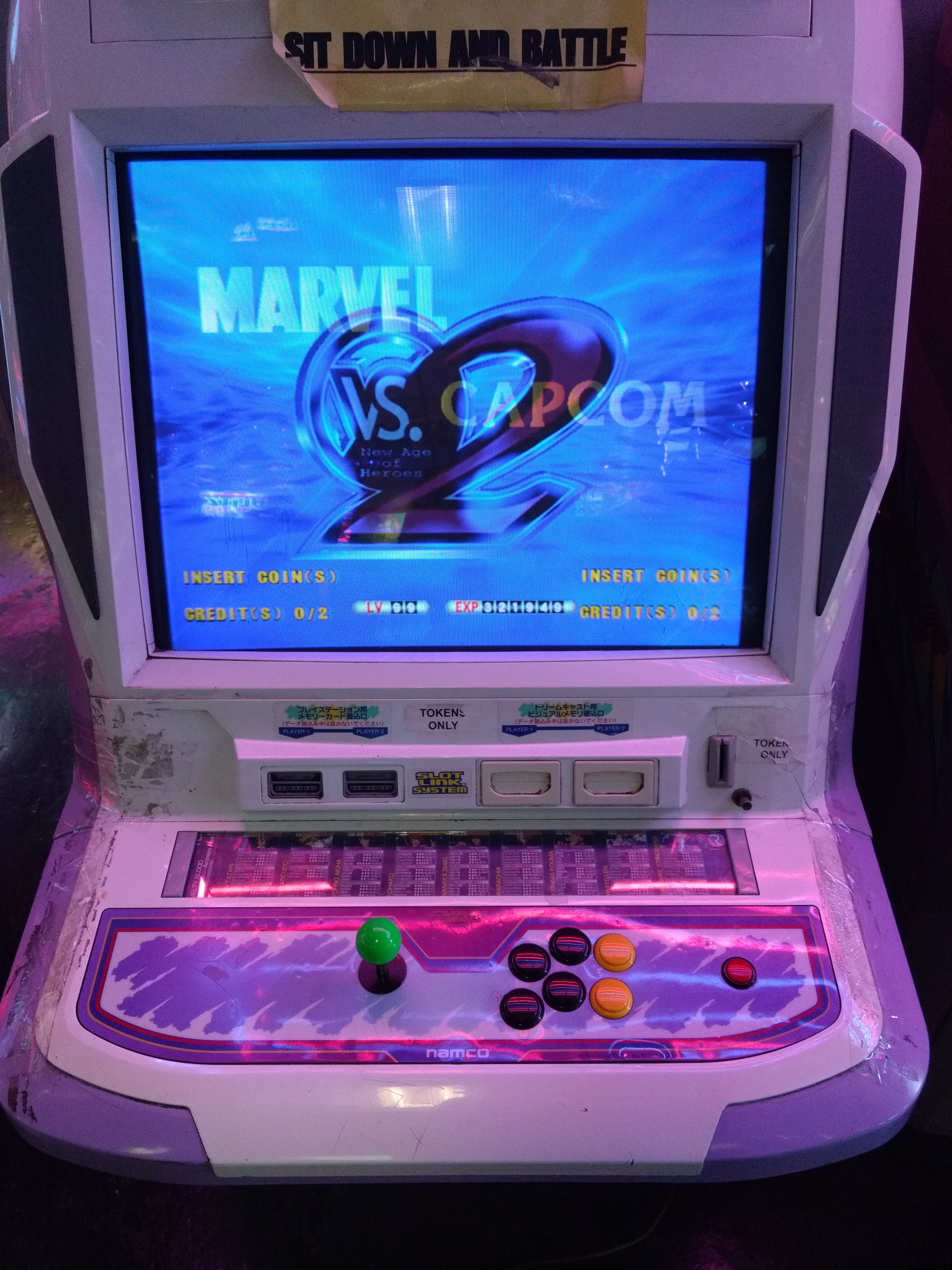
Namco's candy cabs: the Exceleena (CRT), the big Cyberlead (with a marquee/topper) and the modern Noir (LCD, Namco's answer to the Vewlix — the Tekken 7 cabinet).
📄 Dedicated pages: Noir (2007) · Grigio (2018) · Dragon Ball ZENKAI "Blanc" (2011) — with panel pinouts.
Overview¶
| Cabinet | Type | Screen | Era |
|---|---|---|---|
| Exceleena / Exceleena II | candy cab | CRT 29″ (tri-sync on EX II) | late 90s |
| Cyber Lead | "premium" 29″ candy cab | Nanao MS9-29A 15/24 kHz (Toshiba tube), non-rotatable | ~2000 |
| Cyber Lead II | Cyber Lead + memory-card readers (DC/PS1) | tri-sync 15/24/31 kHz | ~2002 (limited) |
| Noir | LCD candy cab | widescreen LCD | 2010s (Tekken 7) |
Details¶
- Exceleena: Namco's standard candy cab, an Astro City alternative; the II (1995) moves to tri-sync (15/24/31 kHz). Quirk: the monitor rotates clockwise (opposite most candy cabs) for Namco TATE games.
- Cyber Lead (~2000): a "premium" 29″ candy cab with a programmable scrolling LED dot-matrix display (marquee). Nanao MS9-29A dual-sync 15/24 kHz monitor (Toshiba tube), non-rotatable (fixed bezel). (Chassis/tube may vary per unit.)
- Cyber Lead II (~2002): the Cyber Lead with a tri-sync (15/24/31 kHz) monitor and Dreamcast / PS1 memory-card readers. Limited run — Namco mostly swapped parts on existing Cyber Leads rather than a real production.
- Noir (2007, launched with Tekken 6): a modern LCD cabinet à la Vewlix, standardised for versus. 32″ HD LCD (VGA/HDMI/DVI inputs, low input lag), JVS I/O compatible with Namco boards (RingEdge, System 357); Tekken 7 runs on System ES3 (a PC: Core i5, 8 GB, Nvidia GPU). Removable 2-player panel, LED strips (Blue V2), coin mech, network. Footprint 820 × 800 × 1700 mm (W×D×H), 140 kg — Namco Tekken 6 SD-S manual, see the dedicated page.
Manufacturer figures — Blanc Cabinet¶
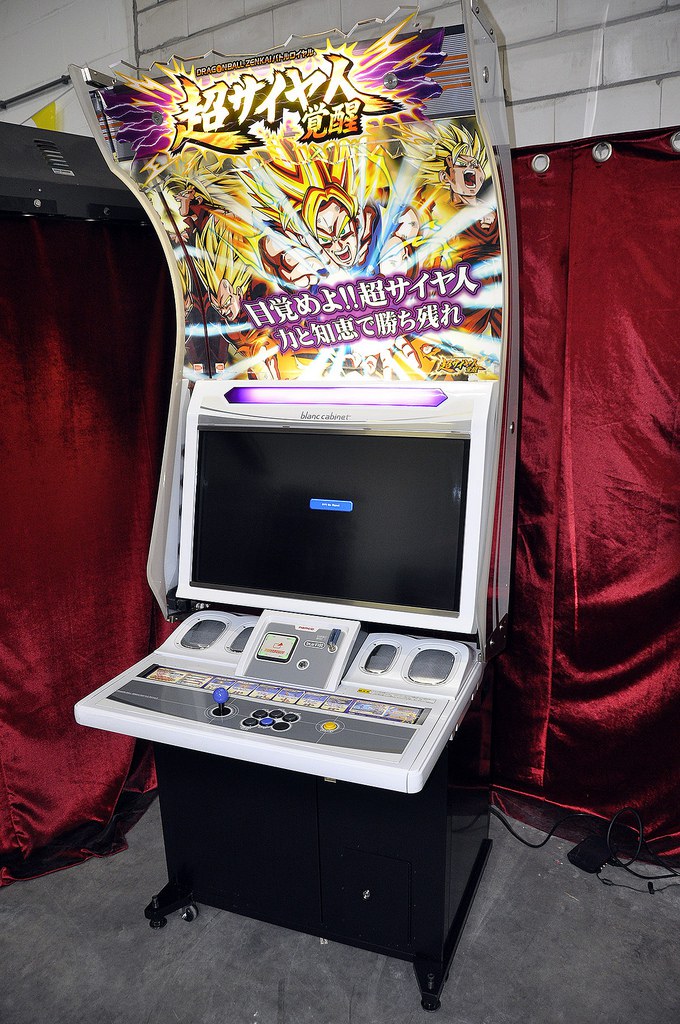
The Blanc is the Noir's pale sister: it is the Dragon Ball ZENKAI Battle Royale cabinet. Its archived manual runs to 184 pages — it is printed under the game's title, ドラゴンボール ZENKAI バトルロイヤル 取扱説明書. Its chapter 2 "仕様", items (6) 寸法 and (7) 重量:
| Item | Value |
|---|---|
| 寸法 ①設置時 (installed) | W 890 × D 800 × H 2,200 mm |
| 重量 ①設置時 (rack fitted) | 150 kg |
| Power draw | 220 W (game board not fitted) · 330 W (board fitted) |
| Max current | 2.7 A (board not fitted) · 4.0 A (board fitted) |
It comes apart, and the manual weighs every piece
§7 ②分割時 — the Blanc does not arrive in one lump:
| Assembly | Dimensions | Weight |
|---|---|---|
| Cabinet Assy | — | 135 kg (rack fitted) · 125 kg (without rack) |
| Side panel (L)/(R) Assy | 1410 × 550 × 40 mm | 4 kg each |
| Sign box | 870 × 180 × 180 mm | 6 kg |
| Sign board pillar L/R | 40 × 380 × 1140 mm | — |
| Sign sheet | 860 × 0.5 mm thick × 820 mm | — |
2,200 mm tall installed, but the cabinet alone is 135 kg and the curved side panels — its visual signature — weigh only 4 kg apiece. Same principle as the Naomi Deluxe Universal: what decides whether it fits is not the total weight.
Draw with and without the board — the Namco convention
220 W without the game board, 330 W with. That is exactly how Namco states the Grigio (49 W empty, 200 W with EXVS.2) and the Noir. For sizing a supply, it is the higher figure that counts.
⚡ Connector & power¶
| Cabinet | Connector | Monitor sync | Power |
|---|---|---|---|
| Exceleena / EX II | JAMMA | 15/24 kHz (EX) · tri-sync (EX II) | candy brick, 100 V AC |
| Cyber Lead | JAMMA | 15/24 kHz (Nanao MS9-29A) — tri-sync is the Cyber Lead II | candy brick, 100 V AC |
| Noir | JVS (arcade PC) | widescreen LCD (31 kHz/HD) | cab PSU + PC/ATX, 100 V AC |
Dimensions and draw re-read from the archived manuals¶
| Cabinet | Dimensions (W×D×H) | Draw | Weight | Source |
|---|---|---|---|---|
| Exceleena | 950 × 950 × 1430 mm (signboard: 1770) | 110 W (AC 100 V ±10 V) | 117 kg | archived EN manual, p. 3, §1 Specification |
| Cyber Lead | 760 × 950 × 1470 mm (shipping figures) | — | — | archived manual, folio 14 (p. 19 of the PDF), §4-2 |
| Noir | 820 × 800 × 1700 mm | — | 140 kg | Namco Tekken 6 SD-S manual §2, see Noir |
These figures are labelled, and they correct an estimate
Namco writes (W) × (D) × (H) for the Exceleena and 横幅(W) × 奥行き(D) × 高さ(H) for the Cyber Lead — the order is not inferred. The Exceleena manual also gives the maximum accepted game board size: (W) 343 × (D) 422 × (H) 120 mm, and a 29″ tube switchable between standard and medium resolution.
This page used to say "~140 W" for a CRT candy brick, by analogy with the Astro City. The Exceleena manual says 110 W. And 950 × 950 is not the "~750 × ~900" shape of Sega and Taito candy cabs: at Namco, you measure.
The Noir's draw depends on the embedded PC (System ES/357) and is not published here — none of the archived manuals gives it.
(Sources: archived Namco service manuals for the dimensions, draw, weight and accepted board size. Arcade Otaku for the rest.)
→ Detailed wiring: Exceleena/Cyberlead = JAMMA → JAMMA wiring; Noir = JVS → JVS wiring + JVS I/O board (Namco NAJV2). Button layout: Control panels.
Technical notes¶
- CRT: Cyber Lead = Nanao MS9-29A (15/24 kHz); Cyber Lead II / Exceleena II = tri-sync → Nanao MS29xx or equivalent.
- Wiring: JAMMA (CRT) / JVS (Noir); close to the Sega candy cabs — see the Astro City § Wiring.
- Power: a candy brick → candy cab PSU.
Common faults¶
| Symptom | Likely cause | Lead |
|---|---|---|
| Unstable image (CRT) | chassis / recap | Adjustments + recap |
| Topper off (Cyberlead) | banner neon/LED | Replace the lighting |
| No image (Noir) | LCD / PC source | LCD + source diagnosis |
| Dead controls | JAMMA/JVS / harness | I/O diagnosis |
Procedure — a cabinet that will not start ✅¶
There is a CRT in this cabinet
The tube stays charged with the cabinet unplugged, and the anode cap is the first thing your hand meets behind the monitor. Discharge it, work with one hand, and never alone if you can help it. → CRT safety
This cabinet is documented as 100 V
It does not go straight onto a European socket. It needs a step-down transformer rated for the whole cabinet, monitor included — not a travel adapter. Feeding 230 V to a cabinet built for 100 V destroys the supply, and usually the monitor with it. → Cabinet power
What this adds
Ordered for a cabinet, not for a board: mains, low-voltage supply, loom, monitor, then the game. The overwhelming majority of "dead cabinets" are dead for a reason that has nothing to do with the PCB — which is why the board comes last here.
1. Mains, and what sits between it and the cabinet. The switch, the fuse or breaker, the isolation transformer if there is one. A cabinet that shows no sign of life at all is almost never electronic.
2. The low-voltage supply — measured under load. Aim for +5 V where power reaches the board — the JAMMA edge, or the JVS power connector, depending on the cabinet — with the game running, not on an idle bench. If the supply has an adjustment (most candy and JVS bricks do; the ATX brick in a PC cabinet does not), do it then and not before: set off-load, it leaves a board that boots and then glitches. With no adjustment the measurement still earns its keep — it tells you whether the supply holds. Check +12 V too, and −5 V if the board uses it: many do not, and an ATX brick does not provide it. → Cabinet power
3. The loom and the connector. Reseat, and check the grounds — a cabinet with a poor ground gives rolling picture, phantom inputs and noise, all at once, and none of it looks like a wiring fault. → Wiring
4. The monitor. This page does not give a single monitor spec — it covers several cabinets. Check which one you have before concluding anything. CRT: no picture but the tube is warm and there is EHT — that is sync or video, not the tube. No EHT at all — chassis. A picture that shrinks, wanders or shifts colour is a chassis recap, and on these monitors that is a scheduled job, not a repair.
5. Scan rate — the mismatch that breaks nothing. If the board's rate is not one the monitor accepts, you get no picture and nothing is faulty. Check what this cabinet takes against what the board puts out before opening anything. → Modernising a cabinet
6. The control panel. Microswitches and the loom, in that order. A single dead direction is a switch; a whole player dead is the loom or its ground. → Control panels
7. Coin mech and sound. Last, because they hide nothing: a mech that no longer registers is usually dirty or misadjusted, and silence with a good picture points at the amplifier and its supply rails.
Manuals (archived)¶
- 📘 Namco Exceleena manual (full English translation) (PDF, EN)
- 📘 Namco Cyber Lead manual (PDF)
(Source: Arcade Otaku Wiki, archived locally for preservation.)
Photos / assets¶
See the Cyberlead 2 photo at the top of the page. (To add: Exceleena, Noir LCD.)
Repair & maintenance
Modernise (video, PSU, JVS, upscaler, PC/FPGA) → Modernising a cabinet. CRT monitor (discharge HV!) → CRT safety (Nanao MS8/MS9 or equivalent chassis) · recap → Recap · diagnosis → PCB fault-finding.
Sources & attribution¶
-
Bandai Namco Games — ドラゴンボール ZENKAI バトルロイヤル 取扱説明書 — the Blanc Cabinet manual, 184 pp., archived here — ch. 2, (6) 寸法: ①設置時 890 × 800 × 2,200 mm, plus the sub-assemblies (side panels 1410 × 550 × 40, sign box 870 × 180 × 180, pillars 40 × 380 × 1140, sheet 860 × 0.5 × 820); §7 重量: 150 kg installed, 135 / 125 kg for the cabinet depending on the rack, 4 kg per side panel, 6 kg for the sign box; draw 200 W without the game board, 330 W with, 4.0 A. ⚠️ This PDF has no text layer: read off the rendered pages, and its CCITT encoding causes render errors on some pages. Via Hard*Candy
-
Hard*Candy / Arcade Otaku — Cyber Lead (Nanao 15/24 kHz, non-rotatable Toei/Orion, scrolling LED display) & Exceleena (clockwise TATE rotation, Exceleena II 1995) — https://www.hard--candy.com/wiki/candy/Cyber_Lead
- Namco — service manuals archived here: Exceleena (EN translation) §1 Specification p. 3 · Cyber Lead §4-2, folio 14 (p. 19 of the PDF). ⚠️ The Exceleena gives figures, consumption, weight and maximum board size; the Cyber Lead's §4-2 gives only its 出荷時 (as-shipped) figures
- Arcade Otaku Wiki — Namco Exceleena / Cyberlead / Noir — https://wiki.arcadeotaku.com/w/Namco_Cyberlead
- Internal pages: Astro City · candy cab PSU
Image:
-
blanc-borne.jpg— source Hard*Candy (⚠️ no licence statement anywhere on the site) — https://www.hard--candy.com/wiki/candy/Blanc_Cabinet -
cyberlead.jpg— Only777, CC BY-SA 4.0 — https://commons.wikimedia.org/wiki/File:Cyberlead_2_cabinet.jpg

Review & corrections
How this space is used
Spotted a wrong value, an outdated procedure, a chip reference that does not match your board? Say so here, with what you observed (model, board revision, serial number, measurement). Every report is cross-checked against a source before anything changes — an unverifiable correction is published as “reported by …, not cross-checked” rather than silently applied.
Reading is open to everyone; posting requires signing in with Discord. Reports from the wiki's declared reviewers are handled first; anyone else's are read too, but go through a human before anything is changed.