Namco System 1
Namco's mid-80s base (1987): several 6809s + an MCU, YM2151 + Namco custom (WSG) sound, and big sprites. Pac-Mania, Galaga '88, Splatterhouse, Dragon Spirit… Each game has a protection key chip. Precedes the System 2 (1988).
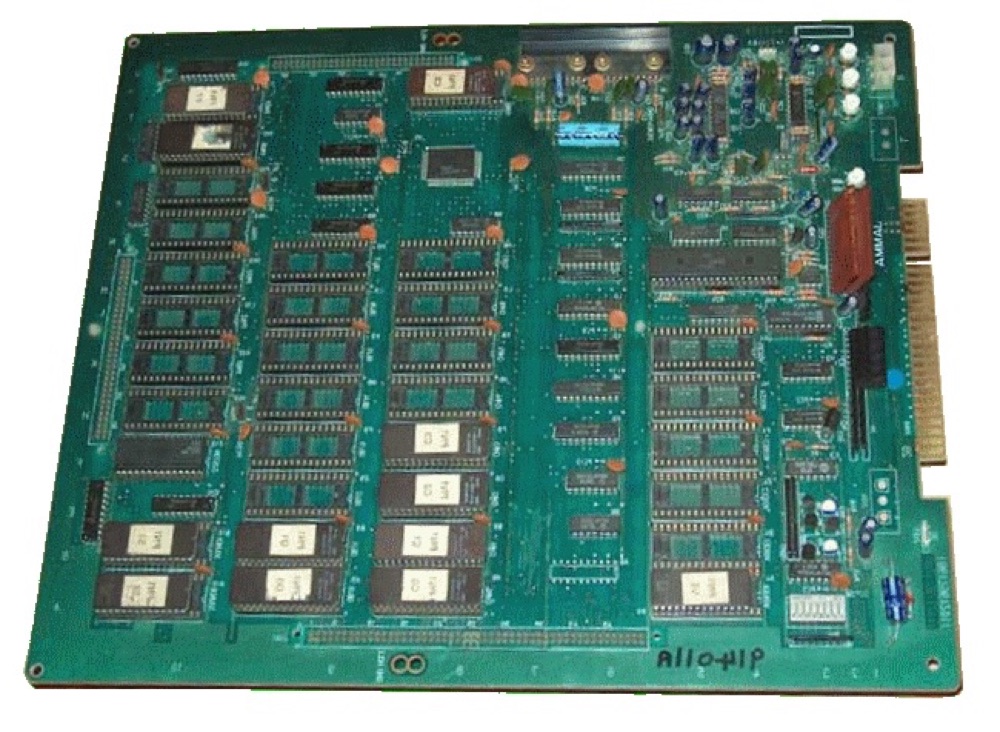
PCB Namco System 1 (Pac-Mania) — photo by II...Richard...II, CC BY-SA 3.0 (Wikimedia Commons).
Identification
| Field | Value |
|---|---|
| Manufacturer | Namco |
| Year | 1987 |
| Type | 2D tiles + sprites (8/16-bit) |
| Protection | custom per-game key chip |
| Settings | DIP + MCU I/O |
Architecture
| Block | Chip | Role |
|---|---|---|
| Main CPU | Motorola 6809 | game logic |
| Sub CPU | Motorola 6809 | offload (objects/display) |
| Sound CPU | Motorola 6809 | drives the sound |
| MCU | Hitachi HD63701 | I/O, inputs, coordination |
| Sound | Yamaha YM2151 (FM) + Namco C30 (8-voice WSG) | FM music + wavetable voices |
| Video | Namco customs (tilemaps + sprites) | ~288×224, big colourful sprites |
The multi-6809 + MCU set is driven by a custom memory manager (C117). Emulated
in MAME (namco/namcos1.cpp).
Protection
Each System 1 game carries a small custom key chip (protection) that the program queries. Without the right key (or its emulation), the game won't run — the keys have been reverse-engineered for MAME.
Notable games
Pac-Mania (1987), Galaga '88 (1987), Dragon Spirit, Rompers, Blazer, Splatterhouse (1988), World Stadium, Bakutotsu Kijuutei, Beraboh Man, Märchen Maze, Wonder Momo, Yokai Douchuuki (Shadow Land)…
Common faults
| Symptom | Likely cause | Lead |
|---|---|---|
| Crashes at boot | key chip / MCU | Check key/MCU; MAME emulates them |
| Corrupt sprites/planes | video RAM, customs | RAM test, contacts |
| No/partial sound | YM2151 / C30 / sound 6809 | Sound-stage diagnosis |
| Lost settings | DIP / MCU | Check DIP, I/O |
| No image | Power, 6809, harness | Base diagnosis |
Modernisation & mods
The common ground for every JAMMA board
Video, power, control panel and upscalers depend on the cabinet rather than the board: everything is centralised in Modernising a cabinet. To run the board outside a cabinet (at home, on a display): supergun.
- Storage 🟡: the game lives in EPROM/mask ROM on the board. Changing or restoring a game means reprogramming the EPROMs (and, for a mask ROM, using a pinout adapter) → EPROM method.
- Media preservation: replacing the original storage, multicarts, ODEs and modern options by family → PCB preservation hub.
- Scan rate 📺: ~16.0 kHz / 60.6 Hz — standard resolution, a classic 15 kHz chassis is fine — the most common JAMMA case → tri-sync and upscalers.
(Computed from the MAME sources —
namco/namcos1.cpp— pixel clock ÷ htotal.) - FPGA / emulation: see the Emulation & FPGA section below.
Repair (technician)
- Per-game key custom: protection — without the right key the game won't run (donor / MAME). HD63701 MCU = I/O + coordination.
- Triple 6809 (game / objects / sound): a freeze = one of the 6809s / its RAM → separate CPU diagnosis.
- Capacitors: recap the sound stage + PSU filtering.
- Oxidised EPROM sockets: re-tin / turned-pin socket.
→ Methods: PCB fault-finding · Recap · EPROM · Traces & vias
Original manuals for games on this platform ✅
Manufacturer manuals for games running on this board. Beyond the instructions, they very often carry the full DIP settings, the connector pinout, the test procedure, the parts list and the expected voltages.
- Dragon Spirit — original manual (PDF)
- Galaga '88 — original manual (PDF)
Pac-Mania — designed by Namco, manufactured by Atari Games
All of them carried the same label here. Opened and identified from their title page on 13 August 2026.
| Doc | What the cover carries | Pages |
|---|---|---|
| TM-315 | Pac-Mania — Operators Manual with Illustrated Parts Lists. The cover reads Pac-Mania is registered and designed by Namco Ltd. Manufactured by Atari Games | 52 |
| SP-315 | Pac-Mania — Schematic Package, Supplement to the Operators Manual: ROM PCB, CPU PCB and audio PCB schematics, switching power supply wiring, and main wiring with the coin door | 20 |
Atari codes read off the covers: TM = Operators Manual, SP = Schematic Package, a supplement to the manual.
→ Full catalogue: service manuals, wiring & game manuals
DIP settings ✅
16 games on this platform, settings extracted from the MAME sources (INPUT_PORTS_START blocks). The Position column gives the switch's physical reference on the board (SW2:!3,!4 = bank SW2, levers 3 and 4) — which is what lets you set it up without the paper manual. Games are sorted by MAME set name.
DIP settings — MAME set bakutotu
| Setting | Position | Options (default in bold) |
|---|---|---|
| Invincibility (Cheat) | SW:2 | Off · On |
| Show Coordinates | SW:3 | Off · On |
| Level Selection | SW:4 | Off · On |
| Sprite Viewer | SW:5 | Off · On |
| Freeze | SW:8 | Off · On |
DIP settings — MAME set berabohm
| Setting | Position | Options (default in bold) |
|---|---|---|
| Invulnerability | SW:3 | Off · On |
| Allow Continue | SW:4 | Off · On |
| Freeze | SW:8 | Off · On |
DIP settings — MAME set boxyboy
| Setting | Position | Options (default in bold) |
|---|---|---|
| Freeze | SW:2 | Off · On |
DIP settings — MAME set dangseed
| Setting | Position | Options (default in bold) |
|---|---|---|
| Freeze | SW:2 | Off · On |
| Kick Watchdog in IRQ | SW:3 | No · Yes |
| Auto Data Sampling | SW:6 | Off · On |
DIP settings — MAME set dspirit
| Setting | Position | Options (default in bold) |
|---|---|---|
| Life | SW:2,3,4,5,6,7,8 | 2 · 3 |
| Open 3rd Life (step1of7) | SW:2 | No (off) · Yes (on) |
| Open 3rd Life (step2of7) | SW:3 | No (off) · Yes (on) |
| Open 3rd Life (step3of7) | SW:4 | Yes (off) · No (on) |
| Open 3rd Life (step4of7) | SW:5 | No (off) · Yes (on) |
| Open 3rd Life (step5of7) | SW:6 | Yes (off) · No (on) |
| Open 3rd Life (step6of7) | SW:7 | Yes (off) · No (on) |
| Open 3rd Life (step7of7) | SW:8 | No (off) · Yes (on) |
DIP settings — MAME set galaga88
| Setting | Position | Options (default in bold) |
|---|---|---|
| Auto Data Sampling | SW:5,3 | Off · On |
| Auto Data Sampling (step1of2) | SW:3 | Off · On |
| Auto Data Sampling (step2of2) | SW:5 | Off · On |
DIP settings — MAME set mmaze
| Setting | Position | Options (default in bold) |
|---|---|---|
| Freeze | SW:4 | Off · On |
| Level Select | SW:8 | Off · On |
DIP settings — MAME set pacmania
| Setting | Position | Options (default in bold) |
|---|---|---|
| Freeze | SW:2 | Off · On |
| Kick Watchdog in IRQ | SW:3 | No · Yes |
| Auto Data Sampling | SW:5 | Off · On |
DIP settings — MAME set puzlclub
| Setting | Position | Options (default in bold) |
|---|---|---|
| Auto Data Sampling | SW:2 | Off · On |
DIP settings — MAME set quester
| Setting | Position | Options (default in bold) |
|---|---|---|
| Unk 1 | SW:2 | Off · On |
| Freeze | SW:4 | Off · On |
| Brightness | SW:6 | Low · Normal |
| Level Select | SW:8 | Off · On |
DIP settings — MAME set shadowld
| Setting | Position | Options (default in bold) |
|---|---|---|
| Freeze | SW:2 | Off · On |
| Alternate sound effects | SW:3 | Off · On |
DIP settings — MAME set splatter
| Setting | Position | Options (default in bold) |
|---|---|---|
| CPU #0 Kick Watchdog in IRQ | SW:4,8 | No · Yes |
| CPU #0 Kick Watchdog in IRQ (step1of2) | SW:4 | No · Yes |
| CPU #0 Kick Watchdog in IRQ (step2of2) | SW:8 | No · Yes |
| CPU #0&1 Kick Watchdog in IRQ | SW:6,7 | No · Yes |
| CPU #0&1 Kick Watchdog in IRQ (step1of2) | SW:6 | No · Yes |
| CPU #0&1 Kick Watchdog in IRQ (step2of2) | SW:7 | No · Yes |
DIP settings — MAME set splatter3
| Setting | Position | Options (default in bold) |
|---|---|---|
| Stage Select | SW:3 | Off · On |
DIP settings — MAME set wldcourt
| Setting | Position | Options (default in bold) |
|---|---|---|
| Draw Debug Lines | SW:2,3,4,5,6,7 | Off · On |
| Draw Debug Lines (step1of6) | SW:2 | Yes (off) · No (on) |
| Draw Debug Lines (step2of6) | SW:3 | No (off) · Yes (on) |
| Draw Debug Lines (step3of6) | SW:4 | Yes (off) · No (on) |
| Draw Debug Lines (step4of6) | SW:5 | Yes (off) · No (on) |
| Draw Debug Lines (step5of6) | SW:6 | Yes (off) · No (on) |
| Draw Debug Lines (step6of6) | SW:7 | No (off) · Yes (on) |
| Freeze | SW:8 | Off · On |
DIP settings — MAME set ws89
| Setting | Position | Options (default in bold) |
|---|---|---|
| Draw Debug Lines | SW:7 | Off · On |
| Freeze | SW:8 | Off · On |
DIP settings — MAME set ws90
| Setting | Position | Options (default in bold) |
|---|---|---|
| Draw Debug Lines | SW:7 | Off · On |
| Freeze | SW:8 | Off · On |
Check against your own board
These settings apply to the game and revision described by MAME. One title may have several DIP sets depending on region or revision, and some systems use soft-dips (settings in memory, via the test menu) rather than physical switches. In case of a discrepancy, the board's silkscreen and the test menu are authoritative.
See also: DIP reference · game manuals
Procedure — a dead board, step by step ✅
What this adds
The general method lives in PCB diagnosis. This is its application to this platform: the same order, but with the values actually expected here, so you do not have to go back and forth.
Tools: multimeter, oscilloscope (or frequency counter), current-limited bench supply, desoldering braid. → Tooling
If the board is still in a cabinet
A CRT holds its charge with the machine unplugged. → CRT safety
1. Inspection, power off. Corrosion, cut tracks, oxidised EPROM legs, leaking SMD capacitors, dubious earlier repairs.
2. The connector, before anything else. A large share of "dead boards" are a contact problem, not a fault. Clean the contacts with isopropyl alcohol and reseat — not with an abrasive eraser on a gold edge, which takes the plating off and brings the problem back worse. It costs two minutes and settles the question.
3. Power, measured on the board. Aim for +5.0 V measured as close as possible to where power reaches the board — not at the PSU output: the drop is in the loom, and that is exactly what makes a board boot on the bench and not in the cabinet. Where you probe depends on this board's connector — JAMMA edge, JVS loom or a proprietary harness — plenty of makers kept one long after JAMMA arrived — see Identification above. → Wiring Check −5 V and +12 V too if the sound stage uses them. Suspected short: bring it up current-limited and find the hot spot.
4. /RESET. It must release after power-up. Held low = the CPU never starts. A 1–2 Hz loop is not the reset circuit, it is the watchdog: the CPU is crashing at boot, so look at the bus, not at the reset.
5. Clocks. There is no measurement table for this platform — MAME's sources yield nothing usable for it. Any frequency quoted under Architecture on this page serves as a marker; otherwise compare against a working board rather than against a number: an invented value condemns healthy parts. → PCB diagnosis
6. Bus. Activity on the main CPU's address lines tells you whether it is running or frozen. Frozen with good clocks and good reset → work RAM, bus buffers, ROMs.
7. It boots but the picture or the sound is wrong — that is another job: see Common faults on this page, then signal tracing.
Emulation & FPGA
- Emulation: MAME (
namco/namcos1.cpp) — keys/protection emulated. - FPGA / MiSTer: no confirmed dedicated core (multi-6809 + MCU + customs).
EPROM repair
Banked 6809 program in 27C512/27C010 → game-by-game EPROM table.
Lineage
After the Namco classics (Pac-Man/Galaga), before the System 2 (dual 68000, 1987-88).
Photos / assets
(To add: System 1 board, 6809, key chip, C30.)
Sources & attribution
-
Photo PCB Namco System 1 (Pac-Mania) — II...Richard...II, CC BY-SA 3.0, Wikimedia Commons — https://commons.wikimedia.org/wiki/File:Pacmania.gif
-
MAME —
namco/namcos1.cpp(multi-6809, HD63701, YM2151 + C30, key chips, games) — https://github.com/mamedev/mame - Wikipedia — Namco System 1 — CC-BY-SA — https://en.wikipedia.org/wiki/Namco_System_1

Review & corrections
How this space is used
Spotted a wrong value, an outdated procedure, a chip reference that does not match your board? Say so here, with what you observed (model, board revision, serial number, measurement). Every report is cross-checked against a source before anything changes — an unverifiable correction is published as “reported by …, not cross-checked” rather than silently applied.
Reading is open to everyone; posting requires signing in with Discord. Reports from the wiki's declared reviewers are handled first; anyone else's are read too, but go through a human before anything is changed.