Sega Nu / ALLS
Sega's modern PC generations after the RingEdge: the Nu (2014) then the ALLS (Amusement Linkage Live System). Still Windows PC tied to ALL.Net, but now encrypted with BitLocker + TPM on top of the keychip — the most locked-down preservation of the whole Sega line. Project DIVA Future Tone, CHUNITHM, maimai…
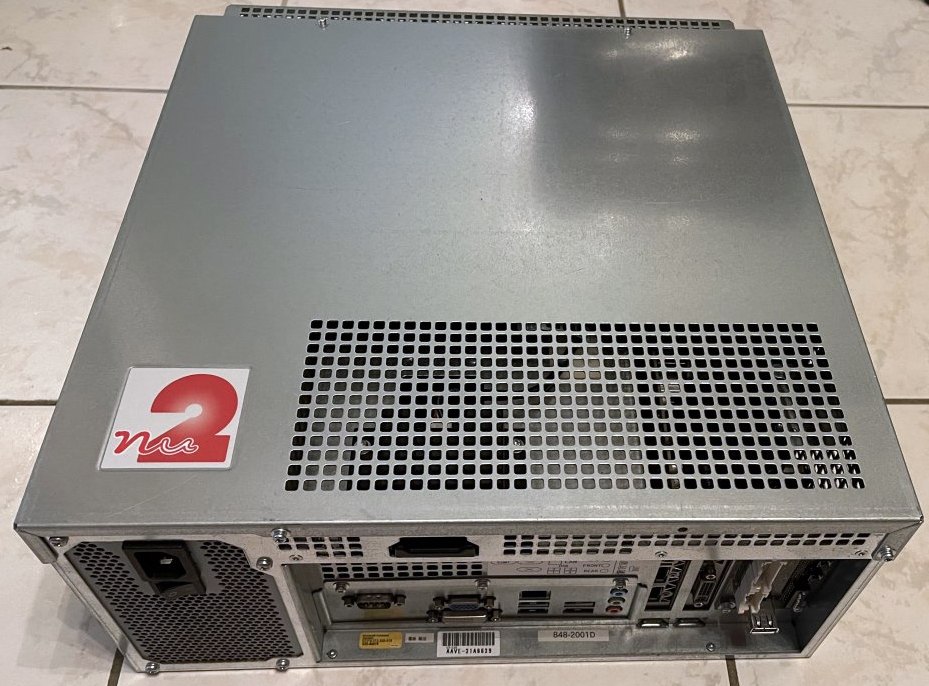
Identification
| Field | Value |
|---|---|
| Manufacturer | Sega |
| Years | Nu (2014) · ALLS (late 2010s→) |
| Base | x86 PC (Windows) |
| Network | ALL.Net / ALL.Net P-ras |
| Security | keychip + BitLocker + TPM + Recovery Key |
Architecture (PC)
These are proprietary Windows PCs (components close to the consumer PC of their era; exact specs vary by revision Nu 1 / Nu 1.1 / ALLS UX / HX / MX). What matters for preservation is not the power but the security:
- Keychip (like RingEdge): gates the launch.
- Disk encryption: Nu/ALLS are protected by BitLocker with TPM and a Recovery Key → storage content is encrypted at rest.
Security & preservation (the real topic)
- Triple lock: keychip + BitLocker/TPM + ALL.Net network dependence. It's Sega's hardest system to preserve.
- Community reverse-engineering: work (e.g. r1cebank's "How Sega Nu works" / keychip series) documents the keychip operation and boot chain to keep cabinets alive.
- Network: many titles (rhythm, player cards) depend on ALL.Net → online content whose preservation relies on servers (official or community).
Notable games
- Nu: Hatsune Miku: Project DIVA Arcade Future Tone, Puyo Puyo (arcade versions)…
- ALLS: CHUNITHM, maimai, O.N.G.E.K.I., WACCA (third parties on a Sega base)… the contemporary rhythm wave.
Faults & repair
PC hardware:
| Symptom | Likely cause | Lead |
|---|---|---|
| Won't boot | missing keychip / BitLocker (Recovery Key) / TPM | Critical parts/keys; see preservation |
| Overheating / GPU crash | GPU (fan/paste) | Clean, re-paste |
| Dead storage | SSD/HDD wear | Image it (but encrypted → key needed) |
| Network down | ALL.Net / NIC | Network diagnosis |
| Controls / card | I/O, card reader | I/O / reader diagnosis |
Modernisation & mods
The common ground for every JAMMA board
Video, power, control panel and upscalers depend on the cabinet rather than the board: everything is centralised in Modernising a cabinet. To run the board outside a cabinet (at home, on a display): supergun.
- Hard disk ⚠️: a perishable medium — image the drive before it fails, then consider an SSD/CF replacement → PCB preservation hub.
- Scan rate 📺: PC-based hardware — VGA output (31 kHz and above). ⚠️ A 15 kHz chassis is incompatible: you need a VGA/tri-sync monitor or a computer display. (Derived from the platform's PC nature documented above — not measured from MAME.)
- FPGA / emulation: see the Emulation & FPGA section below.
Repair (technician)
- Encrypted storage (BitLocker + TPM): the SSD/HDD is encrypted at rest; a dead drive cannot be imaged without the Recovery Key → preservation is blocked without the key (a major heritage limit).
- Network dependency (ALL.Net): many titles require the online server → offline = unplayable.
- x86 PC: standard PC diagnosis (PSU, RAM, caps, cooling, SSD).
→ Methods: PCB fault-finding · Recap · Traces & vias
Procedure — a dead board, step by step ✅
What this adds
The general method lives in PCB diagnosis. This is its application to this platform: the same order, but with the values actually expected here, so you do not have to go back and forth.
This platform is a PC
Most of what kills one of these is not on a board: the disk, the dongle, the BIOS settings or the OS. Go through those first — the procedure below still applies to the rails and the boot, but stripping a machine that simply will not boot off its disk wastes a day.
Tools: multimeter, oscilloscope (or frequency counter), current-limited bench supply, desoldering braid. → Tooling
If the board is still in a cabinet
A CRT holds its charge with the machine unplugged. → CRT safety
1. Inspection, power off. Corrosion, cut tracks, oxidised EPROM legs, leaking SMD capacitors, dubious earlier repairs.
2. The connector, before anything else. A large share of "dead boards" are a contact problem, not a fault. Clean the contacts with isopropyl alcohol and reseat — not with an abrasive eraser on a gold edge, which takes the plating off and brings the problem back worse. It costs two minutes and settles the question.
3. Power, measured on the board. Aim for +5.0 V measured as close as possible to where power reaches the board — not at the PSU output: the drop is in the loom, and that is exactly what makes a board boot on the bench and not in the cabinet. Where you probe depends on this board's connector — JAMMA edge, JVS loom or a proprietary harness — plenty of makers kept one long after JAMMA arrived — see Identification above. → Wiring Check −5 V and +12 V too if the sound stage uses them. Suspected short: bring it up current-limited and find the hot spot.
4. /RESET. It must release after power-up. Held low = the CPU never starts. A 1–2 Hz loop is not the reset circuit, it is the watchdog: the CPU is crashing at boot, so look at the bus, not at the reset.
5. Clocks. There is no measurement table for this platform — MAME's sources yield nothing usable for it. Any frequency quoted under Architecture on this page serves as a marker; otherwise compare against a working board rather than against a number: an invented value condemns healthy parts. → PCB diagnosis
6. Bus. Activity on the main CPU's address lines tells you whether it is running or frozen. Frozen with good clocks and good reset → work RAM, bus buffers, ROMs.
7. It boots but the picture or the sound is wrong — that is another job: see Common faults on this page, then signal tracing.
Emulation & FPGA
- Emulation: Windows PC games → no MAME; preservation via disk image + keychip + BitLocker keys (RE protocols). No FPGA core.
Lineage
After the RingEdge / RingWide (2009) and the Lindbergh (2005). Represents the current state of Sega arcade (networked rhythm).
Photos / assets
(To add: Nu / ALLS board, keychip, TPM module, card reader.)
Sources & attribution
- r1cebank — How Sega Nu works / Sega Nu keychip / Sega Nu preservation (keychip, BitLocker/TPM, boot) — https://r1ce.net/2023/12/23/sega-nu-preservation/index.html
- Wikipedia — ALL.Net — CC-BY-SA — https://en.wikipedia.org/wiki/ALL.Net
Image:
-
nu2-systeme.jpg— uploaded by Black Squirrel to Sega Retro (site CC BY 4.0; ⚠️ the file carries no individual licence) — https://segaretro.org/File:Nu2.jpg

Review & corrections
How this space is used
Spotted a wrong value, an outdated procedure, a chip reference that does not match your board? Say so here, with what you observed (model, board revision, serial number, measurement). Every report is cross-checked against a source before anything changes — an unverifiable correction is published as “reported by …, not cross-checked” rather than silently applied.
Reading is open to everyone; posting requires signing in with Discord. Reports from the wiki's declared reviewers are handled first; anyone else's are read too, but go through a human before anything is changed.