SNK Neo-Geo AES¶
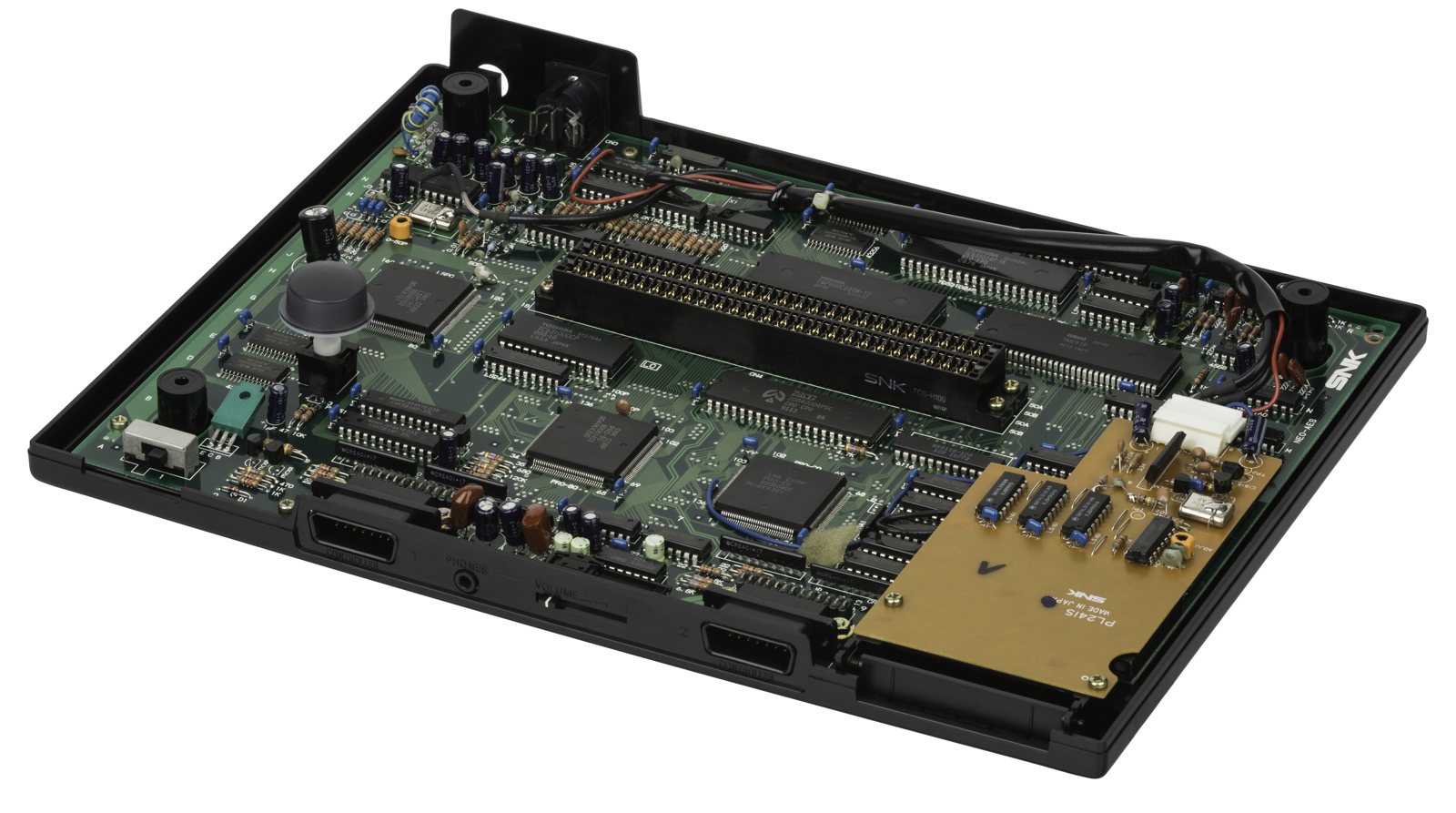
The Advanced Entertainment System: the home version of the Neo-Geo (1990), twin to the arcade Neo-Geo MVS. Same code, same hardware — but cartridges with a different pinout and a "luxury" aura (launched very expensive). No suicide, native RGB.
Identification¶
| Field | Value |
|---|---|
| Manufacturer | SNK |
| Release | 1990 (JP), 1991 (NA) |
| Generation | 4th (16-bit) |
| Media | AES cartridge (pinout ≠ MVS) |
| Native video output | RGB (+ composite / S-Video) |
| Region | JP / US / EU |
Architecture¶
Identical to the MVS: Motorola 68000 @ 12 MHz + Z80 @ 4 MHz, YM2610 sound, 320×224. MVS and AES run the same machine code. → Details: Neo-Geo MVS § Architecture.
AES vs MVS¶
- AES = home console (smaller cartridges, its own pinout).
- MVS = arcade (multi-slot, large cartridges).
- Same games, same code; the cartridge pinout differs deliberately (market segmentation) → hence the MVS↔AES conversion adapters.
- Some games have MVS/AES differences (endings, texts) that the UniBIOS lets you toggle.
Video outputs & region¶
- Native RGB (SCART cable) — excellent picture.
- Region (JP/US/EU): a few game differences; UniBIOS = region-free.
Popular mods — what to buy, where, procedures¶
Source
From ConsoleMods (CC-BY-SA). Soldering: 🟢 none · 🟡 · 🟠 · 🔴.
Universe BIOS (UniBIOS) — THE AES de-zoning¶
- Replace the BIOS chip with a UniBIOS (Razoola, a pre-flashed EEPROM or flash your own) → change the region (JP/US/EU) and the Arcade(MVS)/Console(AES) mode at boot, + cheats, test mode, hiscore save (with a memory card), soft reset. The stock BIOS is marked "531024".
- ⚠️ All AES have a soldered BIOS (no socket) → two methods, exact points below.
Install UniBIOS on AES (soldered BIOS) — exact points (transcribed from ConsoleMods, CC-BY-SA)
"Piggyback" method (stack UniBIOS on the original BIOS) — materials: 1× 15 kΩ 1/4 W resistor + wire (optional: a 40-pin DIP socket for future updates).
- Find the BIOS chip (marked 531024). Find pin 2 (2nd pin counter-clockwise from the half-circle notch).
- Lift/cut pin 2 of the original BIOS (close to the board) and bend it parallel to the board.
- Bend the UniBIOS pin 2 the same way; place UniBIOS on top of the original BIOS, pins aligned, the two pin 2s must NOT touch.
- Solder all pins of both chips together except pin 2 (don't bridge neighbours).
- 15 kΩ resistor between pin 2 of the original BIOS and pin 40 (1st pin clockwise from the notch).
- Wire from UniBIOS pin 2 to pin 20 (common to both chips).
- Power on with no game → blue screen = install OK.
"Direct replacement" method: desolder the original BIOS (531024) and solder the UniBIOS in its place (ideally on a 40-pin DIP socket for updates). Settings are remembered with a memory card on AES. → Neo-Geo MVS § UniBIOS.
Play your library¶
- NeoSD (Terraonion) — a flash cartridge holding the whole library on SD, plug-and-play 🟢.
- MVS → AES conversion: play MVS carts on an AES via an adapter (different pinout).
Video & reliability¶
- Native RGB: superb stock; an optional RGB Bypass Mod cleans the signal further on some boards.
- Backup battery (internal memory) → Battery Replacement; recap (cap kit) per condition. (No "suicide" or accounting battery like on the MVS.)
Common faults¶
| Symptom | Likely cause | Lead |
|---|---|---|
| Cartridge not read / crash | Cartridge connector oxidation | Contact cleaning |
| Lost save (game) | Flat cartridge battery | Replace the battery in the cartridge |
| No image | Power, customs, multi-out | Diagnosis |
| Settings/diagnostics | — | UniBIOS (test menu) |
(No "suicide" or bookkeeping battery like on the MVS.)
Procedure — a dead console, step by step ✅¶
What this adds
Ordered for a console, not for an arcade board: what kills these is almost never the CPU. It is, in real order, the power supply, the capacitors, the drive or the cartridge slot, and only then the logic. → PCB diagnosis
1. The power supply. Two cases, depending on the machine. External brick: ⚠️ read the marking on the machine, next to the socket, and check the adapter against it — voltage and polarity. A centre-negative machine fed centre-positive loses its fuse, sometimes its regulator; do not trust a third-party label or a generic tip. Internal supply (the machine plugs straight into the wall): mains is inside the shell. Unplug, wait, and confirm the large capacitors are discharged before touching the board. Either way, measure under load: a failing supply holds its voltage until it is asked for current.
2. The fuse. Many of these machines have one right behind the socket — it is the part designed to die. Test it in continuity, out of circuit. A fuse that blows again is a short, not a fuse problem.
3. Capacitors. On most machines of this age this is the default suspect rather than a last resort — leaking SMD electrolytics eat the tracks underneath before they give any other sign. ⚠️ Not all of them are like that: some carry very few and are not recapped on principle. Read what this page says about it before reaching for the iron. → Recap
4. The cartridge connector. Cartridge contacts with isopropyl alcohol, never an abrasive eraser: it takes the gold plating off and the problem comes back worse. On the machine side, inspect the slot pins — splayed, bent or oxidised — and check continuity between slot and board.
5. Video output. Isolate the machine from the display: another cable, another TV, another input. A sizeable share of "dead consoles" are a dead cable, or a display that will not lock onto what this machine outputs — see the video section of this page for what that is.
6. Still nothing. Now, and only now, the logic: rails on the board, reset, clock, bus. → PCB diagnosis
Photos / assets¶
(To add: AES console, AES vs MVS cartridge, internal board.)
Advanced repair
Recap + cartridge slot contacts (No. 1 cause); UniBIOS handy for diagnosis. Methods: Recap · PCB fault-finding · Traces & vias.
Archived technical documentation ✅¶
Manufacturer documentation archived locally: schematics, block diagrams, expected voltages, parts lists. The reference when a symptom matches no known fault.
- Neo-Geo (general) — PDF
Status
Manufacturer documents kept for preservation (machines out of production for decades), with no explicit licence — the same position as for the cabinet manuals already archived here.
Sources & attribution¶
- Wikipedia — Neo Geo (system) (AES/MVS same code, different pinout) — CC-BY-SA — https://en.wikipedia.org/wiki/Neo_Geo_(system)
- ConsoleMods — Neo Geo: UNIVERSE BIOS (UniBIOS) (BIOS 531024; piggyback: lift pin 2, 15k resistor pin 2↔pin 40, wire UniBIOS pin 2→pin 20; or direct replacement) — CC-BY-SA — https://consolemods.org/wiki/Neo_Geo:UNIVERSE_BIOS_(UniBIOS)
Image:
-
neogeo-aes-board.jpg— Evan-Amos, public domain — https://commons.wikimedia.org/wiki/File:Neo-Geo-AES-Opened-FL.jpg

Review & corrections
How this space is used
Spotted a wrong value, an outdated procedure, a chip reference that does not match your board? Say so here, with what you observed (model, board revision, serial number, measurement). Every report is cross-checked against a source before anything changes — an unverifiable correction is published as “reported by …, not cross-checked” rather than silently applied.
Reading is open to everyone; posting requires signing in with Discord. Reports from the wiki's declared reviewers are handled first; anyone else's are read too, but go through a human before anything is changed.