Sega Power Base Converter (Master System Converter)¶
The adapter that runs Master System games on a Mega Drive / Genesis. It's not emulation: the Mega Drive already contains what's needed (a Z80 and a Master System-compatible VDP) — the converter just adapts the cartridge connector. Called the Power Base Converter in the US, Master System Converter in Europe, Mega Adaptor in Japan.
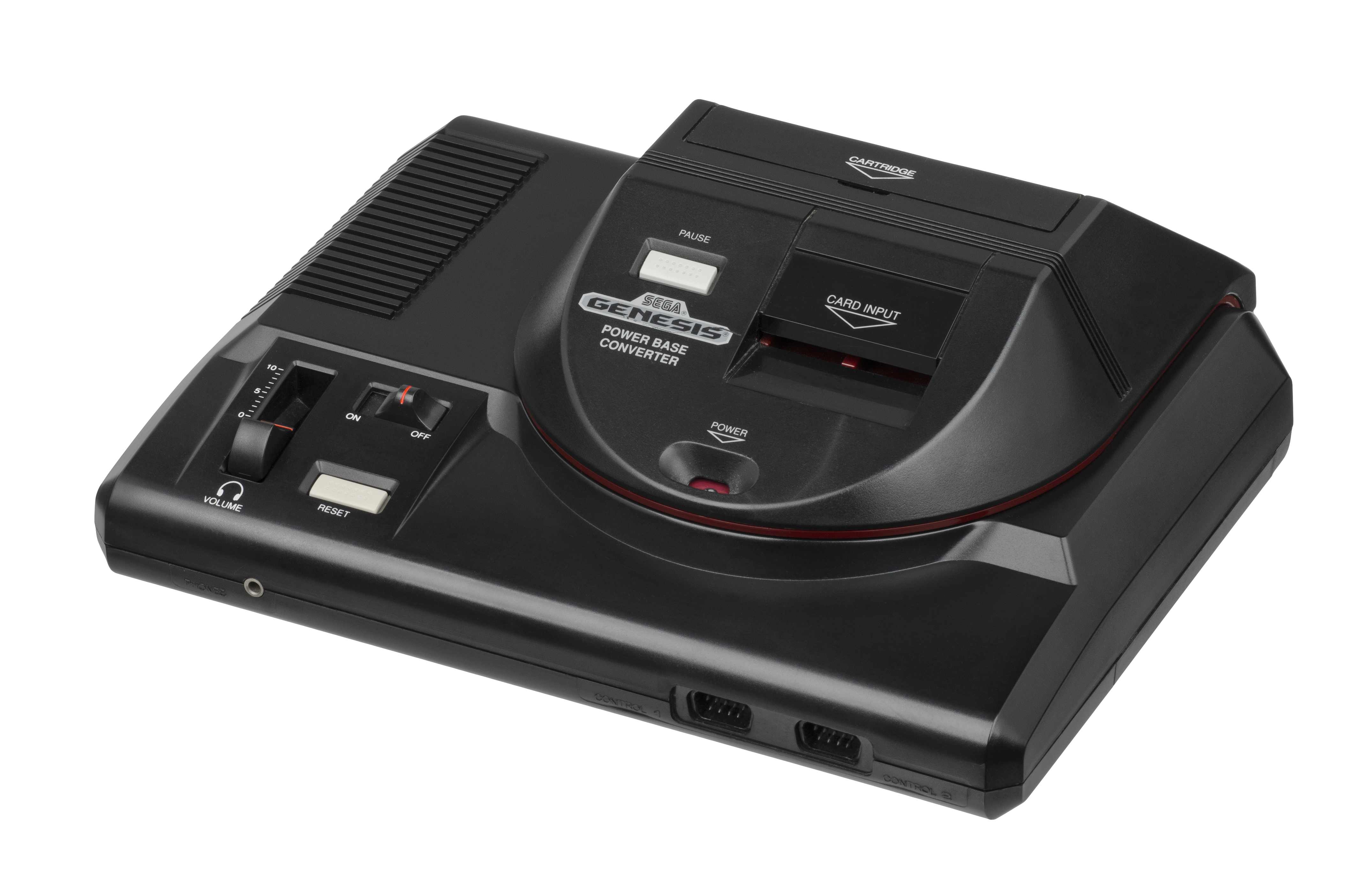
Identification¶
| Field | Value |
|---|---|
| Manufacturer | Sega |
| Type | Passthrough add-on (Mega Drive cartridge slot) |
| Function | play Master System cartridges (Mark III/SMS) on the Mega Drive |
| Variants | Power Base Converter (US) · Master System Converter I / II (EU) · Mega Adaptor (JP, + My Card slot) |
Why it works (no emulation)¶
The Mega Drive is 8-bit backward-compatible by design:
- Its Z80 (normally for sound) can act as the Master System CPU.
- Its VDP 315-5313 includes a Master System-compatible mode (the MD VDP is a superset of the SMS / TMS9918 VDP).
→ In "8-bit mode", the Mega Drive natively runs a Master System game. The converter just physically adapts the slot (cartridge pinout/format) — no emulation chip.
Variants¶
- Power Base Converter (US) / Master System Converter I (EU): the large model, for the Mega Drive / Genesis Model 1.
- Master System Converter II (EU): a compact version, compatible with the Mega Drive 2 (the MD2 slot has a different shape → the large model doesn't fit).
- Mega Adaptor (JP): adds a My Card slot (Sega Card) on top of cartridges.
Limits to know
-
No FM sound: Japanese SMS games with a YM2413 (FM) chip play in PSG only (the Mega Drive lacks the SMS FM chip).
-
No Game Gear (different format and screen).
- Model 1 vs Model 2: check the right converter for your Mega Drive.
- Region: SMS region logic can matter depending on the games.
Installation¶
None: it's a passthrough. Insert it into the Mega Drive cartridge slot, then the Master System cartridge into the converter. Power on → 8-bit mode.
Faults (rare)¶
The converter has no active electronics → almost nothing to repair. The only common fault is a bad contact:
| Symptom | Cause | Lead |
|---|---|---|
| SMS game not read / crash | Oxidised/bent contacts (MD slot or converter slot) | Clean both edges (iso alcohol), reseat |
| Nothing in 8-bit mode | Wrong variant (Model 1 vs 2) | Check the right converter (see Variants) |
| "Poor" sound on a JP game | No FM (normal) | None; an MD hardware limit |
Before / after¶
| Criterion | Mega Drive alone | With the converter |
|---|---|---|
| Master System games | no | yes (native 8-bit mode) |
| FM sound (JP SMS) | — | no (PSG only) |
| Effort | — | adapter (no soldering) |
Modern alternatives¶
The converter is passive, so there's nothing to "modernise" on it. But you can reach the same goal another way:
- Mega Drive flashcart with SMS support: a Mega EverDrive (Pro/X7) plays Master System ROMs directly on the Mega Drive (via its Z80) — no converter or cartridges needed.
- FM sound (JP SMS games): the converter never reproduces FM (no YM2413 on the MD). For FM, play on a real Master System (ideally with the FM mod if export) → see Master System § mods.
- Video: the picture comes out of the Mega Drive → MD RGB/recap mods apply (see Mega Drive).
Where to find¶
- Original Sega converters (second-hand) or community repros.
- Guides: RetroRGB / Sega communities.
Related pages¶
- Host console: Mega Drive / Genesis (the Z80 + VDP that make the backward-compat possible).
- Games: Master System (Mark III).
Procedure — a dead console, step by step ✅¶
This machine does not run on its own
It needs a Mega Drive. Before opening anything, prove the host is good with a plain cartridge — otherwise you spend the day inside the add-on for a fault that is not in it. → Mega Drive
What this adds
Ordered for a console, not for an arcade board: what kills these is almost never the CPU. It is, in real order, the power supply, the capacitors, the drive or the cartridge slot, and only then the logic. → PCB diagnosis
1. The power supply. Two cases, depending on the machine. External brick: ⚠️ read the marking on the machine, next to the socket, and check the adapter against it — voltage and polarity. A centre-negative machine fed centre-positive loses its fuse, sometimes its regulator; do not trust a third-party label or a generic tip. Internal supply (the machine plugs straight into the wall): mains is inside the shell. Unplug, wait, and confirm the large capacitors are discharged before touching the board. Either way, measure under load: a failing supply holds its voltage until it is asked for current.
2. The fuse. Many of these machines have one right behind the socket — it is the part designed to die. Test it in continuity, out of circuit. A fuse that blows again is a short, not a fuse problem.
3. Capacitors. On most machines of this age this is the default suspect rather than a last resort — leaking SMD electrolytics eat the tracks underneath before they give any other sign. ⚠️ Not all of them are like that: some carry very few and are not recapped on principle. Read what this page says about it before reaching for the iron. → Recap
4. The cartridge connector. Cartridge contacts with isopropyl alcohol, never an abrasive eraser: it takes the gold plating off and the problem comes back worse. On the machine side, inspect the slot pins — splayed, bent or oxidised — and check continuity between slot and board.
5. Video output. Isolate the machine from the display: another cable, another TV, another input. A sizeable share of "dead consoles" are a dead cable, or a display that will not lock onto what this machine outputs — see the video section of this page for what that is.
6. Still nothing. Now, and only now, the logic: rails on the board, reset, clock, bus. → PCB diagnosis
Photos / assets¶
(To add: Power Base Converter vs Converter II, on the MD, slot.)
Advanced repair
A simple adapter (SMS → Mega Drive): cartridge contacts, little to repair. Methods: PCB fault-finding · Traces & vias.
Sources & attribution¶
- Wikipedia — Power Base Converter (Z80 + SMS-compatible VDP, US/EU/JP variants, Model 1/2, no FM) — CC-BY-SA — https://en.wikipedia.org/wiki/Power_Base_Converter
- Internal pages: Mega Drive · Master System
Image:
-
power-base-converter.jpg— Evan-Amos, public domain — https://commons.wikimedia.org/wiki/File:Sega-Genesis-Power-Base-Converter.jpg

Review & corrections
How this space is used
Spotted a wrong value, an outdated procedure, a chip reference that does not match your board? Say so here, with what you observed (model, board revision, serial number, measurement). Every report is cross-checked against a source before anything changes — an unverifiable correction is published as “reported by …, not cross-checked” rather than silently applied.
Reading is open to everyone; posting requires signing in with Discord. Reports from the wiki's declared reviewers are handled first; anyone else's are read too, but go through a human before anything is changed.