Bandai WonderSwan
Bandai's handheld (1999), designed by Gunpei Yokoi (creator of the Game Boy). Monochrome then WonderSwan Color (2000) and SwanCrystal (2002). Record battery life (one AA), Japan only.
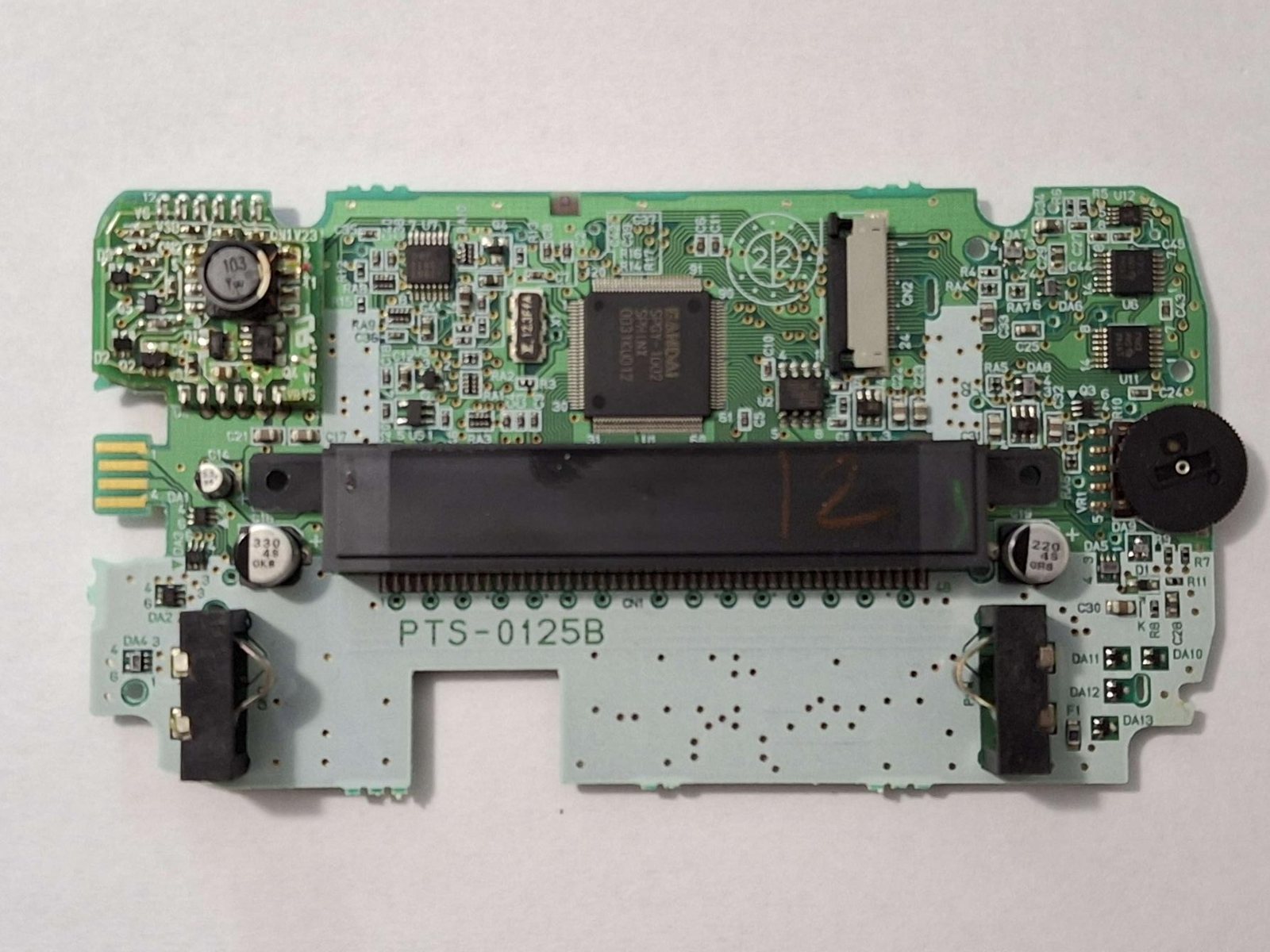
Identification
| Field | Value |
|---|---|
| Manufacturer | Bandai |
| Releases | WonderSwan (1999) · Color (2000) · SwanCrystal (2002) |
| Screen | reflective LCD (SwanCrystal = better LCD) |
| Media | Cartridge |
Architecture (detail)
| Block | Chip | Clock | Role |
|---|---|---|---|
| CPU | NEC V30 MZ (low-power 16-bit x86 core) | ~3.072 MHz | designed by Gunpei Yokoi (Game Boy creator) after Nintendo |
| Video | integrated controller | 224×144, 8-level mono (WS) → 4096 colours / 241 on screen (Color) | |
| Sound | 4 voices (incl. PCM) | mono speaker; stereo via headphones (adapter) | |
| Memory | 16 KB (WS) → 64 KB (Color) RAM | ||
| Power | 1 AA battery — record battery life (~20–40 h) |
Screen usable vertically or horizontally (two button sets). An almost exclusively Japanese market.
"Smart" cartridges & dev
- Some cartridges carry their own hardware: an extra sound chip, an RTC (clock), even sensors — hence games with richer sound than the base.
- WonderWitch: the official development kit (cartridge + C tools) that fed an active homebrew scene.
- MobileWonderGate: a modem adapter for online play (short-lived).
Telling the three models apart ✅
| WonderSwan (1999-2000) | WonderSwan Color (2000-2002) | SwanCrystal (2002-2003) | |
|---|---|---|---|
| Screen | Monochrome (the only one) | Colour, passive matrix | Colour, active matrix TFT (more vibrant) |
| Power control | SIDE-mounted switch | forward-facing button | round yellow button, forward-facing |
| Contrast wheel | — | present | absent |
| Shell | Mostly monochromatic colour schemes | Vibrantly coloured | Opaque and vibrant (except Clear Blue), "SwanCrystal" text on the bezel |
| RAM | 16 KB | 64 KB (×4) | 64 KB |
| Volume | 3 levels | 4 levels |
The visual tells that are enough
- Side-mounted switch → the original WonderSwan.
- Forward-facing button + contrast wheel → WonderSwan Color.
- Round yellow button, no contrast wheel, "SwanCrystal" on the bezel → SwanCrystal.
Compatibility only works one way
The WonderSwan Color retains full backwards compatibility with all original WonderSwan titles and add-ons. The reverse is not true: much like the Game Boy Color, most WonderSwan Color titles will not play on an original WonderSwan. (Source: ConsoleMods, CC-BY-SA, in collaboration with io55.net.)
SwanCrystal: one real difference
Apart from the active matrix TFT panel (versus the Color's passive matrix) and the fourth volume level, the SwanCrystal is identical to the WonderSwan Color. Released when the Game Boy Advance already dominated the Japanese market, it sold poorly; Bandai announced its exit from the handheld market in February 2003, with remaining stock sold online by Qute Corporation until 2008.
Region — not applicable ✅
The WonderSwan was only ever released in Japan. Unlike handhelds such as the Game Boy, it has only one region — so there are no region locks or limitations, and nothing to mod on that front.
⚠️ The real consequence is linguistic, not technical: the entire library is in Japanese. Community translation patches exist (RomHacking.net, Zophar's lists, the WonderSwan Translators GitHub) — these are patches only, everyone sourcing their own game files. (Source: ConsoleMods, CC-BY-SA.)
Common faults
| Symptom | Likely cause | Lead |
|---|---|---|
| Dark / dim screen | Reflective stock | Frontlight / IPS (mod) |
| Battery contact corrosion | Leaked battery | Clean the contacts |
| Cartridge not read | Contacts | Cleaning |
Procedure — a dead console, step by step ✅
What this adds
Ordered for a console, not for an arcade board: what kills these is almost never the CPU. It is, in real order, the power supply, the capacitors, the drive or the cartridge slot, and only then the logic. → PCB diagnosis
1. The power supply. Two cases, depending on the machine. External brick: ⚠️ read the marking on the machine, next to the socket, and check the adapter against it — voltage and polarity. A centre-negative machine fed centre-positive loses its fuse, sometimes its regulator; do not trust a third-party label or a generic tip. Internal supply (the machine plugs straight into the wall): mains is inside the shell. Unplug, wait, and confirm the large capacitors are discharged before touching the board. Either way, measure under load: a failing supply holds its voltage until it is asked for current.
1b. Battery and its contacts. On this machine, before anything else: corroded battery contacts, or a cell that reads fine off-load and collapses under it, give exactly the symptoms of a dead machine.
2. The fuse. Many of these machines have one right behind the socket — it is the part designed to die. Test it in continuity, out of circuit. A fuse that blows again is a short, not a fuse problem.
3. Capacitors. On most machines of this age this is the default suspect rather than a last resort — leaking SMD electrolytics eat the tracks underneath before they give any other sign. ⚠️ Not all of them are like that: some carry very few and are not recapped on principle. Read what this page says about it before reaching for the iron. → Recap
4. The cartridge connector. Cartridge contacts with isopropyl alcohol, never an abrasive eraser: it takes the gold plating off and the problem comes back worse. On the machine side, inspect the slot pins — splayed, bent or oxidised — and check continuity between slot and board.
5. The screen. Lines, a dead half, a picture that fades: it is almost always the ribbon and its solder joints, not the panel. Reseat before you order anything. If this machine has a TV output — not all of them do — test that too: it tells the screen apart from what feeds it.
6. Still nothing. Now, and only now, the logic: rails on the board, reset, clock, bus. → PCB diagnosis
Popular mods — what to buy, how
- Screen (dim stock panel): backlit IPS replacement or frontlight.
IPS screens: there is one for ALL THREE models
A full backlit screen replacement exists for all three consoles (WonderSwan, Color and SwanCrystal). Installation is relatively simple: ⭐ no shell trimming is required, only two wires must be soldered for power. Makho has installation videos for the original and Color WonderSwans. (Source: ConsoleMods, CC-BY-SA.)
The frontlight, historically
Before IPS kits, a frontlight mod was performed on the WonderSwan Color and SwanCrystal using a Game Boy Advance Afterburner. Original guide (in Japanese) by ★★R Mansion WSC★★. It is now superseded by IPS.
- Flashcart: the WonderSwan Flash Masta (Flavor/RetroHQ) — games/homebrew on SD, plug-and-play 🟢. (WonderWitch = the official period dev kit, not a modern flashcart.)
- Reliability: recap as needed + rechargeable USB-C / battery.
Photos / assets
(To add: WonderSwan Color, SwanCrystal, board.)
Advanced repair
Caps + screen; cartridge/battery contacts. Methods: Recap · PCB fault-finding · Traces & vias.
Sources & attribution
- ConsoleMods Wiki — WonderSwan Model Differences — CC-BY-SA — the three models and their visual tells (side switch, contrast wheel, round yellow button), RAM 16→64 KB, passive vs active matrix, one-way compatibility — in collaboration with io55.net — https://consolemods.org/wiki/WonderSwan:WonderSwan_Model_Differences
- ConsoleMods Wiki — Region Information — CC-BY-SA — Japan-exclusive release, single region, no locks; community translation patches — https://consolemods.org/wiki/WonderSwan:Region_Information
- ConsoleMods Wiki — IPS Screen Mod & Frontlight Mod — CC-BY-SA — IPS available for all three models (no shell trimming, two power wires, Makho videos), historic GBA Afterburner frontlight — https://consolemods.org/wiki/WonderSwan:IPS_Screen_Mod
What we did not transcribe (and why)
The ConsoleMods pages Video Output Notes, Backlight Mod, Screen Replacement, Polarizer Replacement, LCD Screen and WonderWitch are empty to this day (red links) — no written procedure therefore exists to bring home for those topics.
- Wikipedia — WonderSwan — CC-BY-SA — https://en.wikipedia.org/wiki/WonderSwan
Image:
-
wonderswan-board.jpg— Vippopper, CC0 (public domain) — https://commons.wikimedia.org/wiki/File:Swancboard1.jpg

Review & corrections
How this space is used
Spotted a wrong value, an outdated procedure, a chip reference that does not match your board? Say so here, with what you observed (model, board revision, serial number, measurement). Every report is cross-checked against a source before anything changes — an unverifiable correction is published as “reported by …, not cross-checked” rather than silently applied.
Reading is open to everyone; posting requires signing in with Discord. Reports from the wiki's declared reviewers are handled first; anyone else's are read too, but go through a human before anything is changed.