Konami Windy / Windy II¶
Konami's candy cab: the Windy then the Windy II (29″ tri-sync monitor), recognisable by its silhouette and often used for Konami games (standard-format Bemani, versus). A direct alternative to the Astro City / Egret II.
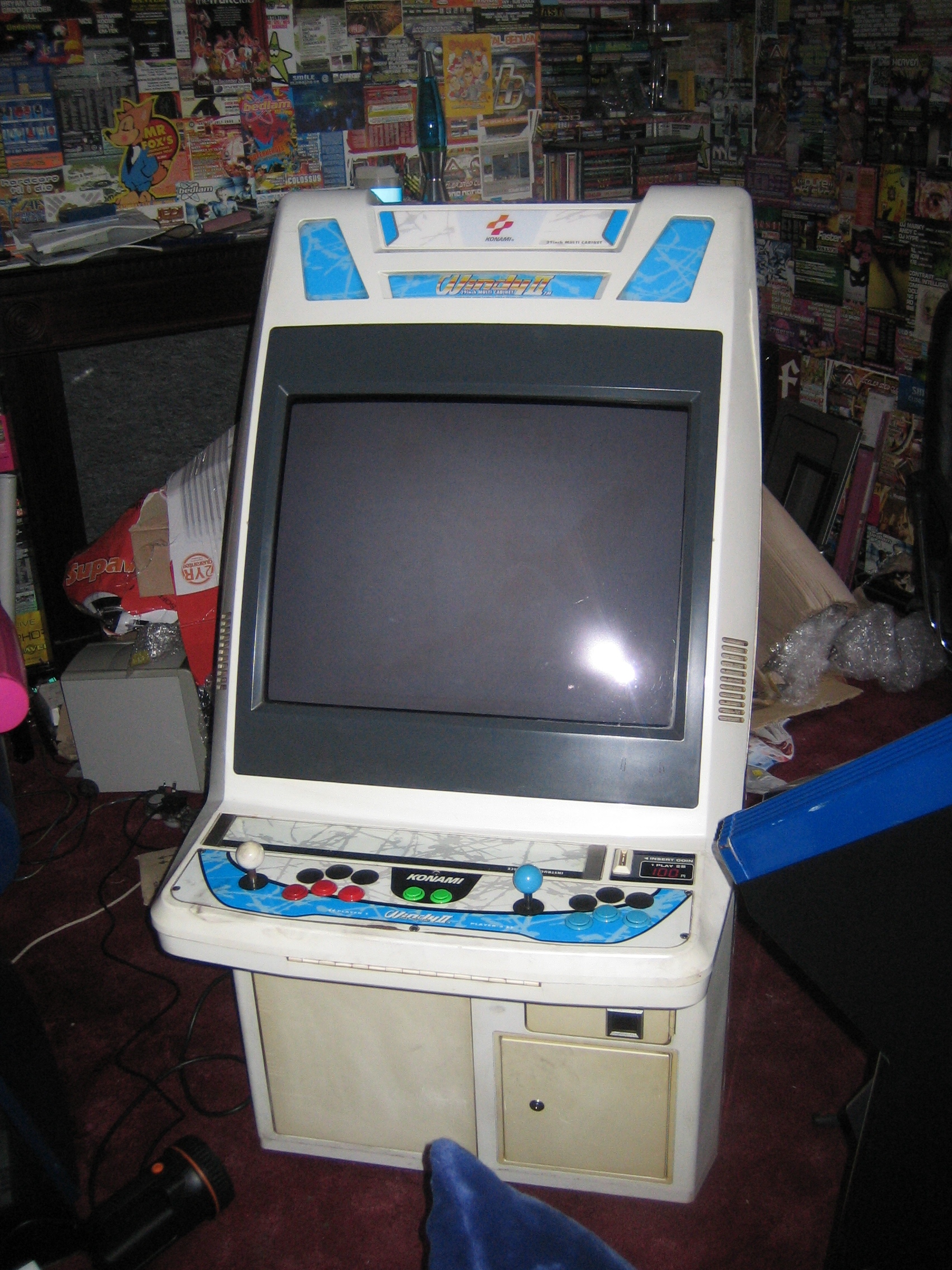
Identification¶
| Field | Value |
|---|---|
| Manufacturer | Konami |
| Type | Candy cab |
| Year | Windy II: 1998 |
| Screen | CRT 29″ (tri-sync 15/24/31 kHz on Windy II), rotatable (no mechanism) |
| Controls | 2 players, interchangeable panel |
| PCB format | JAMMA (+ JVS) |
| Structure | plastic — fragile neck (known flaw, already on the Windy) |
⚡ Connector & power¶
| Aspect | Value |
|---|---|
| PCB connector | JAMMA (56-pin edge) + JVS support (Windy II) |
| Monitor sync | tri-sync 15/24/31 kHz (Windy II), 29″ CRT |
| Power | candy brick, 100 V AC (Japan) |
| Consumption | 180 W (Konami manual, built-in PC configuration) |
| Dimensions | 750 × 905 × 1399 mm (W×D×H) — 1699 mm with marquee |
| Weight | ~105 kg |
Figures taken from the Konami manual
Page 9 of the archived manual, section 仕様, carries the dimension drawing: 750 on the front view (width), 905 on the side view (depth), height 1399 and 1699 with marquee.
Two corrections follow: the height was given as 1339 (transposed digits), and the consumption was estimated as "Astro City order of magnitude" where the manual states 180 W.
⚠️ Arcade Otaku gives the reverse order ("905 x 750 x 1339"): it is their infobox that is wrong, not this page. The manufacturer's drawing prevails.
(Sources: Arcade Otaku / Hard*Candy / GameStone.)
Windy → Windy II
The Windy II (1998) reworks the Windy with a blue colour scheme, a tri-sync monitor and the move to JVS I/O (instead of JAMMA only). Mechanically identical — including the fragile neck, to handle with care.
→ Detailed wiring: JAMMA (+ JVS on Windy II) → JAMMA wiring, JVS wiring and Control panels.
Technical notes¶
- Windy II: a tri-sync monitor (15/24/31 kHz) → accepts classic PCBs and 31 kHz (like the Blast City / Egret II / Exceleena II).
- Wiring: JAMMA + JVS support; the common candy cab principle — see the Astro City § Wiring.
- Power: a candy brick → candy cab PSU.
- JIS screws.
Common faults¶
| Symptom | Likely cause | Lead |
|---|---|---|
| Unstable image / colours | tri-sync chassis, recap | Adjustments + recap (Nanao MS9-like) |
| No power | candy brick | Check +5 V at the JAMMA edge |
| JAMMA contacts | oxidation | Clean the card edge |
Procedure — a cabinet that will not start ✅¶
There is a CRT in this cabinet
The tube stays charged with the cabinet unplugged, and the anode cap is the first thing your hand meets behind the monitor. Discharge it, work with one hand, and never alone if you can help it. → CRT safety
This cabinet is documented as 100 V
It does not go straight onto a European socket. It needs a step-down transformer rated for the whole cabinet, monitor included — not a travel adapter. Feeding 230 V to a cabinet built for 100 V destroys the supply, and usually the monitor with it. → Cabinet power
What this adds
Ordered for a cabinet, not for a board: mains, low-voltage supply, loom, monitor, then the game. The overwhelming majority of "dead cabinets" are dead for a reason that has nothing to do with the PCB — which is why the board comes last here.
1. Mains, and what sits between it and the cabinet. The switch, the fuse or breaker, the isolation transformer if there is one. A cabinet that shows no sign of life at all is almost never electronic.
2. The low-voltage supply — measured under load. Aim for +5 V where power reaches the board — the JAMMA edge, or the JVS power connector, depending on the cabinet — with the game running, not on an idle bench. If the supply has an adjustment (most candy and JVS bricks do; the ATX brick in a PC cabinet does not), do it then and not before: set off-load, it leaves a board that boots and then glitches. With no adjustment the measurement still earns its keep — it tells you whether the supply holds. Check +12 V too, and −5 V if the board uses it: many do not, and an ATX brick does not provide it. → Cabinet power
3. The loom and the connector. Reseat, and check the grounds — a cabinet with a poor ground gives rolling picture, phantom inputs and noise, all at once, and none of it looks like a wiring fault. Connector on this cabinet: JAMMA (+ JVS). → Wiring
4. The monitor. This page describes the monitor as: CRT 29″ (tri-sync 15/24/31 kHz on Windy II), rotatable (no mechanism). CRT: no picture but the tube is warm and there is EHT — that is sync or video, not the tube. No EHT at all — chassis. A picture that shrinks, wanders or shifts colour is a chassis recap, and on these monitors that is a scheduled job, not a repair.
5. Scan rate — the mismatch that breaks nothing. If the board's rate is not one the monitor accepts, you get no picture and nothing is faulty. Check what this cabinet takes against what the board puts out before opening anything. → Modernising a cabinet
6. The control panel. Microswitches and the loom, in that order. A single dead direction is a switch; a whole player dead is the loom or its ground. → Control panels
7. Coin mech and sound. Last, because they hide nothing: a mech that no longer registers is usually dirty or misadjusted, and silence with a good picture points at the amplifier and its supply rails.
Repair¶
Close to the other tri-sync candy cabs: recap + adjustments of the 29″ chassis (see the Nanao MS9), candy power.
Manuals (archived)¶
- 📘 Konami Windy II manual (PDF)
- 📗 Konami JVS → JAMMA adapter manual (PDF)
(Source: Arcade Otaku Wiki, archived locally for preservation.)
Photos / assets¶
See the Windy II photo at the top of the page. (To add: tri-sync chassis, control panel.)
Repair & maintenance
Modernise (video, PSU, JVS, upscaler, PC/FPGA) → Modernising a cabinet. CRT monitor (discharge HV!) → CRT safety · Windy 2 = Toshiba PB-7534 chassis (tri-sync) · recap → Recap · diagnosis → PCB fault-finding.
Sources & attribution¶
- Arcade Otaku Wiki — Konami Windy / Windy II (candy cab, 29″ tri-sync, JAMMA/JVS) — ⚠️ their infobox reads "905 x 750 x 1339", depth first and with the height transposed — https://wiki.arcadeotaku.com/w/Konami_Windy_II
- Konami — Windy II service manual, archived here: PDF, folio 9 (p. 10 of the PDF), section 仕様 — dimensions, marquee height, weight and the 180 W rating
- Hard*Candy / GameStone GSRcade — Windy II (1998, plastic shell, fragile neck, blue colourway) — ⚠️ this source gives the height as 1339 mm; the archived Konami manual says 1399 — https://www.gamestone.co.uk/gsrcade/arcade_information_konami_windy_ii.php
- Internal pages: Astro City · candy cab PSU
Image:
-
windy-ii.jpg— Rogalian, public domain — https://commons.wikimedia.org/wiki/File:Windy_II_003.jpg

Review & corrections
How this space is used
Spotted a wrong value, an outdated procedure, a chip reference that does not match your board? Say so here, with what you observed (model, board revision, serial number, measurement). Every report is cross-checked against a source before anything changes — an unverifiable correction is published as “reported by …, not cross-checked” rather than silently applied.
Reading is open to everyone; posting requires signing in with Discord. Reports from the wiki's declared reviewers are handled first; anyone else's are read too, but go through a human before anything is changed.