Bandai Pippin (@WORLD / ATMARK)
A console that is a Macintosh (1996). Apple designed the platform, Bandai sold it — and it failed spectacularly. For repair that is good news: a PowerPC Mac's failure modes apply here, parameter battery included.
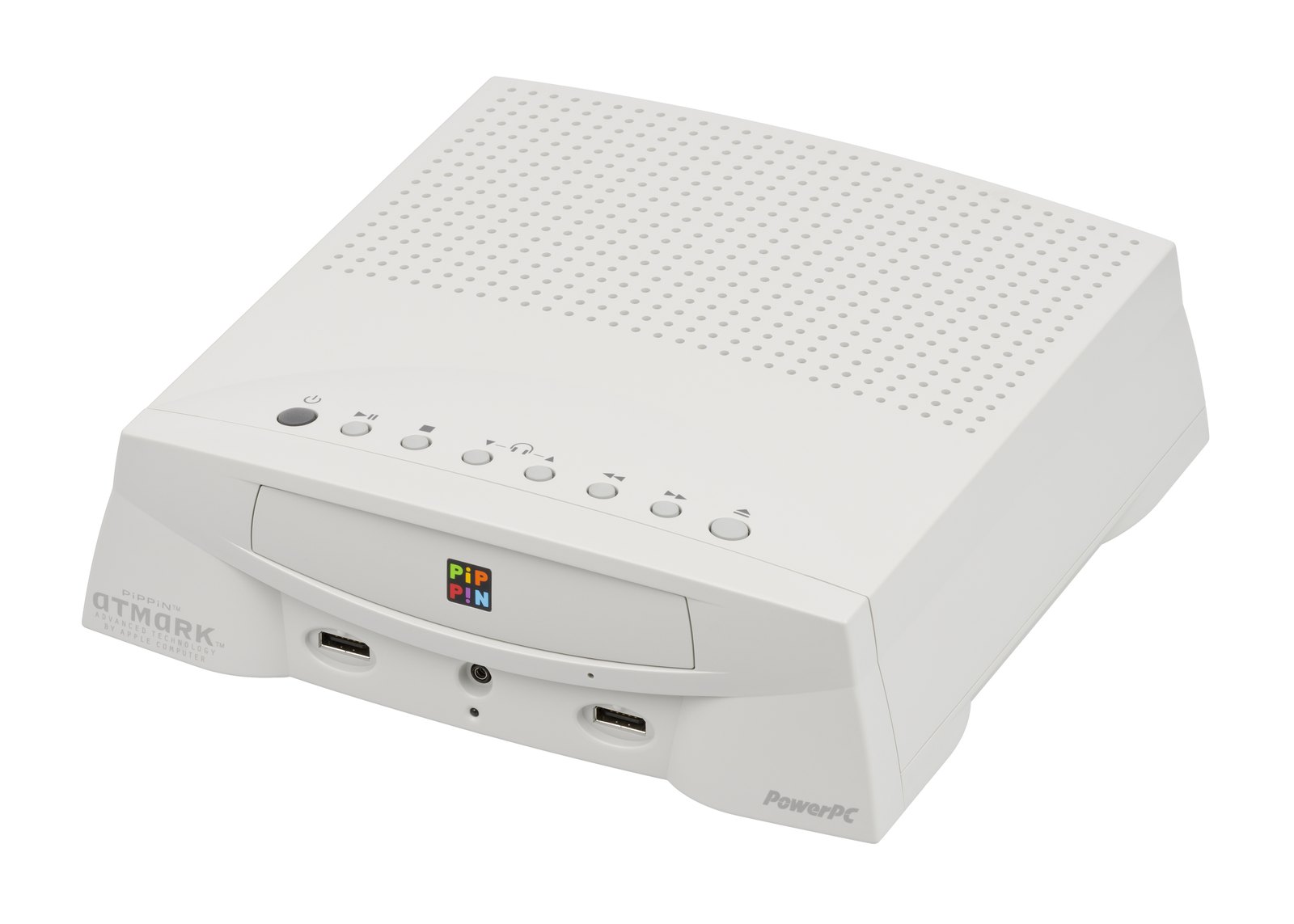
Identification
| Field | Value |
|---|---|
| Designed by | Apple — sold by Bandai |
| Year | 1996 |
| CPU | PowerPC 603 |
| Media | CD-ROM |
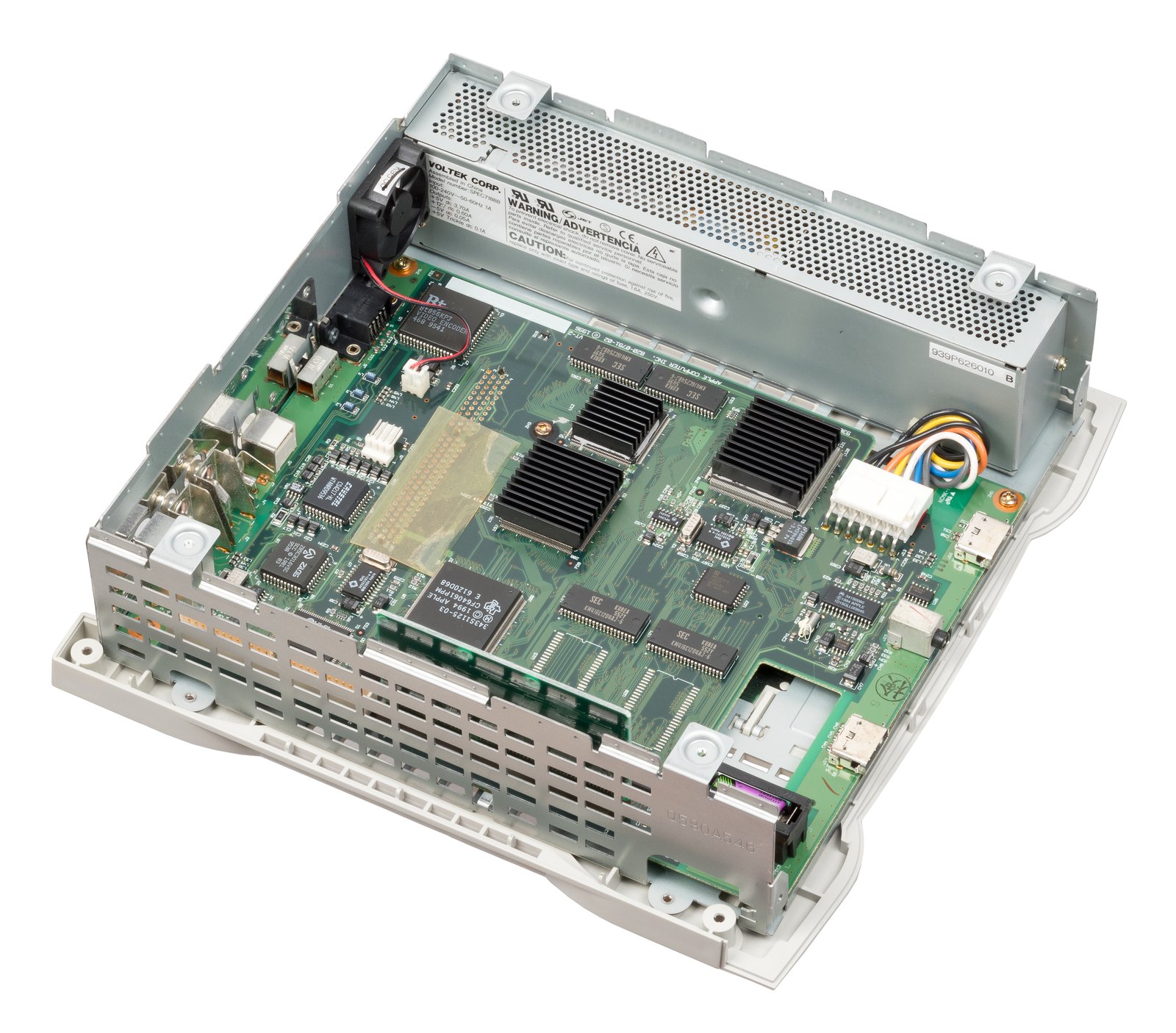
| Video | 343S0153 “Taos” — 640 × 480 double-buffered framebuffer |
| PCI / RAM bridge | 343S0152 “Aspen” — derived from Apple's Bandit controller |
| I/O and sound | 343S1125 “Grand Central” — SWIM III, sound, VIA |
| System controller | 341S0060 “Cuda” — 68HC05 MCU: ADB and parameter RAM |
A Mac in a console case
All four ASICs are Apple parts, taken from the period's Macintosh range. The Pippin is therefore not a proprietary architecture: it is a simplified Power Macintosh with a CD drive and a gamepad.
→ What holds for a 1996 PowerPC Mac holds here: power, capacitors, optical drive. See also Macintosh.
⚠️ The Cuda, and the parameter RAM
This is what it shares with the Macs of the same generation, and it matters.
A PRAM, therefore a battery
The Cuda (341S0060) is a 68HC05 microcontroller handling ADB and the parameter RAM — the Macintosh PRAM.
And on Macs of this era, the PRAM battery is the leading killer of motherboards: it leaks and eats the copper. The useful move is the same as on a Macintosh — take it out before it leaks, neutralise, check the tracks. → Backup batteries
The Taos corrects interlace
An elegant detail: the 343S0153 “Taos” carries a double buffer and a convolution intended to fix interlace flicker — the machine being meant for a television, not a computer monitor.
Common faults
| Symptom | Probable cause | Next step |
|---|---|---|
| Corrosion on the motherboard | PRAM battery leaked | Take the battery out before any diagnosis |
| Will not read the CD | worn optical drive | The dominant failure point on any CD machine |
| Settings lost at boot | PRAM battery flat | The classic symptom on Macs of this generation |
| No picture | Taos or the video output | An Apple part with no replacement |
| Controller not recognised | ADB through the Cuda | The Pippin uses the Macs' ADB bus |
Procedure — a dead console, step by step ✅
What this adds
Ordered for a console, not for an arcade board: what kills these is almost never the CPU. It is, in real order, the power supply, the capacitors, the drive or the cartridge slot, and only then the logic. → PCB diagnosis
1. The power supply. Two cases, depending on the machine. External brick: ⚠️ read the marking on the machine, next to the socket, and check the adapter against it — voltage and polarity. A centre-negative machine fed centre-positive loses its fuse, sometimes its regulator; do not trust a third-party label or a generic tip. Internal supply (the machine plugs straight into the wall): mains is inside the shell. Unplug, wait, and confirm the large capacitors are discharged before touching the board. Either way, measure under load: a failing supply holds its voltage until it is asked for current.
2. The fuse. Many of these machines have one right behind the socket — it is the part designed to die. Test it in continuity, out of circuit. A fuse that blows again is a short, not a fuse problem.
3. Capacitors. On most machines of this age this is the default suspect rather than a last resort — leaking SMD electrolytics eat the tracks underneath before they give any other sign. ⚠️ Not all of them are like that: some carry very few and are not recapped on principle. Read what this page says about it before reaching for the iron. → Recap
4. The drive. On this machine it is the dominant failure point. In order: does the tray move, does the disc spin, is the lens clean (cotton bud, isopropyl alcohol, no pressure), do the rails slide freely. A laser that no longer reads gets replaced; the gain pot is not something to tweak blind — that is the move that finishes off a laser that was still good.
5. Video output. Isolate the machine from the display: another cable, another TV, another input. A sizeable share of "dead consoles" are a dead cable, or a display that will not lock onto what this machine outputs — see the video section of this page for what that is.
6. Still nothing. Now, and only now, the logic: rails on the board, reset, clock, bus. → PCB diagnosis
Repair (technician)
- The battery first. As on any 1996 Mac, it is what decides whether the board survives.
- Treat the machine as a Power Macintosh: power, capacitors, CD drive. Period Mac documentation largely applies.
- The Apple ASICs have no replacement, but they are shared with Macs of the same family — a donor machine is conceivable, which is rare for a console.
→ Methods: PCB diagnosis · Recap · Backup batteries
Modernisation & mods
- ⚠️ Do not host CD or ROM images — method only.
- Neighbours: the same idea as the Cojag or the Aleck 64, but the other way round — here a computer becomes a console.
Emulation & FPGA
MAME covers the platform (apple/pippin.cpp, driver by R. Belmont, from a skeleton
by Angelo Salese, with thanks to the DingusPPC team).
Photos / assets
(To take: the motherboard with the four Apple ASICs and their 343S… markings, the PRAM battery location, and the CD drive.)
Sources & attribution
Text (synthesised here; sources listed for attribution):
- MAME —
src/mame/apple/pippin.cpp(BSD-3-Clause / GPL, driver by R. Belmont from Angelo Salese's skeleton, thanks to the DingusPPC team): identification of the four Apple ASICs — 343S0152 “Aspen” (PCI host bridge and RAM controller derived from Bandit), 343S0153 “Taos” (640 × 480 double-buffered framebuffer with convolution to fix interlace flicker), 343S1125 “Grand Central” (SWIM III, sound, VIA) and 341S0060 “Cuda” (68HC05 MCU handling ADB and parameter RAM); PowerPC 603 CPU — https://github.com/mamedev/mame/blob/master/src/mame/apple/pippin.cpp
Image:
-
pippin-carte-mere.jpg— Evan-Amos, Public domain — https://commons.wikimedia.org/wiki/File:Apple-Bandai-Pippin-Atmark-Motherboard-2.jpg -
pippin-console.jpg— Evan-Amos, Public domain — https://commons.wikimedia.org/wiki/File:Bandai-Apple-Pippin-Console-FL.jpg


Review & corrections
How this space is used
Spotted a wrong value, an outdated procedure, a chip reference that does not match your board? Say so here, with what you observed (model, board revision, serial number, measurement). Every report is cross-checked against a source before anything changes — an unverifiable correction is published as “reported by …, not cross-checked” rather than silently applied.
Reading is open to everyone; posting requires signing in with Discord. Reports from the wiki's declared reviewers are handled first; anyone else's are read too, but go through a human before anything is changed.