Jaleco — Pony cabinets¶
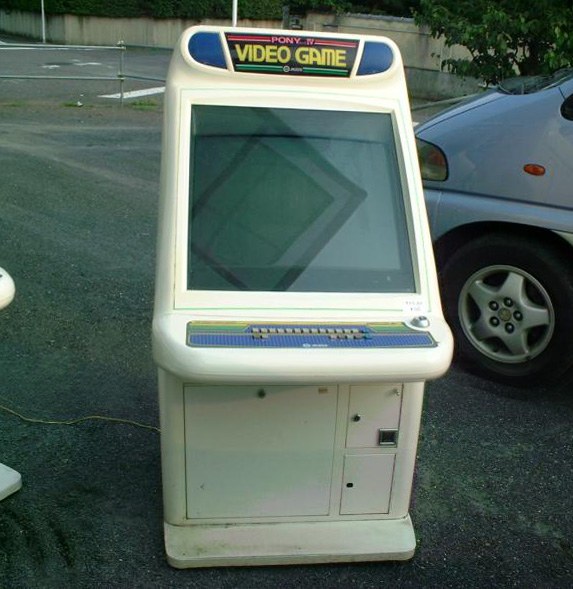
Pony is Jaleco's line of candy / table cabinets (late 80s-90s), less famous than the Sega City but real. It spans Table Pony models, the Pony Mark II to V, and the Pony 40. All JAMMA, CRT monitor — standard candy-cab repair.
Range¶
| Cabinet | Type | Note |
|---|---|---|
| Table Pony (variants) | cocktail / table | table version of the line |
| Pony Mark II / III / IV / V | candy / sit-down | successive iterations |
| Pony 40 | candy / sit-down | a common model in the series |
(In the 90s Jaleco moved to compact candy cabs like the Pony series, with a rotatable monitor yoko/tate and the JAMMA standard.)
Manufacturer figures — Pony Mark IV¶
The Jaleco manual archived here gives, in its §2 仕様, a numbered table:
| № | Item (manual's kanji) | Value |
|---|---|---|
| 1 | 使用電源 | AC100V 50/60 Hz |
| 2 | 消費電力 | approx. 160 W |
| 3 | ブラウン管 | 29-inch colour monitor (×1) |
| 4 | 外径寸法 | 横幅(W) 730 mm · 奥行(D) 869 mm · 高さ(H) 1362 mm |
| 4 | (cont.) | 1640 mm — height with the ゲームエクスプレネーションアクリル fitted |
| 5 | 重量 | approx. 90 kg total |
| 6 | 金庫容量 | ¥250,000 (2,500 × ¥100 coins) |
These figures are the Mark IV's alone
The manual is the Pony Mark IV's. The other models in the range (Table Pony, Mark II, III, V, Pony 40) have no archived document here: nothing licenses applying these figures to them.
As elsewhere, two heights: 1362 mm bare, 1640 mm with the game-explanation acrylic fitted — 278 mm apart. The 付属品 list on the same folio confirms that this acrylic is a supplied part to be fitted (with its bracket and 2 screws), alongside the 4 L-locks and the 4 A / 125 V glass fuse.
(Manual's note: ◆本仕様は改良のため、予告なく変更することがあります。)
⚡ Connectors & power¶
| Aspect | Value |
|---|---|
| PCB connector | JAMMA |
| Power | 100 V AC (Japan) |
| Consumption | 330 W (rated) |
| Dimensions | 1140 × 2120 × 1755 mm (W×D×H) — Pony 40 |
| Weight | ~160 kg |
| Screen | 42″ three-tube projection (超高画質3管式) |
Manufacturer's figures — and this is not a candy cab
The Jaleco flyer archived here (© 1992 JALECO LTD.), 仕様 box: 外形寸法(mm): (W) 1,140 × (D) 2,120 × (H) 1,755 · 重量 約160kg · モニタ 42インチプロジェクションディスプレイ · 消費電力 330W(定格). Jaleco labels (W), (D) and (H).
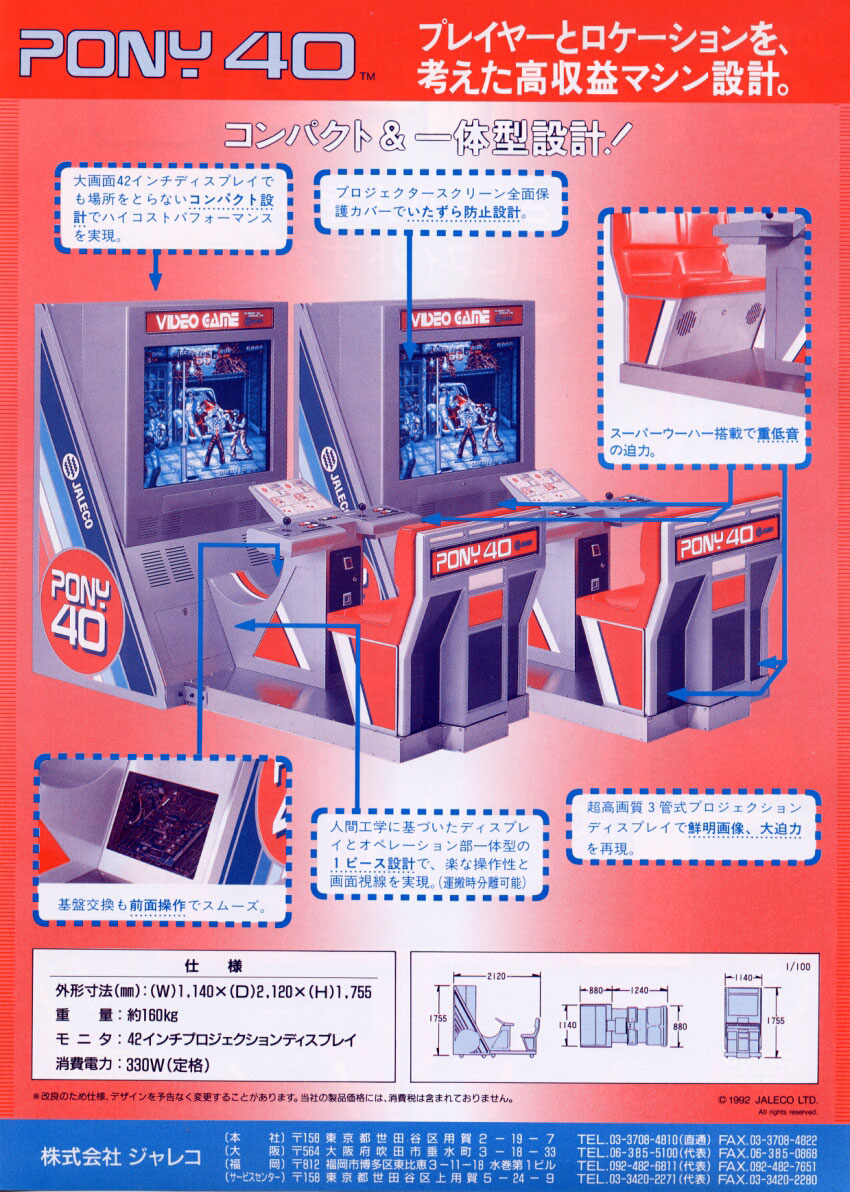
⚠️ 2.12 m deep: the Pony 40 is a one-piece sit-down unit (display and control station joined, separable for transport), not a candy cab. It is deeper than a Versus City (1834) and draws twice what a CRT candy cab does. Check this before booking a van.
The flyer's dimension drawing details the layout: 2120 from the side, 1755 tall, 1140 wide, split 880 / 1240 between base and station.
(Sources: the archived 1992 Jaleco sales flyer for the dimensions, weight, screen and consumption.)
- JAMMA (CRT) → JAMMA wiring, buttons Control panels.
- 100 V AC candy brick (Japan) → candy PSU + a step-down transformer on 230 V.
Common faults¶
| Symptom | Likely cause | Lead |
|---|---|---|
| Unstable / washed-out image | CRT chassis (Nanao/Sanwa) / recap | Recap + adjustments |
| No picture | power / harness / chassis | Diagnose power → monitor |
| Dead controls | JAMMA harness / microswitches | Diagnose I/O, clean |
Repair & maintenance
Modernise (video, PSU, JVS, upscaler, PC/FPGA) → Modernising a cabinet. CRT monitor (discharge HV!) → CRT safety · chassis → Nanao / Sanwa / equivalents · recap → Recap · power → candy PSU · diagnosis → PCB fault-finding.
Procedure — a cabinet that will not start ✅¶
There is a CRT in this cabinet
The tube stays charged with the cabinet unplugged, and the anode cap is the first thing your hand meets behind the monitor. Discharge it, work with one hand, and never alone if you can help it. → CRT safety
This cabinet is documented as 100V
It does not go straight onto a European socket. It needs a step-down transformer rated for the whole cabinet, monitor included — not a travel adapter. Feeding 230 V to a cabinet built for 100V destroys the supply, and usually the monitor with it. → Cabinet power
What this adds
Ordered for a cabinet, not for a board: mains, low-voltage supply, loom, monitor, then the game. The overwhelming majority of "dead cabinets" are dead for a reason that has nothing to do with the PCB — which is why the board comes last here.
1. Mains, and what sits between it and the cabinet. The switch, the fuse or breaker, the isolation transformer if there is one. A cabinet that shows no sign of life at all is almost never electronic.
2. The low-voltage supply — measured under load. Aim for +5 V where power reaches the board — the JAMMA edge, or the JVS power connector, depending on the cabinet — with the game running, not on an idle bench. If the supply has an adjustment (most candy and JVS bricks do; the ATX brick in a PC cabinet does not), do it then and not before: set off-load, it leaves a board that boots and then glitches. With no adjustment the measurement still earns its keep — it tells you whether the supply holds. Check +12 V too, and −5 V if the board uses it: many do not, and an ATX brick does not provide it. → Cabinet power
3. The loom and the connector. Reseat, and check the grounds — a cabinet with a poor ground gives rolling picture, phantom inputs and noise, all at once, and none of it looks like a wiring fault. → Wiring
4. The monitor. This page does not give a single monitor spec — it covers several cabinets. Check which one you have before concluding anything. CRT: no picture but the tube is warm and there is EHT — that is sync or video, not the tube. No EHT at all — chassis. A picture that shrinks, wanders or shifts colour is a chassis recap, and on these monitors that is a scheduled job, not a repair.
5. Scan rate — the mismatch that breaks nothing. If the board's rate is not one the monitor accepts, you get no picture and nothing is faulty. Check what this cabinet takes against what the board puts out before opening anything. → Modernising a cabinet
6. The control panel. Microswitches and the loom, in that order. A single dead direction is a switch; a whole player dead is the loom or its ground. → Control panels
7. Coin mech and sound. Last, because they hide nothing: a mech that no longer registers is usually dirty or misadjusted, and silence with a good picture points at the amplifier and its supply rails.
See also¶
Documents (archived)¶
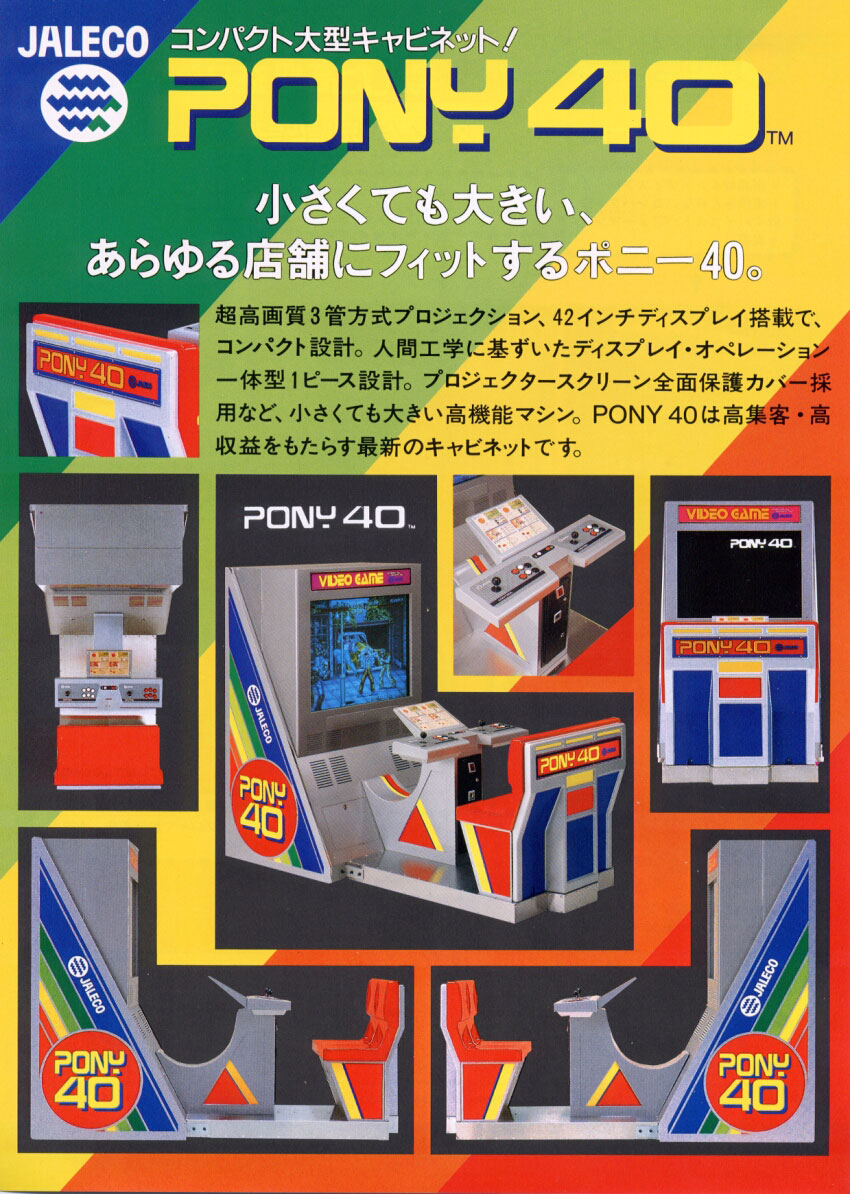
- 📄 Flyer Jaleco — PONY 40 : cover · 仕様 box + dimension drawing ← the source of the figures
Sources & attribution¶
- Jaleco — ポニー Mark IV 取扱説明書, 34 pp., archived here — §2 仕様: AC100V 50/60 Hz, approx. 160 W, 29″, 外径寸法 730 × 869 × 1362 mm (1640 mm with the explanation acrylic fitted), approx. 90 kg, cash box ¥250,000, and the 付属品 list (4 A/125 V fuse, 4 L-locks). ⚠️ This PDF has no text layer: everything quoted from it was read off the rendered pages. Via Hard*Candy
- Jaleco — sales flyer PONY 40, © 1992 JALECO LTD., archived here — 仕様 box: (W) × (D) × (H) labelled, weight, 42″ three-tube projection monitor, consumption, plus a layout dimension drawing. Found via The Arcade Flyer Archive
- Wikipedia — List of Japanese arcade cabinets (Jaleco: Pony series — Table Pony, Pony Mark II-V, Pony 40) — https://en.wikipedia.org/wiki/List_of_Japanese_arcade_cabinets
- Nintendo Life — Exploring Japan's love for candy cabs (Jaleco to compact "Pony" candy cabs, rotatable monitor, JAMMA) — https://www.nintendolife.com/news/2018/04/feature_exploring_japans_undying_love_for_arcade_candy_cabinets
Image:
-
pony-mark-iv-borne.jpg— source Hard*Candy (⚠️ no licence statement anywhere on the site) — https://www.hard--candy.com/wiki/candy/Pony_Mark_IV
Review & corrections
How this space is used
Spotted a wrong value, an outdated procedure, a chip reference that does not match your board? Say so here, with what you observed (model, board revision, serial number, measurement). Every report is cross-checked against a source before anything changes — an unverifiable correction is published as “reported by …, not cross-checked” rather than silently applied.
Reading is open to everyone; posting requires signing in with Discord. Reports from the wiki's declared reviewers are handled first; anyone else's are read too, but go through a human before anything is changed.