SNK Neo Geo Pocket (Color)
SNK's handheld (NGP monochrome 1998, Neo Geo Pocket Color 1999). Renowned for its excellent microswitch stick ("click") and its battery life. An unlucky Game Boy Color rival, but much loved.
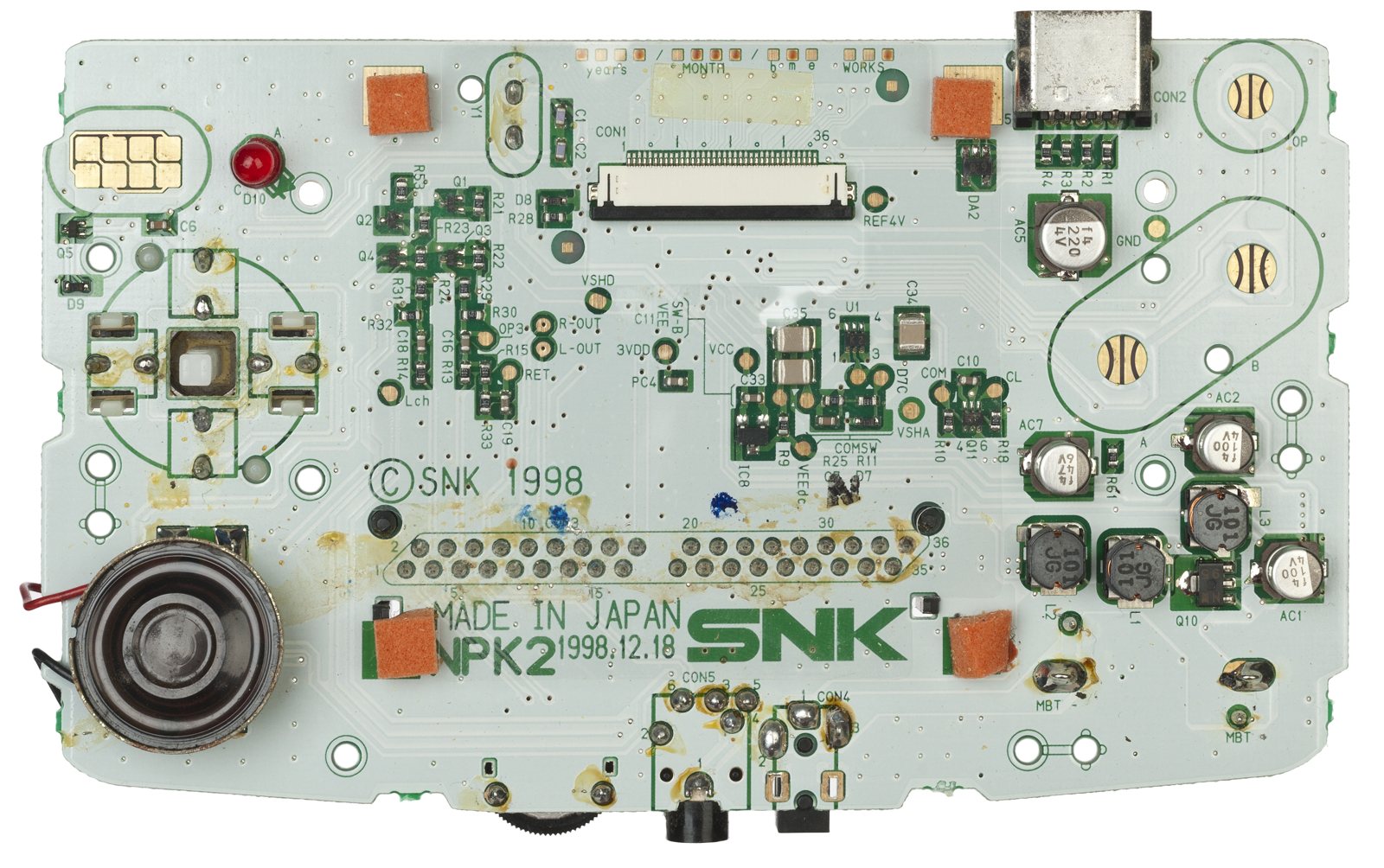
Identification
| Field | Value |
|---|---|
| Manufacturer | SNK |
| Releases | NGP (1998, mono) · NGP Color (1999) |
| Screen | reflective LCD (no backlight) |
| Media | Cartridge |
Architecture (detail)
| Block | Chip | Clock | Role |
|---|---|---|---|
| CPU | Toshiba TLCS-900/H (16-bit) | ~6.144 MHz | a powerful core for a handheld |
| Sound (CPU) | Zilog Z80 | ~3.072 MHz | drives the sound |
| Sound (chip) | T6W28 (close to the SMS SN76489) | + DAC for PCM | |
| Video | integrated controller | 160×152, 4096 colours / 146 on screen (Color) | |
| Memory | 12 KB RAM | ||
| Power | 2 AA batteries — ~40 h battery life |
Renowned for its high-quality clicky micro-stick (ideal for SNK fighting games) and its battery life. A niche market against the Game Boy Color.
Dreamcast link & region
- Dreamcast link cable: the NGPC connects to the Dreamcast (SNK vs Capcom: Card Fighters, The Match of the Millennium) to unlock content — a rare bridge between a handheld and a home console.
- Region / language: an English/Japanese setting in the boot menu; no hard region lock on cartridges.
- Preservation: modern flashcarts (e.g. NeoGeo Pocket Flashmasta) for the library and homebrew.
Telling the three models apart ✅
| Neo Geo Pocket (1998-1999) | Neo Geo Pocket Color (1999-2001) | New Neo Geo Pocket Color (1999-2001) | |
|---|---|---|---|
| Screen | Monochrome (the only one) | Colour | Colour |
| Market | Japan only | Japan + America | Japan only |
| Screen bezel | No text at all, except the console name at the bottom | "COLOR" at the top right, italicised red | "COLOR" at the top right, red but outlined and in cursive |
| Thickness | The slimmest of the three | Thicker than the NGP | Slimmer and lighter than the Color |
| Other tell | Power button slightly further from the top right corner | Some period press releases claim superior sound output to the Color |
The foolproof tell: the screen when off
With the console turned off, a monochrome NGP's screen appears completely BLACK, whereas the Color models look more green/grey. It is the fastest check when the bezel is worn or the console incomplete. (Source: ConsoleMods, CC-BY-SA.)
Compatibility: it works BOTH ways
Unlike most handheld lineages, there is no trap here:
- all NGPC games can be played on an original NGP, in a monochrome mode;
- all NGP games work on the NGPC, in either a coloured or black & white mode.
Very few monochrome games were ever produced, and many were later re-released as colour versions for the NGPC.
The 10 monochrome Neo Geo Pocket games
Baseball Stars · King of Fighters R-1 · Melon-chan's Growth Diary · Master of Syougi · Neo Cherry Master · Neo Geo Cup 98 · Neo Geo Cup 98 Plus · Pocket Tennis · Puzzle Link · Samurai Shodown.
Curiosity: the K2_VIDEO
A developer unit called the K2_VIDEO existed, with controller ports and the ability to output video to an external monitor.
Common faults
| Symptom | Likely cause | Lead |
|---|---|---|
| Dark screen | Reflective stock | Frontlight / backlight (mod) |
| Battery contact corrosion | Leaked batteries | Clean the contacts |
| Imprecise stick | Worn microswitches | Replace the switches |
| Cartridge not read | Contacts | Cleaning |
Procedure — a dead console, step by step ✅
What this adds
Ordered for a console, not for an arcade board: what kills these is almost never the CPU. It is, in real order, the power supply, the capacitors, the drive or the cartridge slot, and only then the logic. → PCB diagnosis
1. The power supply. Two cases, depending on the machine. External brick: ⚠️ read the marking on the machine, next to the socket, and check the adapter against it — voltage and polarity. A centre-negative machine fed centre-positive loses its fuse, sometimes its regulator; do not trust a third-party label or a generic tip. Internal supply (the machine plugs straight into the wall): mains is inside the shell. Unplug, wait, and confirm the large capacitors are discharged before touching the board. Either way, measure under load: a failing supply holds its voltage until it is asked for current.
1b. Battery and its contacts. On this machine, before anything else: corroded battery contacts, or a cell that reads fine off-load and collapses under it, give exactly the symptoms of a dead machine.
2. The fuse. Many of these machines have one right behind the socket — it is the part designed to die. Test it in continuity, out of circuit. A fuse that blows again is a short, not a fuse problem.
3. Capacitors. On most machines of this age this is the default suspect rather than a last resort — leaking SMD electrolytics eat the tracks underneath before they give any other sign. ⚠️ Not all of them are like that: some carry very few and are not recapped on principle. Read what this page says about it before reaching for the iron. → Recap
4. The cartridge connector. Cartridge contacts with isopropyl alcohol, never an abrasive eraser: it takes the gold plating off and the problem comes back worse. On the machine side, inspect the slot pins — splayed, bent or oxidised — and check continuity between slot and board.
5. The screen. Lines, a dead half, a picture that fades: it is almost always the ribbon and its solder joints, not the panel. Reseat before you order anything. If this machine has a TV output — not all of them do — test that too: it tells the screen apart from what feeds it.
6. Still nothing. Now, and only now, the logic: rails on the board, reset, clock, bus. → PCB diagnosis
Popular mods — what to buy, how
- Screen (dim stock panel): frontlight or IPS replacement → lights up/replaces the stock screen (invisible without light). Install 🟡/🟠.
- Flashcart: the NeoGeo Pocket Flash Masta (Flavor/RetroHQ) — games/homebrew on SD, plug-and-play 🟢.
- Reliability: recap + rechargeable USB-C / battery. (The Dreamcast link cable enables cross-console features in a few games.)
Photos / assets
(To add: NGPC, microswitch stick, board.)
Advanced repair
Caps + screen; cartridge/battery contacts. Methods: Recap · PCB fault-finding · Traces & vias.
Sources & attribution
- ConsoleMods Wiki — Neo Geo Pocket Model Differences — CC-BY-SA — the three models and their tells (bezel text, thickness, power button position, black vs green/grey screen when off), the K2_VIDEO developer unit — https://consolemods.org/wiki/Neo_Geo_Pocket:Model_Differences
- ConsoleMods Wiki — Monochrome Games List — CC-BY-SA — two-way NGP/NGPC compatibility and the list of 10 monochrome games — https://consolemods.org/wiki/Neo_Geo_Pocket:Monochrome_Games_List
What we did not transcribe (and why)
The Neo Geo Pocket section of ConsoleMods is very sparsely filled: Connector Pinouts, Region Information, Video Output Notes, Screen Replacements, Frontlight Mod, USB-C Power Mod, LCD Screen, Consolizer and the flash cart pages (Flash Masta, NeoPocket GameDrive) are all empty red links. Our screen, flash cart and power sections therefore rest on our existing sources — nothing has been invented, and products are named without any fabricated URL.
- Wikipedia — Neo Geo Pocket Color — CC-BY-SA — https://en.wikipedia.org/wiki/Neo_Geo_Pocket_Color
Image:
-
ngpc-board.jpg— Evan-Amos, public domain — https://commons.wikimedia.org/wiki/File:Neo_Geo_Color_Motherboard_Top.jpg

Review & corrections
How this space is used
Spotted a wrong value, an outdated procedure, a chip reference that does not match your board? Say so here, with what you observed (model, board revision, serial number, measurement). Every report is cross-checked against a source before anything changes — an unverifiable correction is published as “reported by …, not cross-checked” rather than silently applied.
Reading is open to everyone; posting requires signing in with Discord. Reports from the wiki's declared reviewers are handled first; anyone else's are read too, but go through a human before anything is changed.