Sega Lindbergh
Sega's first arcade hardware on standard PC architecture (2005): a Pentium 4 + GeForce 6 under embedded Linux (MontaVista). Virtua Fighter 5, OutRun 2 SP, After Burner Climax, The House of the Dead 4… Security via a CF + PIC (AES) dongle. Active preservation through Lindbergh Loader (open-source).
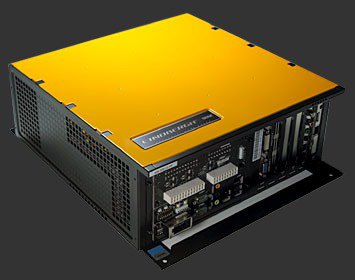
Identification
| Field | Value |
|---|---|
| Manufacturer | Sega |
| Year | 2005 (The House of the Dead 4) |
| Base | standard x86 PC (embedded Linux) |
| Media | HDD / CF (encrypted game data) |
| Security | security board: CF + PIC (AES-CBC) |
| I/O | JVS |
| Variants | Yellow (standard), Red, Blue, Silver (different CPU/GPU specs) |
Architecture (PC)
| Block | Chip | Detail |
|---|---|---|
| CPU | Intel Pentium 4 HT 3.0E (Prescott) | 800 MHz FSB, 1 MB L2, Hyper-Threading |
| GPU | NVIDIA GeForce 6800 GS (AGP) | 256 MB GDDR3 (GeForce 6 series) |
| RAM | 1 GB DDR-400 | |
| OS | MontaVista Linux (embedded) | |
| Media | HDD or CF | game data |
| I/O | JVS | + a game-specific I/O board |
It's an x86 PC in an arcade case: Sega's first step toward standard PC (before RingEdge/Nu). The colour variants (Yellow/Red/Blue/Silver) differ in CPU/GPU per the games' needs.
Security & preservation (the real topic)
- Security board: a PIC + a CF card perform AES-CBC decryption of the game data and store the keys. Without the right security board, the game won't decrypt.
- Preservation:
-
Lindbergh Loader (open-source, Linux): emulates/loads Lindbergh games on a modern Linux PC — designed to replace a dead Lindbergh board in a real cabinet (active preservation).
-
TeknoParrot: partial support for some games (sometimes unstable / behind a paywall depending on the case).
⚠️ We describe the method; no BIOS/keys/games hosted. The open-source tools (Lindbergh Loader), however, are worth preserving.
Notable games
The House of the Dead 4 (2005), Virtua Fighter 5, OutRun 2 SP, After Burner Climax, Initial D Arcade Stage 4/5, Ghost Squad Evolution, Let's Go Jungle!, R-Tuned, Sega Race TV, Virtua Tennis 3, 2 Spicy, Primeval Hunt, Rambo.
Faults & repair
Standard PC hardware → PC maintenance + specifics:
| Symptom | Likely cause | Lead |
|---|---|---|
| Won't decrypt / boot | Dead security board (CF/PIC) | Critical board; back it up; see Lindbergh Loader |
| Overheating / GPU crash | GeForce 6800 (fan/paste) | Clean, re-paste, ventilate; recap if needed |
| HDD/CF end of life | media wear | Image the disk while it still reads |
| Reboots | ATX PSU, capacitors | Replace the PSU / recap |
| Dead controls | JVS I/O / harness | JVS diagnosis |
Modernisation & mods
The common ground for every JAMMA board
Video, power, control panel and upscalers depend on the cabinet rather than the board: everything is centralised in Modernising a cabinet. To run the board outside a cabinet (at home, on a display): supergun.
- Hard disk ⚠️: a perishable medium — image the drive before it fails, then consider an SSD/CF replacement → PCB preservation hub.
- Scan rate 📺: PC-based hardware — VGA output (31 kHz and above). ⚠️ A 15 kHz chassis is incompatible: you need a VGA/tri-sync monitor or a computer display. (Derived from the platform's PC nature documented above — not measured from MAME.)
- FPGA / emulation: see the Emulation & FPGA section below.
Repair (technician)
- x86 PC (Pentium 4 Prescott): diagnose like a PC — ATX PSU, RAM, motherboard caps (Prescott runs hot → frequent overheating/fan issues), GPU variants (Yellow/Red/Blue/Silver).
- CF + PIC security (AES-CBC): the game is encrypted; without the correct security card it won't boot — not a hardware fault.
- HDD/CF: wear → imaging (if the key is available).
- Capacitors: recap PSU / motherboard.
→ Methods: PCB fault-finding · Recap · Traces & vias
Procedure — a dead board, step by step ✅
What this adds
The general method lives in PCB diagnosis. This is its application to this platform: the same order, but with the values actually expected here, so you do not have to go back and forth.
This platform is a PC
Most of what kills one of these is not on a board: the disk, the dongle, the BIOS settings or the OS. Go through those first — the procedure below still applies to the rails and the boot, but stripping a machine that simply will not boot off its disk wastes a day.
Tools: multimeter, oscilloscope (or frequency counter), current-limited bench supply, desoldering braid. → Tooling
If the board is still in a cabinet
A CRT holds its charge with the machine unplugged. → CRT safety
1. Inspection, power off. Corrosion, cut tracks, oxidised EPROM legs, leaking SMD capacitors, dubious earlier repairs.
2. The connector, before anything else. A large share of "dead boards" are a contact problem, not a fault. Clean the contacts with isopropyl alcohol and reseat — not with an abrasive eraser on a gold edge, which takes the plating off and brings the problem back worse. It costs two minutes and settles the question.
3. Power, measured on the board. Aim for +5.0 V measured as close as possible to where power reaches the board — not at the PSU output: the drop is in the loom, and that is exactly what makes a board boot on the bench and not in the cabinet. Where you probe depends on this board's connector — JAMMA edge, JVS loom or a proprietary harness — plenty of makers kept one long after JAMMA arrived — see Identification above. → Wiring Check −5 V and +12 V too if the sound stage uses them. Suspected short: bring it up current-limited and find the hot spot.
4. /RESET. It must release after power-up. Held low = the CPU never starts. A 1–2 Hz loop is not the reset circuit, it is the watchdog: the CPU is crashing at boot, so look at the bus, not at the reset.
5. Clocks. There is no measurement table for this platform — MAME's sources yield nothing usable for it. Any frequency quoted under Architecture on this page serves as a marker; otherwise compare against a working board rather than against a number: an invented value condemns healthy parts. → PCB diagnosis
6. Bus. Activity on the main CPU's address lines tells you whether it is running or frozen. Frozen with good clocks and good reset → work RAM, bus buffers, ROMs.
7. It boots but the picture or the sound is wrong — that is another job: see Common faults on this page, then signal tracing.
Emulation & FPGA
- Emulation / loader: Lindbergh Loader (Linux, open-source), TeknoParrot (partial). No FPGA core (a full PC).
Lineage
Sega's first PC-based board, before Europa-R (driving), RingEdge / RingWide (2009) and Nu / ALLS. For console-based 3D, see Chihiro and Triforce.
Manual (archived)
- 📘 Manual — Sega Lindbergh Universal Cabinet (PDF) — Source: Arcade Otaku Wiki, archived locally.
Photos / assets
(To add: Lindbergh (Yellow) motherboard, GeForce 6800, CF/PIC security board, JVS I/O.)
Sources & attribution
- Sega Retro / Arcade Otaku — Sega Lindbergh (P4 3.0E, GeForce 6800 GS, 1 GB, MontaVista Linux, CF/PIC AES security, games) — https://wiki.arcadeotaku.com/w/Sega_Lindbergh
- System16 — Sega Lindbergh Yellow Hardware — https://www.system16.com/hardware.php?id=731
- GitHub lindbergh-loader (open-source Linux emulator/loader) — https://github.com/lindbergh-loader/lindbergh-loader
Image:
-
lindbergh-boitier.jpg— uploaded by Mikel to Sega Retro (site CC BY 4.0; ⚠️ the file carries no individual licence) — https://segaretro.org/File:Lindbergh_system_upleft.jpg

Review & corrections
How this space is used
Spotted a wrong value, an outdated procedure, a chip reference that does not match your board? Say so here, with what you observed (model, board revision, serial number, measurement). Every report is cross-checked against a source before anything changes — an unverifiable correction is published as “reported by …, not cross-checked” rather than silently applied.
Reading is open to everyone; posting requires signing in with Discord. Reports from the wiki's declared reviewers are handled first; anyone else's are read too, but go through a human before anything is changed.