N64 RGB (analog)
Getting clean analog RGB out of a Nintendo 64. Depending on the board revision, it's either a simple tap on the video DAC, or an FPGA mod that reads the digital video bus — the late boards having lost the "chatty" video converter.
| Field | Value |
|---|---|
| System | Nintendo 64 (NTSC/PAL) |
| Type | analog RGB — DAC tap or FPGA on the digital bus |
| Level | 🟡 (early boards, tap) → 🟠 (FPGA, late boards) |
| Reversible | ⚠️ partially (wires soldered to the bus) |
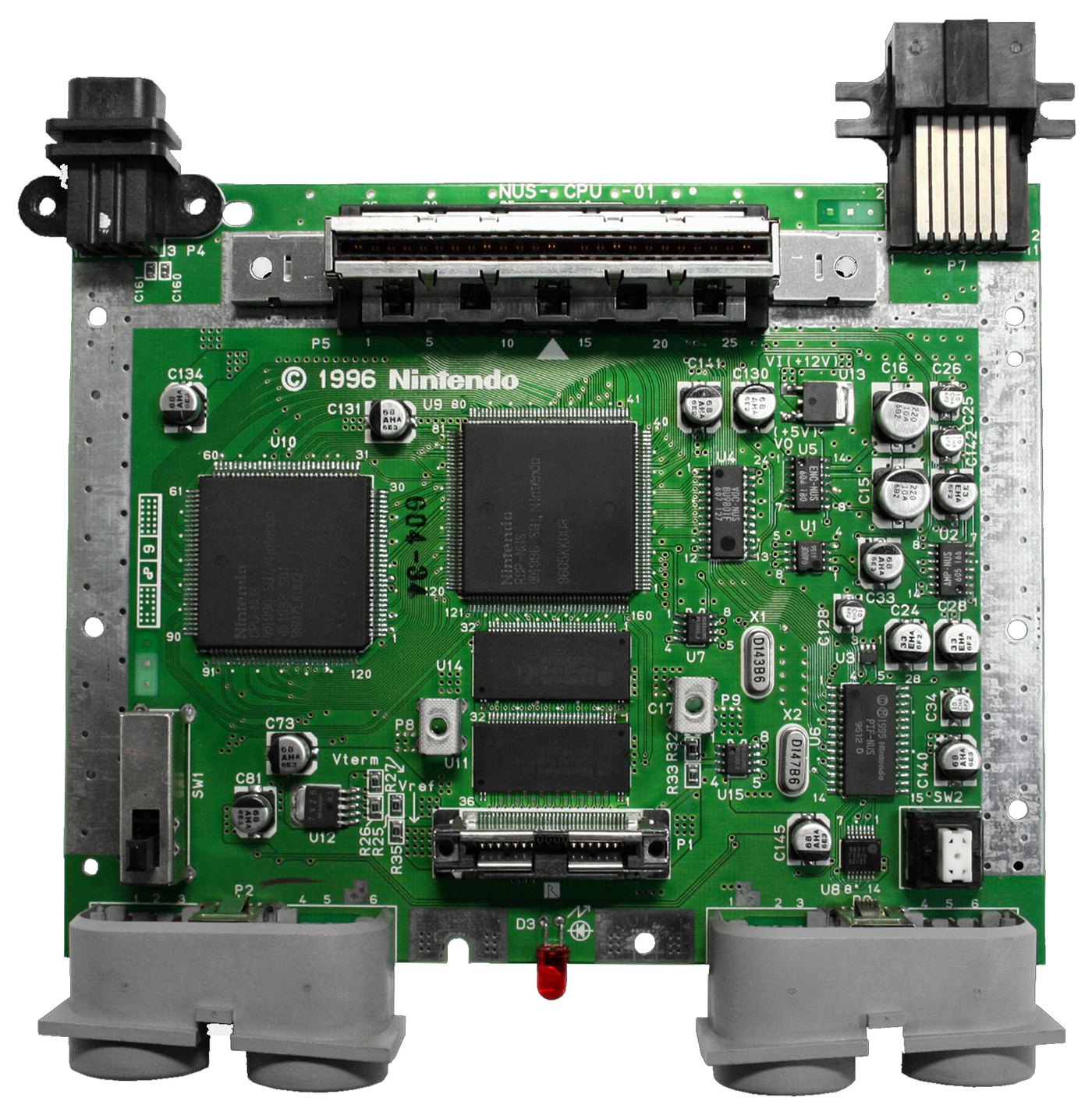
The crux: the board revision
The N64 computes its video digitally (RCP bus → video VDC/DAC). The key point is which converter your board has:
| Board revision | Video converter | "Easy" RGB? |
|---|---|---|
| NUS-CPU-01/02/03 (early) | VDAC exposing usable components | ✅ RGB by amplification/tap |
| NUS-CPU-04 and later | "stingy" integrated DAC | ❌ analog tap insufficient → FPGA required |
→ Identify the revision (NUS-CPU-0x marking on the board) before choosing the
kit.
The two mod families
- RGB by amplification (early boards): tap R/G/B at the DAC and level them (THS7314 type amp, see RGB & SCART). Simple, but only for early boards.
- RGB by FPGA (all boards): an N64RGB (viletim) type board or the open-source borti4938 (N64Adv) design reads the digital video bus (the colour bits before the DAC) and re-synthesises a perfect RGB — works even on late boards, with options (deblur, 240p/scanlines depending on the design).
Deblur
The N64 applies a slight horizontal blur (AA/dither). FPGA mods often offer a deblur that makes the image markedly sharper — a big visual plus.
Installation (summary)
- Open the N64, remove the board, identify the NUS-CPU revision.
- FPGA: solder the flex/wires onto the digital video bus points (RCP/DAC pins per the kit's guide) + power + csync.
- Route the output to a multi-out (often DIN) for a SCART/component cable.
- Set the options (deblur, output format).
It's fine soldering on closely-spaced pins → precision iron, magnifier.
Before / after
| Criterion | Original N64 | N64 RGB (FPGA + deblur) |
|---|---|---|
| Output | composite / S-Video | clean RGB / component |
| Sharpness | blurry (AA + composite) | sharp (deblur) |
| Late boards | no analog RGB possible | RGB possible via FPGA |
Where to buy
- viletim (Tim Worthington) — N64 RGB — http://etim.net.au/
- Open-source borti4938 design (N64 RGB / N64Adv) — firmware archived here:
n64rgb_fw.tar.gz· README. Public GitHub repo, PCBs sold by several mod shops (see RetroRGB). - Reference dossier: RetroRGB — https://www.retrorgb.com/n64rgb.html
Alternatives
- Digital HDMI output (perfect image, all boards): see N64 digital (UltraHDMI / PixelFX).
Sources & attribution
- RetroRGB — N64 RGB dossier (revisions, deblur) — https://www.retrorgb.com/n64rgb.html
-
Tim Worthington — http://etim.net.au/ · borti4938 — open-source N64RGB project (GitHub) Image:
-
n64-carte-mere.jpg— Yaca2671, CC BY-SA 3.0, Wikimedia Commons — https://commons.wikimedia.org/wiki/File:NUS-CPU-01_F_01.jpg

Review & corrections
How this space is used
Spotted a wrong value, an outdated procedure, a chip reference that does not match your board? Say so here, with what you observed (model, board revision, serial number, measurement). Every report is cross-checked against a source before anything changes — an unverifiable correction is published as “reported by …, not cross-checked” rather than silently applied.
Reading is open to everyone; posting requires signing in with Discord. Reports from the wiki's declared reviewers are handled first; anyone else's are read too, but go through a human before anything is changed.