Namco System 246 / 256
Namco's arcade platforms (2001 / 2004), based on the PlayStation 2. Tekken 4/5, Soul Calibur II/III, Time Crisis 3, Taiko no Tatsujin… The game (on DVD or HDD) is paired to a security dongle: no dongle, no boot. That's the hard preservation point — but the scene now has tools to work around it cleanly (dump, the open Proverb bootloader, dongle rebinding).
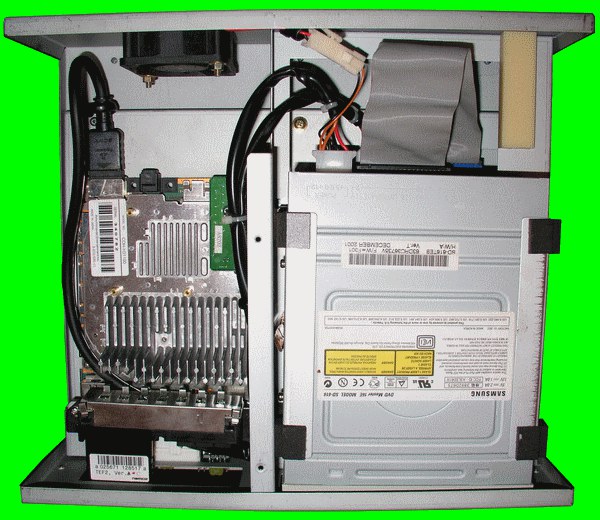
Identification
| Field | Value |
|---|---|
| Manufacturer | Namco (Sony PS2 hardware) |
| Years | 246 (2001) · 256 (2004) |
| Base | Sony PlayStation 2 |
| Boards | 246: COH-H3xxxx (EE + GS separate) · 256: COH-H4xxxx (EE + GS fused) |
| Media | DVD-ROM and/or HDD (IDE) + a security dongle |
| I/O | JVS (+ a game-specific I/O board: sticks, wheels, guns, drums…) |
| Region | signed by an iLinkID (read by games) |
Architecture (≈ PS2)
| Block | Chip | Role |
|---|---|---|
| CPU | Emotion Engine (MIPS R5900) + VU0/VU1 | PlayStation 2 base |
| GPU | Graphics Synthesizer (4 MB eDRAM) | rendering; 246 EE+GS separate, 256 fused |
| Sound | SPU2 | 48 ADPCM voices |
| Settings | on-board SRAM | stores operator settings (dumpable/restorable) |
| Expansion | ACRAM (RAM expansion board, System 246) | extra RAM for some games |
System 246 = a PS2 in an arcade case (COH-H3xxxx boards). The System 256 (2004) is a cost-reduced revision (EE + GS fused, like the PS2 Slim). A shared platform: Namco, but also Capcom, Taito, Arika, Tecmo…
The security dongle (the real topic)
Boot goes through Sony's "PSALM" bootloader (boot.bin) and a hardware dongle
paired to the game:
- The dongle (a small plug-in board) holds a security key / NAND; the game on DVD or HDD is encrypted/signed and boots only with the right dongle.
- The dongle is game-specific (sometimes revision-specific) → changing game in theory needs both the right media AND the right dongle.
- The board's SRAM stores settings; the iLinkID acts as a region signature.
This triple lock (media + dongle + region) is what makes preservation hard.
Modern preservation solutions
The arcade PS2 scene (GitHub org PS2Homebrew-arcade, PSX-Place, Arcade-Projects) has produced open-source tools that answer "how do I run other games" directly:
| Tool | Role |
|---|---|
| Dongle dumper (PSX-Place) | back up the dongle contents (NAND) before it dies |
| Proverb | an alternative bootloader to Sony's PSALM boot.bin → run other games / custom code on the arcade PS2 |
| Dongle-Rebinder | batch re-bind the boot.bin to dongle images (used with SD2PSX / MemCard Pro) |
| biosdrain / sram-dumper | dump the BIOS, SRAM (settings) and system specs |
| System256-Region-Changer | change the iLinkID (region) |
| pcsx2x6 / pcsx2-coh | PCSX2 forks dedicated to 246/256 emulation |
On top of these are reversible dongle conversions (community services, e.g. Arcade-Projects): back up the dongle NAND, then reprogram it for another game, the operation being fully reversible.
Preserve first, play later
Top priority: dump the dongle and image the HDD/DVD while they still read. Media and dongle age; once saved, the tools above let you play again without wearing out the original.
⚠️ We only describe the method and re-host no BIOS, keys or games. The open-source tools (Proverb, Dongle-Rebinder…), however, are worth preserving.
Notable games
Tekken 4 (2001), Soul Calibur II (2002), Time Crisis 3, Vampire Night, Wangan Midnight, Tekken 5 (2004), Soul Calibur III, Taiko no Tatsujin, The Idolm@ster (256), Fate/Unlimited Codes, Sengoku Basara X…
Faults & repair
PlayStation 2-class hardware → most PS2 repairs apply, plus the dongle:
| Symptom | Likely cause | Lead |
|---|---|---|
| Won't boot (dongle) | Dead dongle / oxidised contacts | Clean the contacts; dump the dongle before it fails; Proverb/rebind routes |
| Media not read (DVD) | Worn PS2 laser (KHS-400 family) | Adjust/replace the laser, or switch to HDD/SD |
| Media not read (HDD) | IDE disk at end of life | Image the disk, replace with an image (SD2PSX/MemCard Pro depending on setup) |
| Reboots / crashes | Tired PSU electrolytics | Recap the power stage |
| Overheating / GS artefacts | Dry thermal paste, GS struggling | Clean, re-paste, ventilation; GS reflow as a last resort (like a fat PS2) |
| Lost settings | Config SRAM | Dump/restore via sram-dumper |
| Dead controls | JVS I/O board / harness | JVS diagnosis, contacts |
Modernisation & mods
The common ground for every JAMMA board
Video, power, control panel and upscalers depend on the cabinet rather than the board: everything is centralised in Modernising a cabinet. To run the board outside a cabinet (at home, on a display): supergun.
- Optical storage 🟡: the drive is the number-one wear part. Modern routes: an ODE, netboot, or replacement by flash storage depending on the platform → PCB preservation hub.
- Scan rate 📺: PC-based hardware — VGA output (31 kHz and above). ⚠️ A 15 kHz chassis is incompatible: you need a VGA/tri-sync monitor or a computer display. (Derived from the platform's PC nature documented above — not measured from MAME.)
- FPGA / emulation: see the Emulation & FPGA section below.
Repair (technician)
- PS2 base (Emotion Engine + GS): PS2-type faults (PSU, recap, GS/RAM, overheating).
- Media security + dongle: the game (encrypted/signed DVD/HDD) boots with the right media AND the right dongle — without the correct dongle it won't boot (not a hardware fault).
- DVD-ROM / HDD: mechanism/laser or HDD wear = weak points.
- Capacitors: recap PSU / board.
→ Methods: PCB fault-finding · Recap · Traces & vias
Procedure — a dead board, step by step ✅
What this adds
The general method lives in PCB diagnosis. This is its application to this platform: the same order, but with the values actually expected here, so you do not have to go back and forth.
Tools: multimeter, oscilloscope (or frequency counter), current-limited bench supply, desoldering braid. → Tooling
If the board is still in a cabinet
A CRT holds its charge with the machine unplugged. → CRT safety
1. Inspection, power off. Corrosion, cut tracks, oxidised EPROM legs, leaking SMD capacitors, dubious earlier repairs.
2. The connector, before anything else. A large share of "dead boards" are a contact problem, not a fault. Clean the contacts with isopropyl alcohol and reseat — not with an abrasive eraser on a gold edge, which takes the plating off and brings the problem back worse. It costs two minutes and settles the question.
3. Power, measured on the board. Aim for +5.0 V measured as close as possible to where power reaches the board — not at the PSU output: the drop is in the loom, and that is exactly what makes a board boot on the bench and not in the cabinet. Where you probe depends on this board's connector — JAMMA edge, JVS loom or a proprietary harness — plenty of makers kept one long after JAMMA arrived — see Identification above. → Wiring Check −5 V and +12 V too if the sound stage uses them. Suspected short: bring it up current-limited and find the hot spot.
4. /RESET. It must release after power-up. Held low = the CPU never starts. A 1–2 Hz loop is not the reset circuit, it is the watchdog: the CPU is crashing at boot, so look at the bus, not at the reset.
5. Clocks. There is no measurement table for this platform — MAME's sources yield nothing usable for it. Any frequency quoted under Architecture on this page serves as a marker; otherwise compare against a working board rather than against a number: an invented value condemns healthy parts. → PCB diagnosis
6. Bus. Activity on the main CPU's address lines tells you whether it is running or frozen. Frozen with good clocks and good reset → work RAM, bus buffers, ROMs.
7. It boots but the picture or the sound is wrong — that is another job: see Common faults on this page, then signal tracing.
Emulation & FPGA
- Emulation: dedicated PCSX2 forks (pcsx2x6, pcsx2-coh) — still imperfect but improving fast, driven by dongle dumping.
- FPGA / MiSTer: no core (it's a full PS2, out of FPGA budget).
Lineage
- 2D/pseudo-3D predecessors: Namco System 2.
- Successor: Namco System 357/369 (PlayStation 3 base) — see the dossier Namco System 357/369 (HDD mounting, motherboard conversion, GEX/RPCS3).
- Converts & dongle: Namco converts guide.
Photos / assets
(To add: 246 (COH-H3) vs 256 (COH-H4) board, the security dongle, drive/HDD, JVS I/O board, ACRAM board.)
Sources & attribution
- Wikipedia — Namco System 246 (PS2 base, 246 EE+GS separate / 256 fused, DVD/HDD + dongle, JVS, games) — CC-BY-SA — https://en.wikipedia.org/wiki/Namco_System_246
- GitHub PS2Homebrew-arcade — Proverb (bootloader), Dongle-Rebinder, biosdrain, sram-dumper, System256-Region-Changer, pcsx2x6/pcsx2-coh (open-source tools) — https://github.com/PS2Homebrew-arcade
- PSX-Place — Namco System 246/256 security dongle dumper — https://www.psx-place.com/resources/namco-system-246-256-security-dongle-dumper.1474/
- Arcade-Projects — Namco System 246/256 Dongle Conversions (Fully Reversible) (WebFetch blocked; read via browser) — https://www.arcade-projects.com/threads/namco-system-246-256-dongle-conversions-fully-reversible.28/
- Internal page: Namco System 357/369 (PS3 successor)
Image:
-
system246-ensemble.jpg— II…Richard…II, CC BY 3.0, Wikimedia Commons — https://commons.wikimedia.org/wiki/File:System_246_PCB.gif

Review & corrections
How this space is used
Spotted a wrong value, an outdated procedure, a chip reference that does not match your board? Say so here, with what you observed (model, board revision, serial number, measurement). Every report is cross-checked against a source before anything changes — an unverifiable correction is published as “reported by …, not cross-checked” rather than silently applied.
Reading is open to everyone; posting requires signing in with Discord. Reports from the wiki's declared reviewers are handled first; anyone else's are read too, but go through a human before anything is changed.