IBM PC & compatibles (DOS gaming)
The IBM PC (1981) and its compatibles (clones) founded DOS gaming: from CGA 4-colour to VGA 256-colour, from the PC speaker to AdLib then the Sound Blaster. Standard period-PC repair: RIFA/PSU, leaking CMOS battery, recap, ISA cards.
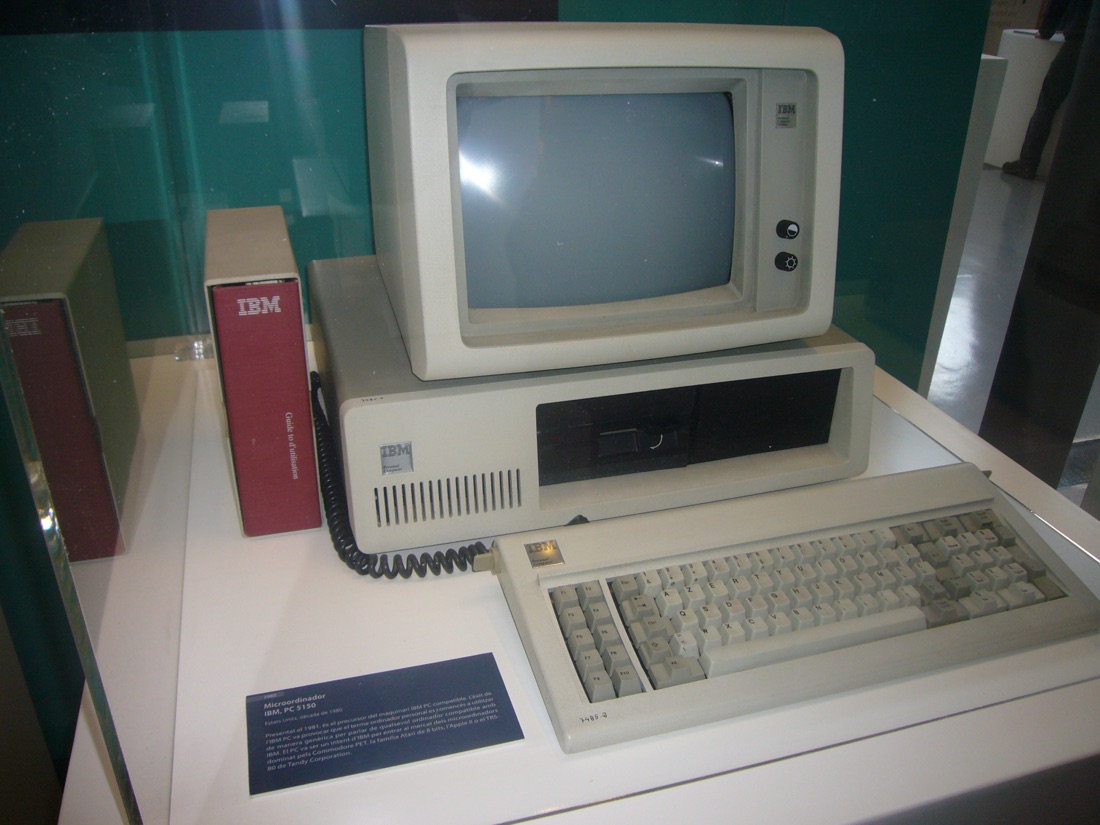
IBM PC 5150 — photo by Jordiferrer, CC BY-SA 3.0 (Wikimedia Commons).
Identification / generations
| Machine | Year | CPU | Gaming note |
|---|---|---|---|
| IBM PC (5150) / XT | 1981-83 | 8088 | CGA, PC speaker |
| IBM PCjr / Tandy 1000 | 1984 | 8088 | 3-voice sound (TI) + better graphics → "Tandy" mode |
| IBM PC/AT & 286 clones | 1984 | 80286 | EGA, MCGA/VGA |
| 386 / 486 clones | 1987-93 | 386/486 | VGA 256 c. + Sound Blaster — the DOS golden age |
Sound: PC speaker → AdLib (YM3812) → Sound Blaster (OPL + DAC). Video: CGA → EGA → VGA/MCGA (320×200 256 colours, the games' standard).
Repair (technician)
RIFA caps (mains filter)
The PSU-input RIFA caps smoke/explode with age (smell, white smoke) → replace them as a matter of course on a period supply.
Leaking CMOS / barrel battery
Many AT/clone motherboards have a barrel (NiCd) or Dallas RTC battery that leaks and eats the board (often near the keyboard connector) → remove/replace, repair the traces → backup batteries.
- PSU: recap + RIFA; a tired AT/ATX supply = instability.
- Floppy drives (5.25″ / 3.5″): mechanism/head → clean; HxC/Gotek for preservation.
- ISA cards (VGA, Sound Blaster): oxidised contacts → clean the gold fingers + slot.
- RAM (SIMM/DIMM): reseat / contacts; POST beeps for diagnosis.
- Display: VGA (HD-15) output → a multisync/31 kHz monitor.
Procedure — a dead computer, step by step ✅
What this adds
Ordered for a home computer: what kills these is its power supply, its battery, its capacitors, its socketed RAM and its keyboard — roughly in that order, and well before the CPU. → PCB diagnosis
1. The power supply — measured before it is plugged in. This is the one step not to swap around. On a machine of this age a supply does not simply stop: a 5 V regulator that fails high puts 7, 9, 12 V onto the bus and takes the RAM and the custom chips with it. Measure every rail off the machine, under a dummy load if you can, and only then plug it in. This page documents RIFA capacitors on this machine: the mains filter caps that crack, then let go in smoke on the first power-up. Replace them before you switch on, not after.
2. The battery — before anything else. This page documents a cell that leaks — check on the page whether your model is one of the affected ones, several of these pages cover a whole range. Its electrolyte eats the copper underneath and keeps eating while the machine sits in a cupboard, so it comes out first, before any diagnosis. Neutralise, clean, then check continuity on the tracks around it — a machine that no longer boots after storage is very often this and nothing else. → Backup batteries
3. Capacitors. Recap is the default on these machines, not a last resort — and on the supply first, since that is what protects everything else. → Recap
4. RAM, on its sockets. These machines were built to be repaired: the RAM, and often the logic, sit in sockets. Reseat everything first — thirty years of oxide is a classic no-boot. Then swap chips: a bad RAM chip usually gives a repeatable pattern of garbage or a screen frozen at a fixed character.
5. The keyboard. A console does not have one; a computer's is a wear part. A membrane keyboard fails as whole dead rows or columns — that is the membrane, not the machine. A mechanical one wants its contacts cleaning, not replacing. Check this page: the failure mode is often documented per model.
6. Storage — tape or disk. Both often come down to the same things: a dirty head, and for tape the azimuth and a belt turned to tar. ⚠️ On the floppy side, check whether the mechanism actually has a belt before looking for one: many do, but some drives are direct drive, and hunting a belt that isn't there means stripping a drive for nothing. A machine that boots but loads nothing is a drive fault, not a logic fault — do not go looking on the board for it.
7. Video output. RF, composite, RGB or a dedicated monitor, depending on the machine (see Identification). Test with something else before you conclude: a period modulator and a modern TV disagree far more often than either is broken.
8. Still nothing. Now the logic: rails on the board, reset, clock, bus. → PCB diagnosis
Common faults
| Symptom | Likely cause | Lead |
|---|---|---|
| Smoke / smell at power-on | PSU RIFA | Replace the RIFA |
| Lost clock / corrosion | CMOS/barrel battery | Remove, repair traces |
| No POST / beeps | RAM / card / CPU | Decode the beep codes, reseat |
| No sound | sound card / IRQ/DMA | Check the Sound Blaster (jumpers/SET BLASTER) |
| Card not detected | ISA contacts | Clean fingers + slot |
Modernisation & mods — what to buy, how
Barrel/Dallas battery + RIFA
The barrel battery (or Dallas RTC module) leaks and eats the board → remove it, repair traces, wire a remote coin cell (or a rebuilt Dallas). Replace the PSU's RIFA caps (smoke).
Modern storage - XT-IDE / XT-CF 🟡: CompactFlash as a hard disk on the 8-bit ISA bus (XT/AT); Gotek + FlashFloppy or HxC 🟡 for the 5.25″/3.5″ drives; CF/SD-IDE adapters on AT+ 🟢.
Video - CGA/EGA (digital RGBI) 🟡 → RGB2HDMI (the emblematic CGA case); VGA → a simple VGA→HDMI 🟢.
Sound - Open-hardware recreations: Snark Barker (Sound Blaster clone) 🟠, remade AdLib cards 🟢 → DOS-game compatibility without an unobtainable period card.
Power - A suitable ATX supply 🟢 to replace a failing AT unit (AT↔ATX adapter).
⚠️ Do not host games/BIOS — method only.
See also
Sources & attribution
- Photo IBM PC 5150 — Jordiferrer, CC BY-SA 3.0, Wikimedia Commons — https://commons.wikimedia.org/wiki/File:IBM_PC-5150.JPG
- Wikipedia — IBM PC / DOS gaming (8088→486, CGA/EGA/VGA, AdLib/Sound Blaster) — CC-BY-SA — https://en.wikipedia.org/wiki/IBM_Personal_Computer
- Established retro-PC community knowledge (RIFA, barrel/Dallas battery, SET BLASTER) — synthesis.

Review & corrections
How this space is used
Spotted a wrong value, an outdated procedure, a chip reference that does not match your board? Say so here, with what you observed (model, board revision, serial number, measurement). Every report is cross-checked against a source before anything changes — an unverifiable correction is published as “reported by …, not cross-checked” rather than silently applied.
Reading is open to everyone; posting requires signing in with Discord. Reports from the wiki's declared reviewers are handled first; anyone else's are read too, but go through a human before anything is changed.