Apple Lisa
The first mass-market computer with a graphical interface (1983) — and a spectacular commercial failure at $9,995 a unit. Technically, a machine full of custom silicon: in-house MMU, in-house video… but a floppy controller that is in fact a perfectly repairable microprocessor board.
Integrated CRT — discharge before doing anything
The Lisa is an all-in-one: the 12-inch monochrome monitor is inside the machine, with its extra-high-tension circuit. That circuit stays charged after unplugging, sometimes for days.
Discharge the EHT before putting your hands in → CRT safety. This applies equally to the Macintosh XL, which has the same screen.
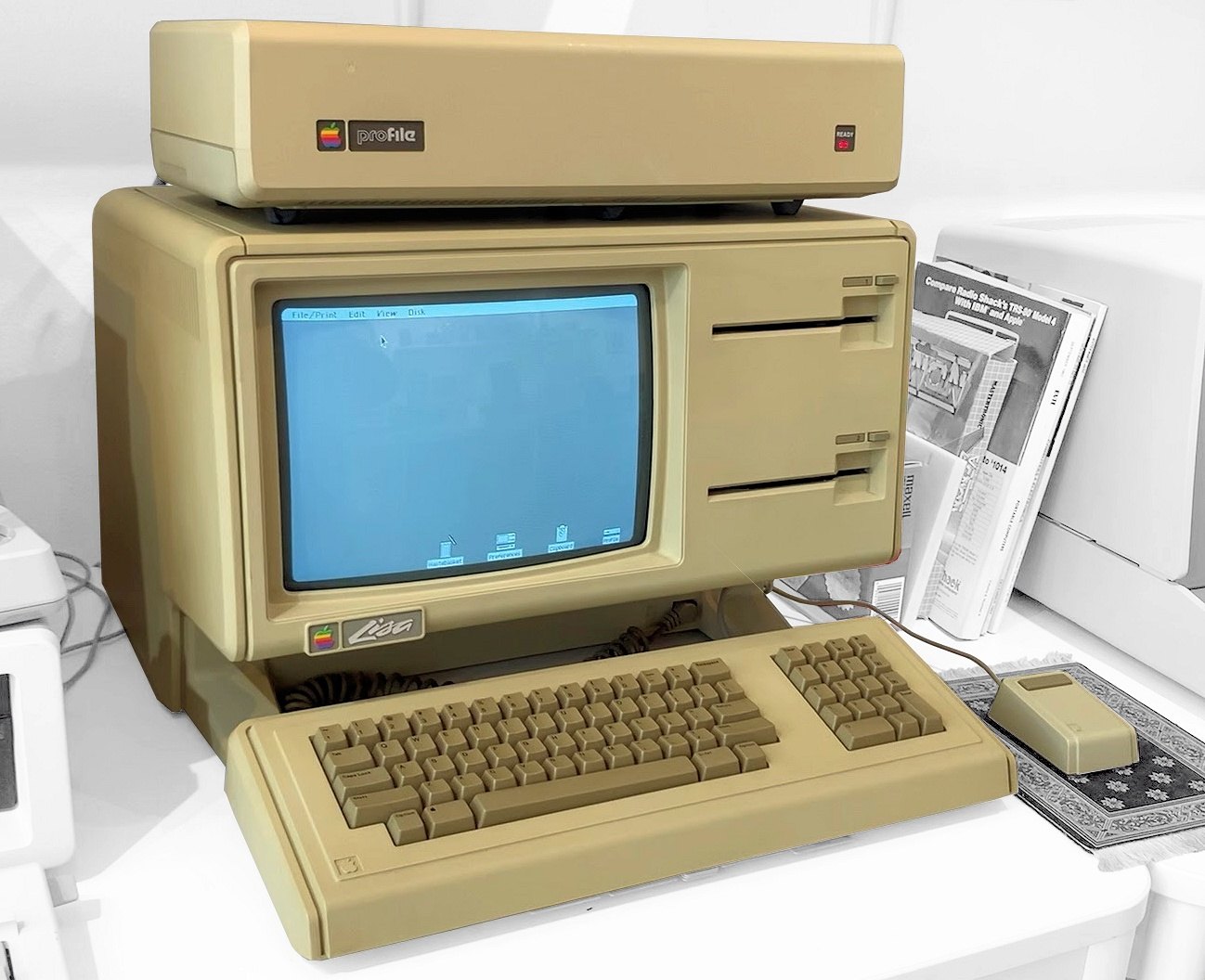
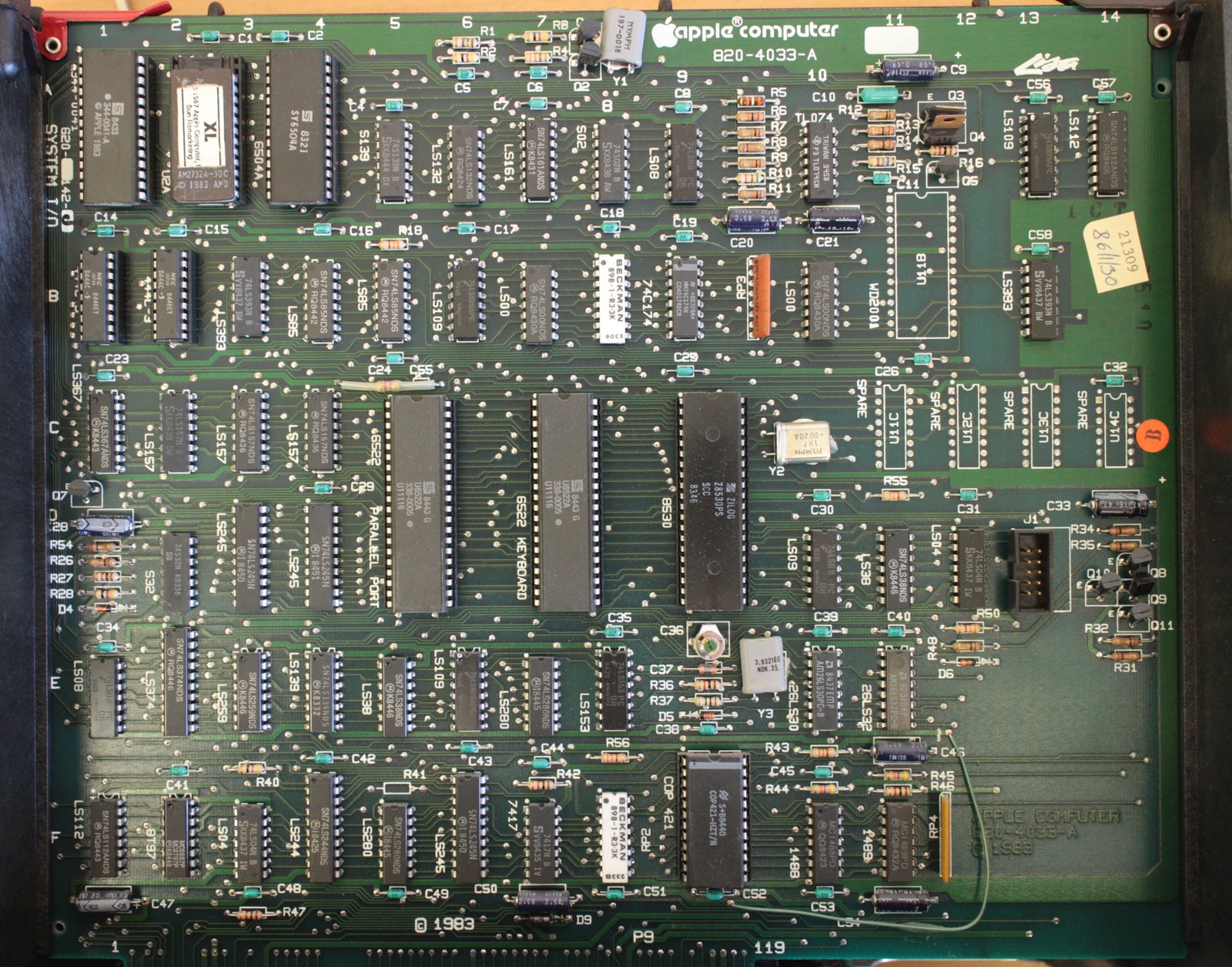
Identification
| Field | Value |
|---|---|
| Manufacturer | Apple |
| Years | 1983-1985 |
| CPU | M68000 @ ~5.09 MHz (20.37504 MHz ÷ 4 crystal) |
| RAM | 1 MB (Lisa) · 512 KB and up (Lisa 2) · 1 MB (Lisa 2/10) |
| I/O | COP421 @ 3.93216 MHz — I/O board, designator U9F |
| Keyboard | COP421 @ 3.93216 MHz — same nominal crystal |
| Interfaces | two MOS 6522 (VIA) — ⚠️ frequency differs by model, see below |
| Serial | SCC 8530 @ 7.8336 MHz |
| Video | custom Lisa Video @ 20.37504 MHz (Macintosh XL: different device) |
| MMU | Apple custom |
| Floppy | MOS 6504 @ 2 MHz board (16 MHz crystal ÷ 8) |
| Screen | integrated 12″ monochrome, 720 × 364 |
\"Nominal\" values, not round ones
The MAME driver says so itself: the CPU clock is \"nominally 5 MHz\" but is actually 20.37504 ÷ 4 = 5.09376 MHz.
Measuring 5.09 instead of 5.00 is therefore not drift — it is the exact value.
Expected clocks — measurement table ✅
| Component | Frequency | Scope |
|---|---|---|
| M68000 | 5.09376 MHz | whole range (20.37504 ÷ 4) |
| COP421 ×2 | 3.93216 MHz | I/O (U9F) and keyboard |
| Lisa Video | 20.37504 MHz | video |
| SCC 8530 | 7.8336 MHz | serial |
| MOS 6504 | 2 MHz | floppy board (16 MHz crystal ÷ 8) |
| IWM | 8 MHz | floppy board, Lisa 2/10 and Macintosh XL (16 MHz ÷ 2) |
| MOS 6522 ×2 | ⚠️ see below | model-dependent |
The VIAs do not run at the same frequency across the range
This is the measurement trap on this machine.
| Model | Both VIA frequency | Divider |
|---|---|---|
| Lisa and Lisa 2 | 509.376 kHz | 20.37504 ÷ 40 |
| Lisa 2/10 and Macintosh XL | 1.27344 MHz | 20.37504 ÷ 16 |
Measuring 1.27 MHz on a 2/10 or a Macintosh XL is normal. The driver itself distinguishes an "old MB" with a slow VIA from a "new MB" with a fast one.
Caveat: that driver comment refers only to the parallel port VIA, while its code switches both VIAs to ÷ 16. The driver contradicts itself slightly here — we flag it rather than resolve it.
(The driver also annotates these VIAs "nominally 500 kHz": once again, the round figure is the label, not the measurement.)
Both COP421s share the same crystal
A design fact, not to be confused with a failure mode
The Lisa has two COP421 microcontrollers: one on the I/O board (U9F), one inside the keyboard, both at 3.93216 MHz. The MAME driver notes that this equality is required for serial communications to work.
What that means at the bench: check that each of the two oscillators is actually oscillating at 3.93216 MHz. What it does not mean: that a crystal might have "drifted" to another frequency. A crystal oscillates at its frequency, or it does not — and no source documents a keyboard fault caused by a clock mismatch on this machine.
The models
| Model | Year | Notable |
|---|---|---|
| Lisa | 1983 | the original, "Twiggy" drives |
| Lisa 2 | 1984 | Sony 400 KB 3.5″ drive |
| Lisa 2/10 | 1984 | internal 10 MB Widget hard disk |
| Macintosh XL | 1985 | rebadged Lisa 2/10 — with differences, see below |
The Macintosh XL is a Lisa 2/10 — give or take a few parts
It is the same platform: same logic repair procedures, and this page applies. But "it's the same machine" is too absolute, and the differences are precisely the parts you replace during a repair:
- different video device (the driver instantiates a distinct component);
- different boot ROM;
- different floppy-board ROM;
- different screen geometry — and an official Macintosh XL Screen Kit changed it to 608 × 432 with square pixels. Two Macintosh XLs may therefore not have the same screen.
⚠️ The MAME driver contradicts itself about the Lisa 2/10's disk ROM (ioa8 in
one place, io88 in another). Unverifiable as it stands; flagged as such.
Common faults
| Symptom | Likely cause | Lead |
|---|---|---|
| Won't boot | M68000, 20.37504 MHz crystal, or the custom MMU | The MMU has no replacement part |
| No picture | custom video | Same crystal as the CPU |
| Floppy unreadable | the controller board or the drive | ⚠️ the board is repairable, see below |
| VIA "out of spec" at 1.27 MHz | nothing on a 2/10 or a Mac XL | See the VIA note |
| Clock "wrong" at 5.09 MHz | none — that is the exact value | See the note above |
Repair (technician)
- Not all the customs are equal. The MMU and the video are Lisa-specific and have no replacement. The floppy controller, however, is not a custom: it is a MOS 6504 board (6502 family, still findable) at 2 MHz, with its own ROM and NVRAM, plus an IWM at 8 MHz on the Lisa 2/10 and Macintosh XL. A floppy fault is therefore repairable at component level.
- A third crystal: 16 MHz, on the floppy controller board. Don't look for it on the motherboard.
- The model changes everything on the storage side: Twiggy (1983), Sony 400 KB 3.5″ (1984), or the 10 MB Widget disk (2/10 and Macintosh XL).
- A 1983 machine: recap and clock battery apply as on the Macintosh of the same generation.
→ Methods: PCB diagnosis · Recap · Backup batteries
Procedure — a dead computer, step by step ✅
There is a CRT inside this machine
The tube holds its charge with the machine unplugged, and on these all-in-ones the analogue board sits right where your hands go. Discharge it, or work on the logic board out of the case. → CRT safety
What this adds
Ordered for a home computer: what kills these is its power supply, its battery, its capacitors, its socketed RAM and its keyboard — roughly in that order, and well before the CPU. → PCB diagnosis
1. The power supply — measured before it is plugged in. This is the one step not to swap around. On a machine of this age a supply does not simply stop: a 5 V regulator that fails high puts 7, 9, 12 V onto the bus and takes the RAM and the custom chips with it. Measure every rail off the machine, under a dummy load if you can, and only then plug it in.
2. The battery, if it has one. Any RTC or backup cell soldered to a board is a future leak. If yours has one and it has never been changed, take it out before it takes the tracks with it. → Backup batteries
3. Capacitors. Recap is the default on these machines, not a last resort — and on the supply first, since that is what protects everything else. → Recap
4. RAM, on its sockets. These machines were built to be repaired: the RAM, and often the logic, sit in sockets. Reseat everything first — thirty years of oxide is a classic no-boot. Then swap chips: a bad RAM chip usually gives a repeatable pattern of garbage or a screen frozen at a fixed character.
5. The keyboard. A console does not have one; a computer's is a wear part. A membrane keyboard fails as whole dead rows or columns — that is the membrane, not the machine. A mechanical one wants its contacts cleaning, not replacing. Check this page: the failure mode is often documented per model.
6. Storage — tape or disk. Both often come down to the same things: a dirty head, and for tape the azimuth and a belt turned to tar. ⚠️ On the floppy side, check whether the mechanism actually has a belt before looking for one: many do, but some drives are direct drive, and hunting a belt that isn't there means stripping a drive for nothing. A machine that boots but loads nothing is a drive fault, not a logic fault — do not go looking on the board for it.
7. Video output. RF, composite, RGB or a dedicated monitor, depending on the machine (see Identification). Test with something else before you conclude: a period modulator and a modern TV disagree far more often than either is broken.
8. Still nothing. Now the logic: rails on the board, reset, clock, bus. → PCB diagnosis
Modernisation & mods
- ⚠️ Do not host ROMs or disk images — method only.
Photos / assets
(To take: the motherboard with the Apple customs, the floppy controller board with its 6504 and 16 MHz crystal, the two COP421s including the keyboard one, and a Twiggy drive if you ever meet one — it is the rarest part of the machine.)
Archived manufacturer documentation ✅
Manufacturer documentation archived locally. ⚠️ These are owner's and reference manuals, not service manuals: they give the specifications, the connectors and the expected behaviour, but not the schematics or troubleshooting voltages.
Status
Manufacturer documents with no explicit licence, kept for preservation (machines out of production for decades).
Sources & attribution
Text (synthesis; sources listed for attribution):
- MAME —
src/mame/apple/lisa.cpp(BSD-3-Clause / GPL, driver by Raphael Nabet, rewritten in depth by Olivier Galibert in 2023): M68000 at 20.37504 MHz ÷ 4 with the note "CPUCK is nominally 5 MHz"; two COP421s at 3.93216 MHz, the I/O board one at U9F, with the remark "same clock as iocop — required for working serial comms"; two MOS6522s at ÷ 40 ("nominally 500 kHz") on thelisaandlisa2machines, switched to ÷ 16 onlisa210andmacxl, the driver describing an "old MB" with a slow VIA and a "new MB" with a fast one for the parallel port only while its code changes both; SCC8530 at 7,833,600 Hz; custom video at the full crystal, replaced by a distinct device on the Macintosh XL; custom MMU; distinct boot ROM and disk ROM on the Macintosh XL; and the four models — Lisa (1983), Lisa 2 and Lisa 2/10 (1984), Macintosh XL (1985) — https://github.com/mamedev/mame/blob/master/src/mame/apple/lisa.cpp - MAME —
src/mame/apple/lisafdc.cpp(same licence): the floppy controller is a board built around a MOS 6504 clocked at 16 MHz ÷ 8, with an IWM at 16 MHz ÷ 2 on the Lisa 2/10 and Macintosh XL variants — this is the source for the fact that this subsystem is not a custom — https://github.com/mamedev/mame/blob/master/src/mame/apple/lisafdc.cpp - Wikipedia — Apple Lisa (CC-BY-SA): "The integrated monochrome black-on-white monitor has 720 × 364 rectangular pixels on a 12-inch (30 cm) screen" — this is the source for this page's CRT warning; the $9,995 launch price; "the first mass-market personal computer operable through a graphical user interface"; and the RAM figures (1 MB, 512 KB, 1 MB) — https://en.wikipedia.org/wiki/Apple_Lisa
- Wikipedia — Macintosh XL (CC-BY-SA): describes the machine as identical to the previously sold Lisa 2/10, and documents the Macintosh XL Screen Kit taking the display to 608 × 432 with square pixels — https://en.wikipedia.org/wiki/Macintosh_XL
Image:
-
lisa-carte-io.jpg— Autopilot, CC BY-SA 4.0 — https://commons.wikimedia.org/wiki/File:Apple_Lisa_IO_board.JPG -
lisa-machine.jpg— Timothy Colegrove, CC BY-SA 4.0 — https://commons.wikimedia.org/wiki/File:Apple-lisa-1.jpg


Review & corrections
How this space is used
Spotted a wrong value, an outdated procedure, a chip reference that does not match your board? Say so here, with what you observed (model, board revision, serial number, measurement). Every report is cross-checked against a source before anything changes — an unverifiable correction is published as “reported by …, not cross-checked” rather than silently applied.
Reading is open to everyone; posting requires signing in with Discord. Reports from the wiki's declared reviewers are handled first; anyone else's are read too, but go through a human before anything is changed.