Konami Gradius / Nemesis / Twin16 (shmups)
The 16-bit hardware of Konami's legendary shmups (1985-1988): Nemesis / Gradius, Salamander, TwinBee, then Gradius II (Twin16). A 68000 + Z80 + PSG + speech base. Note: the original Bubble System and its bubble memory requiring a warm-up!
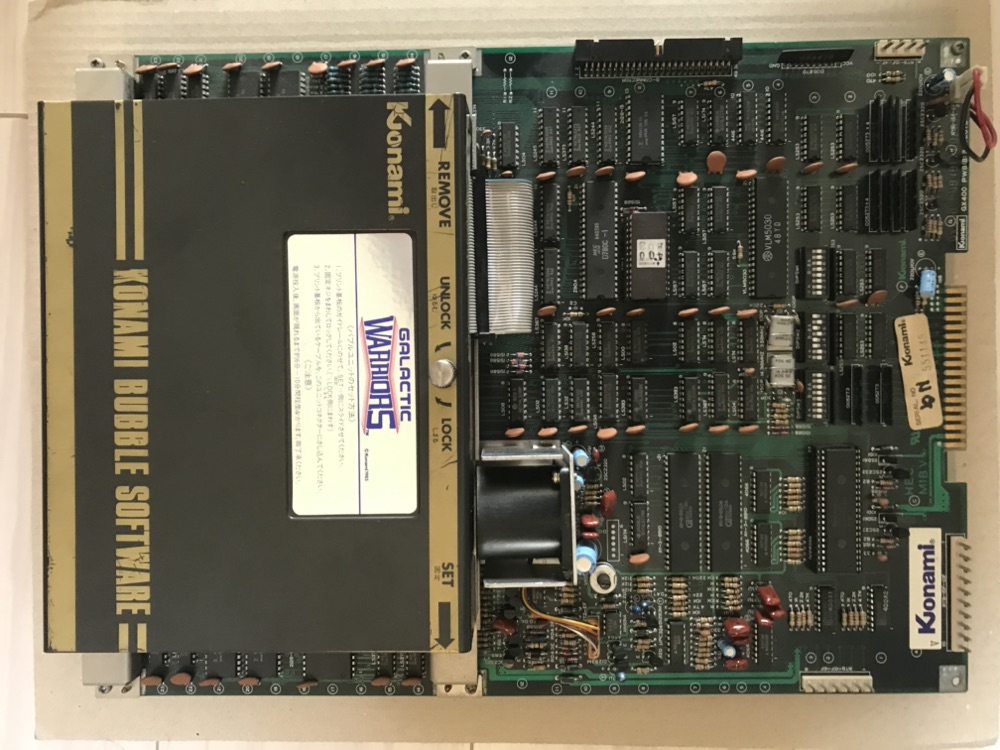
Konami Bubble System (Gradius) — photo by Mceight8, CC BY-SA 4.0 (Wikimedia Commons).
Identification
| Field | Value |
|---|---|
| Manufacturer | Konami |
| Years | 1985 (Nemesis) → 1988 (Twin16) |
| Type | 16-bit 2D (scrolling shoot'em up) |
| Settings | DIP |
The families
| Hardware | CPU | Games | MAME driver |
|---|---|---|---|
| Nemesis / GX400 | 68000 + Z80 | Nemesis (Gradius), Salamander (Life Force), TwinBee, Konami GT | konami/nemesis.cpp |
| Bubble System | 68000 + bubble memory | Gradius, TwinBee, RF2 (original versions) | konami/nemesis.cpp |
| Twin16 | 2× 68000 | Gradius II (Vulcan Venture), Devil World, Cuebrick, Hard Puncher, Miami | konami/twin16.cpp |
Sound: AY-3-8910 ×2 + K005289 + VLM5030 (speech) on Nemesis; YM2151 + K007232 on Twin16.
The Bubble System and its warm-up
The very first Gradius / TwinBee run on the Bubble System: the game is in magnetic bubble memory, which must warm up ~30 s at boot (a "WARMING UP" screen with a countdown and dedicated music). It's a famous design flaw — and a real preservation headache (bubble carts are fragile; ROM conversions exist).
Notable games
Nemesis / Gradius (1985), Salamander / Life Force (1986), TwinBee, Gradius II: GOFER no Yabou (1988), Konami GT, RF2…
Common faults
| Symptom | Likely cause | Lead |
|---|---|---|
| "Warming up" never finishes | dead bubble memory (Bubble System) | Convert to ROM; rare part |
| Corrupt sprites/planes | customs / RAM | RAM test, contacts |
| Mute voice / partial sound | VLM5030 / PSG | Sound-stage diagnosis |
| Freeze (Twin16) | one of the 2× 68000 | CPU diagnosis, RAM test |
| No image | Power, 68000, harness | Base diagnosis |
Modernisation & mods
The common ground for every JAMMA board
Video, power, control panel and upscalers depend on the cabinet rather than the board: everything is centralised in Modernising a cabinet. To run the board outside a cabinet (at home, on a display): supergun.
- Storage 🟡: the game lives in EPROM/mask ROM on the board. Changing or restoring a game means reprogramming the EPROMs (and, for a mask ROM, using a pinout adapter) → EPROM method.
- Media preservation: replacing the original storage, multicarts, ODEs and modern options by family → PCB preservation hub.
- Scan rate 📺: ~16.0 kHz / 60.6 Hz — standard resolution, a classic 15 kHz chassis is fine → tri-sync and upscalers.
(Computed from the MAME sources —
konami/nemesis.cpp— pixel clock ÷ htotal.) - FPGA / emulation: see the Emulation & FPGA section below.
Repair (technician)
- Bubble System: the bubble memory needs a warm-up (~1 min, "wait" message on-screen) before it boots — a Bubble System stuck on the wait screen is not necessarily faulty. Bubbles age: many have been converted to EPROM.
- Twin16 (2× 68000): a freeze = one of the two 68000s / its RAM → separate CPU diagnosis.
- Customs / video RAM: corrupt sprites = RAM + buffers first.
- Capacitors: recap the sound stage + PSU filtering.
→ Methods: PCB fault-finding · Recap · EPROM · Traces & vias
Expected clocks — measurement table ✅
Values extracted from the MAME sources for this platform. On a scope or frequency counter, a clock that is missing or off-value points straight at the crystal, the divider or the chip at fault — the fastest starting point on a dead board.
| Component | Expected clock | Role |
|---|---|---|
| AY8910 | 1.789772 MHz | PSG |
| K007232 | 3.579545 MHz | Konami PCM |
| M68000 | 6.144 MHz · 9.216 MHz | main CPU |
| YM2151 | 3.579545 MHz | FM (sound) |
| YM3812 | 3.579545 MHz | FM (sound) |
| Z80 | 1.789772 MHz · 3.579545 MHz | sound CPU (usually) |
How to read this table
Several values for one component = several board variants in this family (or several instances of the chip clocked differently). These frequencies are those of the clock signal at the component's input, not of its original crystal — on many boards the clock is divided down from a single master crystal.
Archived original schematics ✅
Manufacturer schematics for games in this family, archived locally (so they do not depend on a third-party site staying up). They give the board's real functional breakdown: clock tree, address decoding, video stage, sound stage, power supply — exactly what you need to trace a missing signal back to its source.
- Nemesis / Gradius — full schematic (PDF)
Scope and limits
A schematic applies to the game and revision named. Within one family the general breakdown (buses, decoding, sound/video stages) carries over from board to board, but component references and custom chip pinouts do not transpose between titles. Use it as a map of the logic, not as a cross-reference table.
Source: the Arcade Game Manuals collection on the Internet Archive. Manufacturer documents with no explicit licence, kept here for preservation (machines out of service for over 25 years).
DIP settings ✅
16 games on this platform, settings extracted from the MAME sources (INPUT_PORTS_START blocks). The Position column gives the switch's physical reference on the board (SW2:!3,!4 = bank SW2, levers 3 and 4) — which is what lets you set it up without the paper manual. Games are sorted by MAME set name.
DIP settings — MAME set blkpnthr
| Setting | Position | Options (default in bold) |
|---|---|---|
| Flip Screen | SW3:1 | Off · On |
| Continue | SW3:2,3 | Off · 2 Areas · 3 Areas · 4 Areas |
| Lives | SW2:1,2 | 3 · 4 · 5 · 7 |
| Cabinet | SW2:3 | Upright · Cocktail |
| Bonus Life | SW2:4,5 | 50k 100k · 20k 50k · 30k 70k · 80k 150k |
| Difficulty | SW2:6,7 | Easy · Normal · Hard · Hardest |
| Demo Sounds | SW2:8 | Off · On |
DIP settings — MAME set bs_gradius
| Setting | Position | Options (default in bold) |
|---|---|---|
| Lives | SW2:1,2 | 3 · 4 · 5 · 7 |
| Cabinet | SW2:3 | Upright · Cocktail |
| Bonus Life | SW2:4,5 | 20k and every 70k · 30k and every 80k · 20k only · 30k only |
| Upright Controls | SW3:2 | Single · Dual |
DIP settings — MAME set bs_twinbee
| Setting | Position | Options (default in bold) |
|---|---|---|
| Lives | SW2:1,2 | 2 · 3 · 4 · 7 |
| Bonus Life | SW2:4,5 | 20k 100k · 30k 120k · 40k 140k · 50k 160k |
DIP settings — MAME set bubsys
| Setting | Position | Options (default in bold) |
|---|---|---|
| Difficulty | SW2:6,7 | Easy · Normal · Hard · Hardest |
| Demo Sounds | SW2:8 | Off · On |
| Flip Screen | SW3:1 | Off · On |
| Players | SW3:2 | 1 · 2 |
DIP settings — MAME set citybomb
| Setting | Position | Options (default in bold) |
|---|---|---|
| Flip Screen | SW3:1 | Off · On |
| Upright Controls | SW3:2 | Single · Dual |
| Device Type | SW3:4 | Handle · Joystick |
| Cabinet | SW2:3 | Upright · Cocktail |
| Qualify | SW2:4,5 | Long · Normal · Short · Very Short |
| Difficulty | SW2:6,7 | Easy · Normal · Hard · Hardest |
| Demo Sounds | SW2:8 | Off · On |
DIP settings — MAME set gradius
| Setting | Position | Options (default in bold) |
|---|---|---|
| Lives | SW2:1,2 | 3 · 4 · 5 · 7 |
| Cabinet | SW2:3 | Upright · Cocktail |
| Bonus Life | SW2:4,5 | 20k and every 70k · 30k and every 80k · 20k only · 30k only |
| Difficulty | SW2:6,7 | Easy · Normal · Hard · Hardest |
| Demo Sounds | SW2:8 | Off · On |
| Flip Screen | SW3:1 | Off · On |
| Upright Controls | SW3:2 | Single · Dual |
DIP settings — MAME set gwarrior
| Setting | Position | Options (default in bold) |
|---|---|---|
| Lives | SW2:1,2 | 1 · 2 · 3 · 7 |
| Bonus Life | SW2:4,5 | 30k 100k 200k 400k · 40k 120k 240k 480k · 50k 150k 300k 600k · 100k 200k 400k 800k |
| Difficulty | SW2:6,7 | Easy · Normal · Hard · Hardest |
| Demo Sounds | SW2:8 | Off · On |
| Flip Screen | SW3:1 | Off · On |
| Players | SW3:2 | 1 · 2 |
DIP settings — MAME set hcrash
| Setting | Position | Options (default in bold) |
|---|---|---|
| Cabinet | SW2:1,2 | Konami GT without brake · Konami GT with brake · WEC Le Mans 24 Upright |
| Difficulty | SW2:6,7 | Easy · Normal · Hard · Hardest |
| Demo Sounds | SW2:8 | Off · On |
| Flip Screen | SW3:1 | Off · On |
| Quantity of Initials | SW3:2 | 3 · 7 |
| Speed Unit | SW3:4 | km/h · M.P.H. |
DIP settings — MAME set konamigt
| Setting | Position | Options (default in bold) |
|---|---|---|
| Difficulty | SW2:5,6 | Easy · Normal · Hard · Hardest |
| Demo Sounds | SW2:8 | Off · On |
| Flip Screen | SW3:1 | Off · On |
DIP settings — MAME set lifefrcj
| Setting | Position | Options (default in bold) |
|---|---|---|
| Flip Screen | SW3:1 | Off · On |
| Cabinet | SW3:4 | Upright · Cocktail |
| Lives | SW2:1,2 | 3 · 4 · 5 · 6 |
| Coin Slot(s) | SW2:3 | 1 · 2 |
| Bonus Life | SW2:4,5 | 70k and every 200k · 100k and every 300k · 70k only · 100k only |
| Difficulty | SW2:6,7 | Easy · Normal · Hard · Hardest |
| Demo Sounds | SW2:8 | Off · On |
DIP settings — MAME set nemesis
| Setting | Position | Options (default in bold) |
|---|---|---|
| Lives | SW2:1,2 | 3 · 4 · 5 · 7 |
| Cabinet | SW2:3 | Upright · Cocktail |
| Bonus Life | SW2:4,5 | 50k and every 100k · 30k · 50k · 100k |
| Difficulty | SW2:6,7 | Easy · Normal · Hard · Hardest |
| Demo Sounds | SW2:8 | Off · On |
| Flip Screen | SW3:1 | Off · On |
| Upright Controls | SW3:2 | Single · Dual |
DIP settings — MAME set nemesuk
| Setting | Position | Options (default in bold) |
|---|---|---|
| Lives | SW2:1,2 | 2 · 3 · 5 · 7 |
| Bonus Life | SW2:4,5 | 20k and every 70k · 30k and every 80k · 20k · 30k |
DIP settings — MAME set nyanpani
| Setting | Position | Options (default in bold) |
|---|---|---|
| Flip Screen | SW3:1 | Off · On |
| Lives | SW2:1,2 | 2 · 3 · 5 · 7 |
| Difficulty | SW2:6,7 | Easy · Normal · Hard · Hardest |
| Demo Sounds | SW2:8 | Off · On |
DIP settings — MAME set rf2
| Setting | Position | Options (default in bold) |
|---|---|---|
| Difficulty | SW2:5,6 | Easy · Normal · Hard · Hardest |
| Demo Sounds | SW2:8 | Off · On |
| Flip Screen | SW3:1 | Off · On |
DIP settings — MAME set salamand
| Setting | Position | Options (default in bold) |
|---|---|---|
| Flip Screen | SW3:1 | Off · On |
| Cabinet | SW3:4 | Upright · Cocktail |
| Coinage | SW1:1,2,3,4 | 4C 1C · 3C 1C · 2C 1C · 3C 2C · 4C 3C · 1C 1C · 3C 4C · 2C 3C · 1C 2C · 2C 5C … |
| Lives | SW2:1,2 | 2 · 3 · 5 · 7 |
| Coin Slot(s) | SW2:3 | 1 · 2 |
| Max Credit(s) | SW2:4,5 | 1 · 3 · 5 · 9 |
| Difficulty | SW2:6,7 | Easy · Normal · Hard · Hardest |
| Demo Sounds | SW2:8 | Off · On |
DIP settings — MAME set twinbee
| Setting | Position | Options (default in bold) |
|---|---|---|
| Lives | SW2:1,2 | 2 · 3 · 4 · 7 |
| Bonus Life | SW2:4,5 | 20k 100k · 30k 120k · 40k 140k · 50k 160k |
| Difficulty | SW2:6,7 | Easy · Normal · Hard · Hardest |
| Demo Sounds | SW2:8 | Off · On |
| Flip Screen | SW3:1 | Off · On |
| Players | SW3:2 | 1 · 2 |
Check against your own board
These settings apply to the game and revision described by MAME. One title may have several DIP sets depending on region or revision, and some systems use soft-dips (settings in memory, via the test menu) rather than physical switches. In case of a discrepancy, the board's silkscreen and the test menu are authoritative.
See also: DIP reference · game manuals
Procedure — a dead board, step by step ✅
What this adds
The general method lives in PCB diagnosis. This is its application to this platform: the same order, but with the values actually expected here, so you do not have to go back and forth.
Tools: multimeter, oscilloscope (or frequency counter), current-limited bench supply, desoldering braid. → Tooling
If the board is still in a cabinet
A CRT holds its charge with the machine unplugged. → CRT safety
1. Inspection, power off. Corrosion, cut tracks, oxidised EPROM legs, leaking SMD capacitors, dubious earlier repairs.
2. The connector, before anything else. A large share of "dead boards" are a contact problem, not a fault. Clean the contacts with isopropyl alcohol and reseat — not with an abrasive eraser on a gold edge, which takes the plating off and brings the problem back worse. It costs two minutes and settles the question.
3. Power, measured on the board. Aim for +5.0 V measured as close as possible to where power reaches the board — not at the PSU output: the drop is in the loom, and that is exactly what makes a board boot on the bench and not in the cabinet. Where you probe depends on this board's connector — JAMMA edge, JVS loom or a proprietary harness — plenty of makers kept one long after JAMMA arrived — see Identification above. → Wiring Check −5 V and +12 V too if the sound stage uses them. Suspected short: bring it up current-limited and find the hot spot.
4. /RESET. It must release after power-up. Held low = the CPU never starts. A 1–2 Hz loop is not the reset circuit, it is the watchdog: the CPU is crashing at boot, so look at the bus, not at the reset.
5. Clocks — the values expected on this platform.
- AY8910 → 1.789772 MHz (PSG)
- K007232 → 3.579545 MHz (Konami PCM)
- M68000 → 6.144 MHz · 9.216 MHz (Main CPU)
- YM2151 → 3.579545 MHz (FM (sound))
- YM3812 → 3.579545 MHz (FM (sound))
- Z80 → 1.789772 MHz · 3.579545 MHz (Sound CPU (usually))
No clock on the M68000 (6.144 MHz · 9.216 MHz) and there is no point measuring anything else: the fault is the crystal, the divider, or the chip itself. That single measurement splits a dead board in two.
Several values for one component means several board variants in this family, not several readings on the same one: identify yours before calling a clock wrong. That is the mistake that replaces a healthy crystal.
6. Bus. Activity on the main CPU's address lines tells you whether it is running or frozen. Frozen with good clocks and good reset → work RAM, bus buffers, ROMs.
7. It boots but the picture or the sound is wrong — that is another job: see Common faults on this page, then signal tracing.
Emulation & FPGA
- Emulation: MAME (
konami/nemesis.cpp,twin16.cpp) — Bubble System emulated. - FPGA / MiSTer: a Konami (Nemesis/Gradius) core is available.
EPROM repair
68000 program in 27C256 / 27C512 / 27C010 (MAME konami/nemesis.cpp): Nemesis /
Gradius = 8× 27C256 · TwinBee = 2× 27C256 · Salamander / Lifeforce = 2× 27C512 +
2× 27C010. Graphics are mask ROMs; some carry a VLM5030 (voice) or a protection.
Lineage
After the Konami classics; contemporary with the 68000 beat-em-up era (TMNT) and precedes the GX.
Photos / assets
(To add: Nemesis board, Bubble System + bubble cart, Twin16.)
Sources & attribution
-
Photo Konami Bubble System (Gradius) — Mceight8, CC BY-SA 4.0, Wikimedia Commons — https://commons.wikimedia.org/wiki/File:%E3%83%90%E3%83%96%E3%83%AB%E3%82%B7%E3%82%B9%E3%83%86%E3%83%A0%E5%9F%BA%E6%9D%BF.jpg
-
MAME —
konami/nemesis.cpp,twin16.cpp(68000(×2), Z80, PSG/VLM5030, bubble memory, games) — https://github.com/mamedev/mame - Wikipedia — Gradius / Bubble System — CC-BY-SA — https://en.wikipedia.org/wiki/Gradius

Review & corrections
How this space is used
Spotted a wrong value, an outdated procedure, a chip reference that does not match your board? Say so here, with what you observed (model, board revision, serial number, measurement). Every report is cross-checked against a source before anything changes — an unverifiable correction is published as “reported by …, not cross-checked” rather than silently applied.
Reading is open to everyone; posting requires signing in with Discord. Reports from the wiki's declared reviewers are handled first; anyone else's are read too, but go through a human before anything is changed.