Philips CD-i
Philips' CD multimedia system (1991), conceived as a living-room "appliance" more than a games console: encyclopaedias, Photo CD, Video CD (with an MPEG cartridge), and a small library that became cult for its licensed Nintendo Zelda and Hotel Mario games.
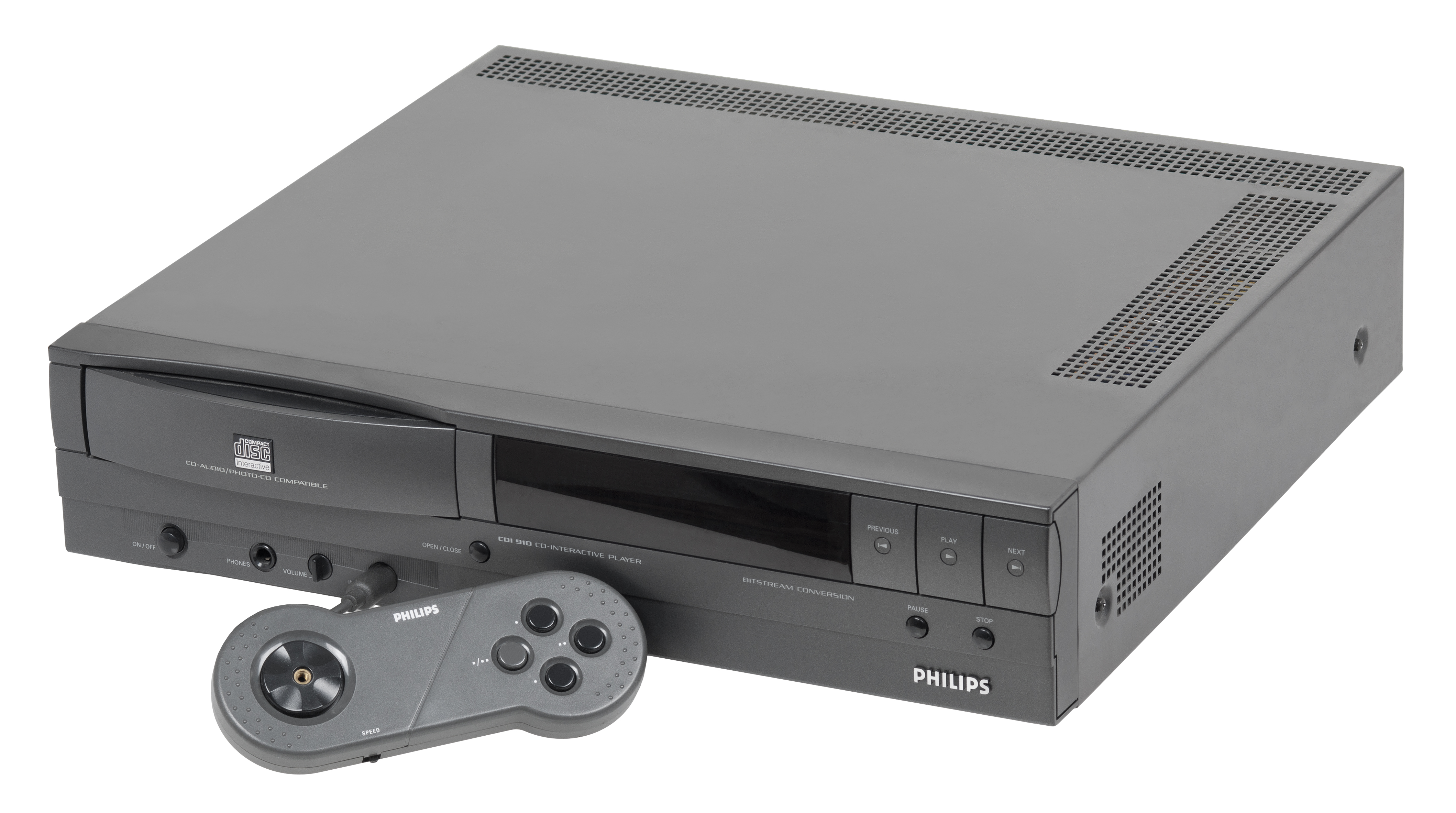
Identification
| Field | Value |
|---|---|
| Manufacturer | Philips (also Magnavox in the US) |
| Release | 1991 (US), 1992 (JP), 1992 (EU) |
| Type | CD-i multimedia player (games + educational + video) |
| Media | CD-i disc (+ Audio CD, CD+G, Photo CD, Video CD via cartridge) |
| End of life | 1998 (product line) / 1999 (format) |
Architecture
| Block | Chip | Clock | Role |
|---|---|---|---|
| CPU | Philips SCC68070 (68000 family, 16/32-bit) | 15.5 MHz | CISC core |
| Video | SCC66470 VSC (later MCD 212) | 256×224 to 512×480; up to 32,768 colours on screen | |
| Sound | MCD 221 | 8-bit ADPCM, 16-bit stereo up to 44.1 kHz | |
| Memory | 1 MB RAM total | ||
| Media | CD drive | CD-i discs up to ~744 MB |
The CD-i targets the general public (the living-room "interactive CD"): many educational and reference titles, hence a small games catalogue.
Digital Video Cartridge (MPEG)
- Optional MPEG-1 expansion cartridge (~$200–250) adding full-motion video playback and Video CD compatibility.
- Without it, some "FMV" games are unplayable — a point to check for preservation (knowing whether the machine is fitted with one).
Models & save clock
- Many models: living-room players (210, 220, 450, 490…), the portable 370, and Magnavox variants in the US.
- Timekeeper / NVRAM: CD-i players store settings and saves in a battery-backed NVRAM chip (Timekeeper type). A dead battery loses settings and can even hang at boot on some models — a well-known community fault.
Controllers & games
- Control: a wired or infrared remote/gamepad, often with two buttons — ergonomics criticised for action games.
- Cult library: Hotel Mario, and above all the CD-i Zelda games (Link: The Faces of Evil, Zelda: The Wand of Gamelon, Zelda's Adventure) — Nintendo had licensed its characters to Philips, a unique case that makes them collectors' pieces. Also Burn:Cycle.
Common faults
| Symptom | Likely cause | Lead |
|---|---|---|
| Won't read CDs | Worn laser / optical block | Adjust/replace, image it first |
| Hangs / lost settings | Flat NVRAM Timekeeper (battery) | Replace the battery-backed chip |
| Degraded sound/video, corrosion | Capacitors | Targeted recap |
| Missing FMV video | No Digital Video Cartridge | Fit the MPEG cartridge |
Original service manual ✅
Manufacturer manual archived locally. It typically carries the schematics, the block diagram, the expected voltages and waveforms, the parts list and the disassembly procedures — the reference when a symptom matches no known fault.
Status
A manufacturer document with no explicit licence, kept for preservation (machine long out of production). Source: Internet Archive.
Procedure — a dead console, step by step ✅
What this adds
Ordered for a console, not for an arcade board: what kills these is almost never the CPU. It is, in real order, the power supply, the capacitors, the drive or the cartridge slot, and only then the logic. → PCB diagnosis
1. The power supply. Two cases, depending on the machine. External brick: ⚠️ read the marking on the machine, next to the socket, and check the adapter against it — voltage and polarity. A centre-negative machine fed centre-positive loses its fuse, sometimes its regulator; do not trust a third-party label or a generic tip. Internal supply (the machine plugs straight into the wall): mains is inside the shell. Unplug, wait, and confirm the large capacitors are discharged before touching the board. Either way, measure under load: a failing supply holds its voltage until it is asked for current.
2. The fuse. Many of these machines have one right behind the socket — it is the part designed to die. Test it in continuity, out of circuit. A fuse that blows again is a short, not a fuse problem.
3. Capacitors. On most machines of this age this is the default suspect rather than a last resort — leaking SMD electrolytics eat the tracks underneath before they give any other sign. ⚠️ Not all of them are like that: some carry very few and are not recapped on principle. Read what this page says about it before reaching for the iron. → Recap
4. The drive. On this machine it is the dominant failure point. In order: does the tray move, does the disc spin, is the lens clean (cotton bud, isopropyl alcohol, no pressure), do the rails slide freely. A laser that no longer reads gets replaced; the gain pot is not something to tweak blind — that is the move that finishes off a laser that was still good.
5. Video output. Isolate the machine from the display: another cable, another TV, another input. A sizeable share of "dead consoles" are a dead cable, or a display that will not lock onto what this machine outputs — see the video section of this page for what that is.
6. Still nothing. Now, and only now, the logic: rails on the board, reset, clock, bus. → PCB diagnosis
Preservation & emulation
- CD imaging: image the discs (CD-i-specific formats) while they still read.
- NVRAM: replacing the Timekeeper chip is often essential for a reliable player.
- Emulation: CD-i Emulator and community cores (accuracy varies by BIOS/model).
Mods & repair — what to buy, how
Dead Timekeeper = lock-up: THE CD-i repair
Players store settings/saves in a Timekeeper chip (NVRAM with an embedded battery, not externally replaceable). After ~20-30 years the internal cell is dead → lost settings and, on several models, a boot lock-up. The exact part depends on the model (Timekeeper module such as M48T… / DS12… SmartWatch): read the chip's marking before buying.
- Timekeeper replacement 🟡: desolder the old chip (often DIP-socketed → just pull it, otherwise desolder), fit a new chip of the same type you read. Documented alternative: rebuilt Timekeeper modules (milled shell + external CR2032 soldered to the chip's supply pins).
- Targeted recap: aging power / A-V caps (corrosion, degraded picture).
- Laser / optical block 🟠: lens clean + laser-gain adjust; failing that, swap the drive. No consumer ODE → image the discs first while they still read.
- Digital Video Cartridge (MPEG): fit/verify the DVC cartridge for full-screen FMV games.
Photos / assets
(To add: CD-i player, Digital Video Cartridge, controller, NVRAM chip.)
Advanced repair
Optical drive (laser) + recap; a clock battery on some models. Methods: ODE (optical drive) · Recap · Backup batteries.
Sources & attribution
- Wikipedia — CD-i (specs, dates, DVC) — CC-BY-SA — https://en.wikipedia.org/wiki/CD-i
- ConsoleMods — CD-i (NVRAM Timekeeper, mods) — to reference — https://consolemods.org/wiki/CD-i
Image:
-
cd-i.jpg— Evan-Amos, public domain — https://commons.wikimedia.org/wiki/File:CD-i-910-Console-Set.jpg

Review & corrections
How this space is used
Spotted a wrong value, an outdated procedure, a chip reference that does not match your board? Say so here, with what you observed (model, board revision, serial number, measurement). Every report is cross-checked against a source before anything changes — an unverifiable correction is published as “reported by …, not cross-checked” rather than silently applied.
Reading is open to everyone; posting requires signing in with Discord. Reports from the wiki's declared reviewers are handled first; anyone else's are read too, but go through a human before anything is changed.