Enterprise 64 / 128
The ambitious British also-ran (1985): a Z80A backed by two custom chips — Nick (video, up to 672 px, 256 colors) and Dave (sound + memory management) — under EXOS/IS-BASIC. It arrived too late, but the hardware is remarkable. Standard 8-bit repair: recap, keyboard, custom chips.
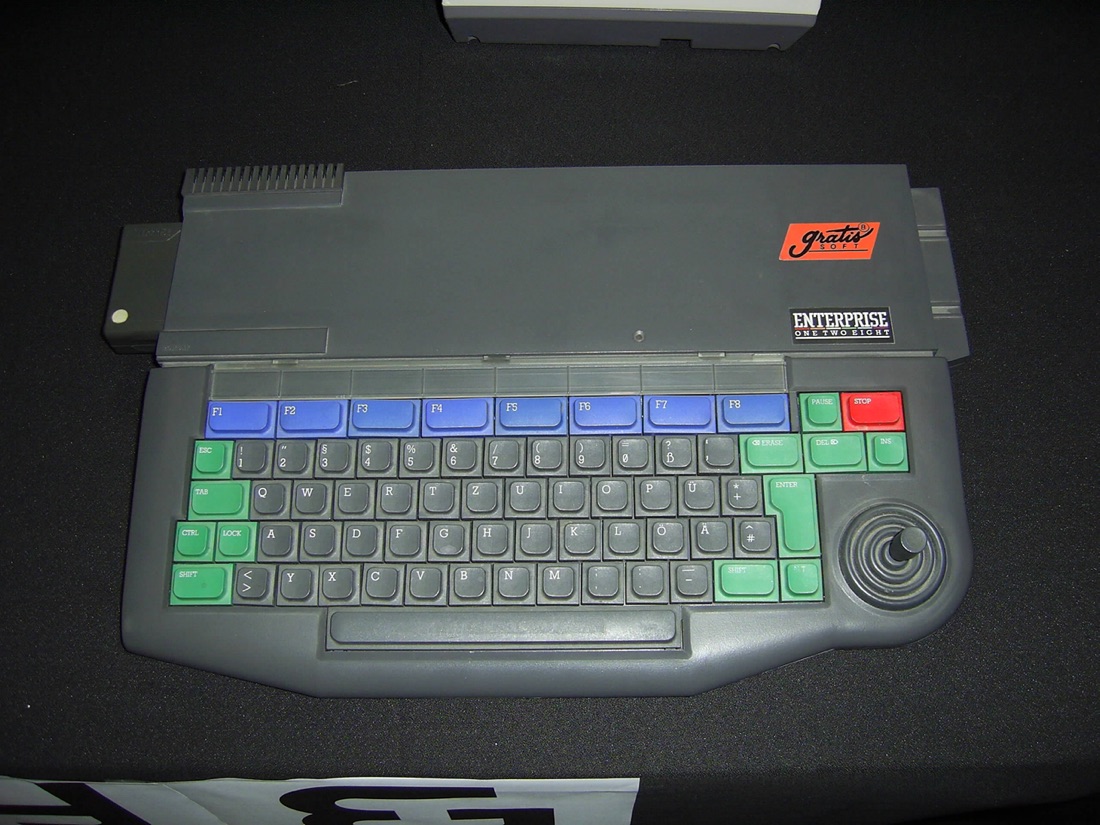
Enterprise 128 — photo by Wikimedia Commons, CC BY-SA 2.5 (Wikimedia Commons).
Identification
| Model | Year | Note |
|---|---|---|
| Enterprise 64 | 1985 | 64 KB (expandable), "futuristic" design |
| Enterprise 128 | 1985 | 128 KB |
CPU: Zilog Z80A @ 4 MHz; Nick (video) + Dave (stereo sound + MMU); RGB/RF output; cassette + 3.5″ floppy (EXDOS via interface).
Repair (technician)
- Recap (external PSU + board) → Recap.
- Custom Nick / Dave chips: the video/sound heart, unobtainable new → handle with care, diagnose by substituting the rest (Z80, RAM).
- Keyboard: flex / contacts (the Enterprise's "soft" keyboard ages) → clean.
- RAM: DRAM → test / substitution.
Procedure — a dead computer, step by step ✅
What this adds
Ordered for a home computer: what kills these is its power supply, its battery, its capacitors, its socketed RAM and its keyboard — roughly in that order, and well before the CPU. → PCB diagnosis
1. The power supply — measured before it is plugged in. This is the one step not to swap around. On a machine of this age a supply does not simply stop: a 5 V regulator that fails high puts 7, 9, 12 V onto the bus and takes the RAM and the custom chips with it. Measure every rail off the machine, under a dummy load if you can, and only then plug it in.
2. The battery, if it has one. Any RTC or backup cell soldered to a board is a future leak. If yours has one and it has never been changed, take it out before it takes the tracks with it. → Backup batteries
3. Capacitors. Recap is the default on these machines, not a last resort — and on the supply first, since that is what protects everything else. → Recap
4. RAM, on its sockets. These machines were built to be repaired: the RAM, and often the logic, sit in sockets. Reseat everything first — thirty years of oxide is a classic no-boot. Then swap chips: a bad RAM chip usually gives a repeatable pattern of garbage or a screen frozen at a fixed character.
5. The keyboard. A console does not have one; a computer's is a wear part. A membrane keyboard fails as whole dead rows or columns — that is the membrane, not the machine. A mechanical one wants its contacts cleaning, not replacing. Check this page: the failure mode is often documented per model.
6. Storage — tape or disk. Both often come down to the same things: a dirty head, and for tape the azimuth and a belt turned to tar. ⚠️ On the floppy side, check whether the mechanism actually has a belt before looking for one: many do, but some drives are direct drive, and hunting a belt that isn't there means stripping a drive for nothing. A machine that boots but loads nothing is a drive fault, not a logic fault — do not go looking on the board for it.
7. Video output. RF, composite, RGB or a dedicated monitor, depending on the machine (see Identification). Test with something else before you conclude: a period modulator and a modern TV disagree far more often than either is broken.
8. Still nothing. Now the logic: rails on the board, reset, clock, bus. → PCB diagnosis
Modernisation & mods — what to buy, how
- Storage: Gotek + FlashFloppy with EXDOS 🟡; community SD interfaces (EPNET-type network/SD cards) 🟡 → disk images from a card.
- Video: RGB output 🟢 → SCART then OSSC / RetroTINK or RGB2HDMI.
- Expansion: RAM (up to several hundred KB) 🟡, cartridges 🟢.
- Reliability: recap 🟠; clean the connectors.
⚠️ Do not host ROMs/games — method only.
See also
- ZX Spectrum · Amstrad CPC · Recap.
Sources & attribution
- Photo Enterprise 128 — Wikimedia Commons, CC BY-SA 2.5, Wikimedia Commons — https://commons.wikimedia.org/wiki/File:Enterprise128_01.jpg
- Wikipedia — Enterprise (computer) (Z80A, Nick, Dave, EXOS) — CC-BY-SA — https://en.wikipedia.org/wiki/Enterprise_(computer)
- Established Enterprise community knowledge (Nick/Dave, EXDOS) — synthesis.

Review & corrections
How this space is used
Spotted a wrong value, an outdated procedure, a chip reference that does not match your board? Say so here, with what you observed (model, board revision, serial number, measurement). Every report is cross-checked against a source before anything changes — an unverifiable correction is published as “reported by …, not cross-checked” rather than silently applied.
Reading is open to everyone; posting requires signing in with Discord. Reports from the wiki's declared reviewers are handled first; anyone else's are read too, but go through a human before anything is changed.