Sega Nomad
Sega's portable Mega Drive (1995, North America): it plays Mega Drive/Genesis cartridges on an LCD screen. A battery hog (6 AA), but a cult object. The stock screen calls for the IPS (McWill) mod.
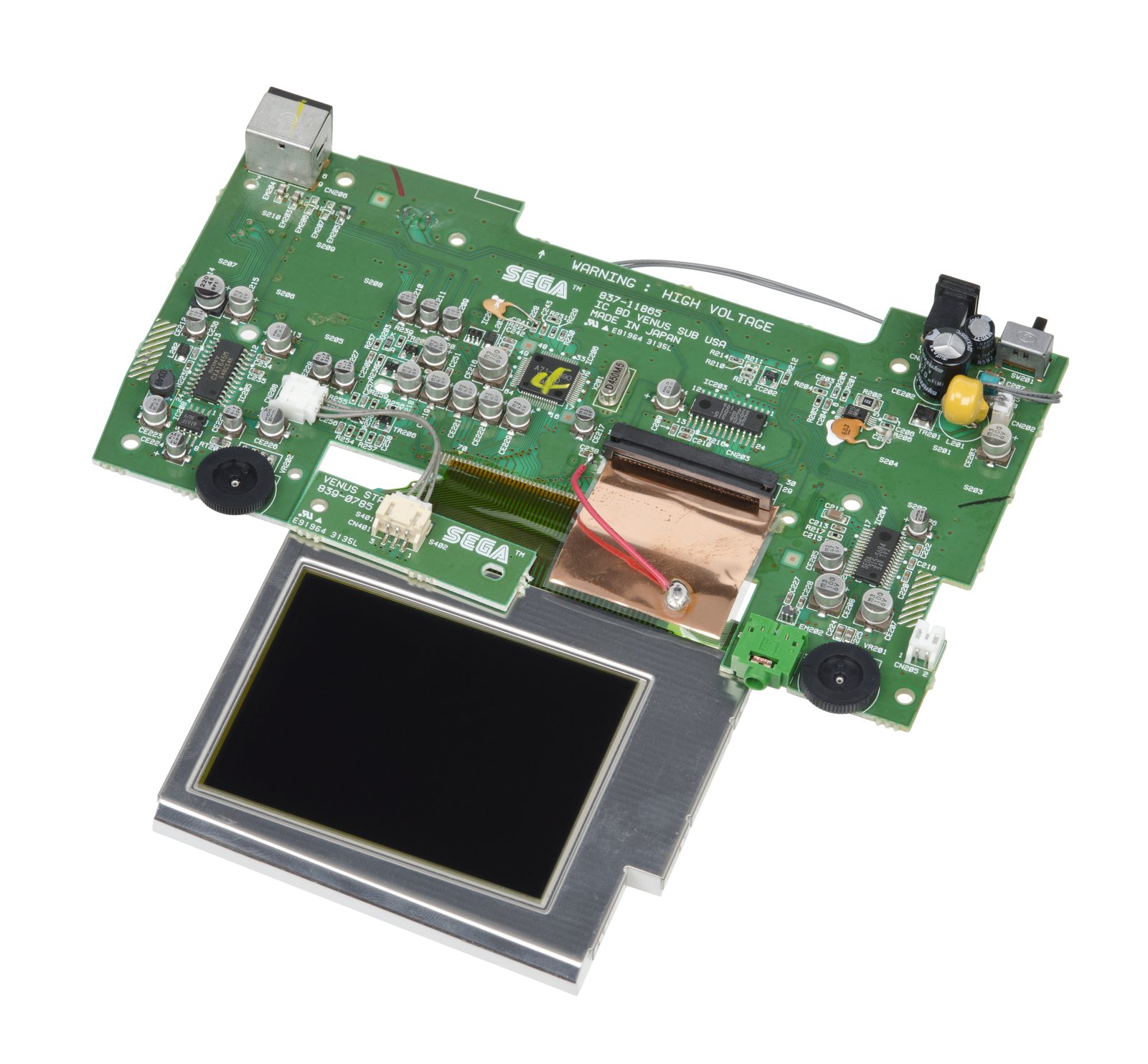
Identification
| Field | Value |
|---|---|
| Manufacturer | Sega |
| Release | 1995 (NA) |
| Base | Mega Drive / Genesis (portable) |
| Screen | stock backlit LCD |
| Media | Mega Drive/Genesis cartridge |
Architecture
Internally identical to a Mega Drive: 68000 @ 7.67 MHz + Z80 @ 3.58 MHz, VDP 315-5313, YM2612 + SN76489 PSG sound, a 3.25″ LCD (~320×224). 100% compatible with MD/Genesis cartridges; no Mega-CD/32X port. See Mega Drive for the chip detail and the CXX recap.
- TV out (A/V) + controller port 2: the Nomad can plug into a TV and play 2-player — it's a portable living-room Genesis, not just a handheld. It then needs an external PSU (6×AA won't cut it).
- No hardware region lock (but a 60 Hz game on a US unit stays 60 Hz); some thick EA "yellow tab" cartridges won't fit physically.
- Derived from the Genesis 3 (Majesco) silicon — hence the missing MD ports.
| Symptom | Likely cause | Lead |
|---|---|---|
| Poor screen / lines | Stock LCD | IPS screen (McWill) |
| Degraded sound/video | Capacitors | Recap |
| Catastrophic battery life | By design (6 AA) | Li-ion battery (mod) |
| Cartridge not read | Contacts | Cleaning |
Capacitor list (per board & CE reference) ✅
Source: Console5 TechWiki. The Nomad (USA) has two boards: the MAIN (IC BD VENUS MAIN, 837-11864) and the SUB (IC BD VENUS SUB, 837-11865). Identified chips: 68000 MC68H000FN8, Z80 Z84C0006, VDP 315-5700, RGB encoder CXA1645M, 315-5684 amp.
MAIN board (837-11864) — 4 caps
| Ref | µF | V |
|---|---|---|
| CE1, CE2, CE4 | 47 | 6 |
| CE3 | 100 | 6 |
SUB board (837-11865) — 29 caps
Grouped shopping list:
| µF | V | Qty |
|---|---|---|
| 47 | 6 | 11 |
| 100 | 6 | 4 |
| 100 | 25 | 1 |
| 820 | 6.3 | 1 |
| 22 | 6 | 2 |
| 10 | 16 | 4 |
| 220 | 4 | 1 |
| 4.7 | 35 | 4 |
| 10 | 35 | 1 |
In addition to the list
-
An unnumbered low-ESR OS-CON on the LCD side of the SUB board (value not stated by the source).
-
A 100 µF / 10 V OS-CON polymer (reference only, not included in kits — long lifespan).
SUB board — per-reference list (CE201 → CE229) — expand
| Ref | µF | V | Ref | µF | V |
|---|---|---|---|---|---|
| CE201 | 100 | 25 | CE216 | 100 | 6 |
| CE202 | 820 | 6.3 | CE217 | 22 | 6 |
| CE203 | 100 | 6 | CE218 | 47 | 6 |
| CE204 | 47 | 6 | CE219 | 47 | 6 |
| CE205 | 47 | 6 | CE220 | 47 | 6 |
| CE206 | 22 | 6 | CE221 | 47 | 6 |
| CE207 | 100 | 6 | CE222 | 47 | 6 |
| CE208 | 100 | 6 | CE223 | 47 | 6 |
| CE209 | 10 | 16 | CE224 | 4.7 | 35 |
| CE210 | 10 | 16 | CE225 | 4.7 | 35 |
| CE211 | 10 | 16 | CE226 | 10 | 35 |
| CE212 | 10 | 16 | CE227 | 4.7 | 35 |
| CE213 | 47 | 6 | CE228 | 4.7 | 35 |
| CE214 | 220 | 4 | CE229 | 47 | 6 |
| CE215 | 47 | 6 |
Cartridge audio not wired (EverDrive/Mega SD)
The Nomad doesn't connect the cartridge audio lines → no sound from an EverDrive/Mega SD type add-on without a mod. Two published mods exist (injection at the 315-5684) — see Console5.
Popular mods — what to buy, how
Recap first
The Nomad suffers from leaking caps (sound, picture, power) → recap before the other mods.
- McWill LCD screen: replaces the stock panel (dim, blurry, power-hungry) with a sharp IPS LCD — the mod that transforms the console. Install 🟠. → McWill LCD page.
- Power: the Nomad eats batteries (6 AA ≈ 2-3 h) → internal Li-ion + USB-C or a modern supply (9-10 V); the McWill also cuts consumption sharply.
- Prosound / AV-RGB out: community mods (expansion port / headphone tap) to play on an external screen — RGB points below.
- Buttons/D-pad: refresh the rubber contacts (conductive pads) if response goes mushy.
- See also Mega Drive.
RGB out — same points as the Mega Drive (VDP 315-5313)
The Nomad is a portable Mega Drive: it carries the same Sega 315-5313 VDP. For an external RGB output, tap RGBS on the same pins as the MD Model 1, then amplify (THS7314) to SCART:
| Signal | 315-5313 VDP pin |
|---|---|
| Red | 27 |
| Green | 28 |
| Blue | 29 |
| Composite sync | 54 |
Full detail (anti "RAM noise", amp, multi-out output): Mega Drive — RGB bypass. (Pins transcribed from ConsoleMods, CC-BY-SA — see the Mega Drive page's Sources.)
Procedure — a dead console, step by step ✅
Backlight and battery
The backlight inverter carries a high voltage, live, on a board you are holding. And a swollen lithium cell is not to be pierced or bent — take it out first and put it somewhere safe.
What this adds
Ordered for a console, not for an arcade board: what kills these is almost never the CPU. It is, in real order, the power supply, the capacitors, the drive or the cartridge slot, and only then the logic. → PCB diagnosis
1. The power supply. Two cases, depending on the machine. External brick: ⚠️ read the marking on the machine, next to the socket, and check the adapter against it — voltage and polarity. A centre-negative machine fed centre-positive loses its fuse, sometimes its regulator; do not trust a third-party label or a generic tip. Internal supply (the machine plugs straight into the wall): mains is inside the shell. Unplug, wait, and confirm the large capacitors are discharged before touching the board. Either way, measure under load: a failing supply holds its voltage until it is asked for current.
1b. Battery and its contacts. On this machine, before anything else: corroded battery contacts, or a cell that reads fine off-load and collapses under it, give exactly the symptoms of a dead machine.
2. The fuse. Many of these machines have one right behind the socket — it is the part designed to die. Test it in continuity, out of circuit. A fuse that blows again is a short, not a fuse problem.
3. Capacitors. On most machines of this age this is the default suspect rather than a last resort — leaking SMD electrolytics eat the tracks underneath before they give any other sign. ⚠️ Not all of them are like that: some carry very few and are not recapped on principle. Read what this page says about it before reaching for the iron. → Recap
4. The cartridge connector. Cartridge contacts with isopropyl alcohol, never an abrasive eraser: it takes the gold plating off and the problem comes back worse. On the machine side, inspect the slot pins — splayed, bent or oxidised — and check continuity between slot and board.
5. The screen. Lines, a dead half, a picture that fades: it is almost always the ribbon and its solder joints, not the panel. Reseat before you order anything. If this machine has a TV output — not all of them do — test that too: it tells the screen apart from what feeds it.
6. Still nothing. Now, and only now, the logic: rails on the board, reset, clock, bus. → PCB diagnosis
Photos / assets
(To add: Nomad, screen, board.)
Advanced repair
Very power-hungry (mains use recommended) + recap + backlight. Methods: Recap · PCB fault-finding · Traces & vias.
Sources & attribution
- Wikipedia — Sega Nomad — CC-BY-SA — https://en.wikipedia.org/wiki/Sega_Nomad
- Console5 TechWiki — Nomad (recap BOM MAIN 837-11864 / SUB 837-11865 per CE reference, chip IDs) — https://wiki.console5.com/wiki/Sega_Nomad
Image:
-
nomad-board.jpg— Evan-Amos, public domain — https://commons.wikimedia.org/wiki/File:Sega-Genesis-Nomad-Motherboard2-01.jpg

Review & corrections
How this space is used
Spotted a wrong value, an outdated procedure, a chip reference that does not match your board? Say so here, with what you observed (model, board revision, serial number, measurement). Every report is cross-checked against a source before anything changes — an unverifiable correction is published as “reported by …, not cross-checked” rather than silently applied.
Reading is open to everyone; posting requires signing in with Discord. Reports from the wiki's declared reviewers are handled first; anyone else's are read too, but go through a human before anything is changed.