GDEMU / MODE (Dreamcast, Naomi)
The #1 Dreamcast mod: the GDEMU replaces the GD-ROM drive with an SD card. No more laser, near-instant loading. The MODE (Terraonion) is the high-end alternative with screen/USB-C output.
| Field | Value |
|---|---|
| Systems | Dreamcast (VA0/VA1) · Naomi (via GD/DIMM or netboot) |
| Type | SD ODE (replaces the GD-ROM) |
| Level | 🟢 solderless (clips in place of the drive) |
| Reversible | ✅ (you can refit the original drive) |
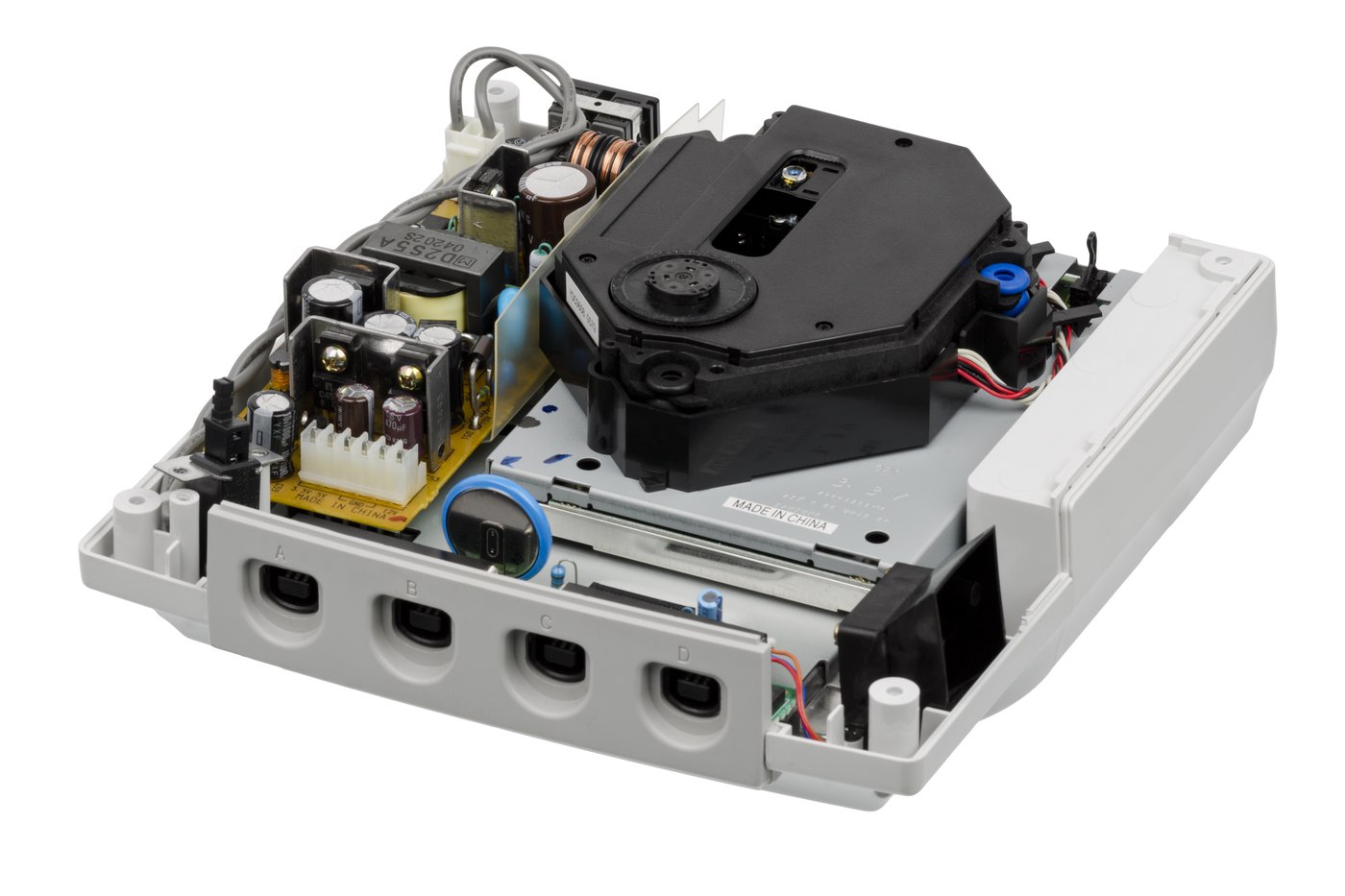
GDEMU (Deunan)
- An SD card that plugs into the GD-ROM drive connector.
- Solderless: remove the drive, fit the GDEMU (sometimes with a 3D-printed bracket/spacer and a power extension).
- Game selection menu (via the GDMenu tool on the SD).
- Beware of clones: the GDEMU is massively cloned. The original manufacturer (Deunan) remains the reference — clones fund other people and sometimes have bugs.
Dreamcast revision compatibility
The GDEMU targets VA1 boards (the most common). On VA0/VA2, check compatibility/adaptations. Look at the revision before buying.
MODE (Terraonion)
- High-end Dreamcast + Naomi ODE: USB-C, selection OLED screen, updates, robust.
- Pricier, but polished and well supported.
On the Naomi side
The Naomi (arcade, the DC's cousin) is preserved mainly by: - Netboot (NetDIMM): the game is loaded from a PC over the network into the DIMM board — no GD or critical battery. See Naomi. - GDEMU/MODE possible depending on the setup.
Installation (Dreamcast, summary)
- Open the DC, remove the GD-ROM drive and its ribbon.
- Fit the GDEMU on the connector, add a spacer + power extension if needed (for mechanical retention).
- Prepare the SD (FAT32) with GDMenu + your images.
- Close up, boot → game menu.
Before / after
| Criterion | Original DC (GD-ROM) | With GDEMU |
|---|---|---|
| Laser | worn, failure cause #1 | removed |
| Loading | slow, noisy | fast, silent |
| Reliability | fragile mechanics | solid (no moving parts) |
Where to buy
- GDEMU — Deunan project (official, gdemu.wordpress.com) — avoid the clones sold cheap.
- MODE — Terraonion — https://www.terraonion.com/
- Guides: RetroRGB — https://www.retrorgb.com/
Open-source SD preparation archived here
To prepare the SD card (sorting games, GDMenu menu, image conversion), the
cross-platform GDMENU Card Manager tool — C#/Avalonia source to compile:
GDMENUCardManager.tar.gz
· README — upstream:
https://github.com/sonik-br/GDMENUCardManager. (.exe/.dll binaries stripped.) We host
no games or firmware.
Alternatives / complements
- Modern PSU DreamPSU / PicoPSU (the DC's other weak point).
- Native VGA for the image (see Dreamcast).
Sources & attribution
- Deunan — GDEMU project (official)
- Terraonion — MODE — https://www.terraonion.com/
-
RetroRGB — Dreamcast ODE dossiers — https://www.retrorgb.com/ Image:
-
dreamcast-lecteur.jpg— Evan-Amos, public domain, Wikimedia Commons — https://commons.wikimedia.org/wiki/File:Sega-Dreamcast-Deconstructed-04.jpg

Review & corrections
How this space is used
Spotted a wrong value, an outdated procedure, a chip reference that does not match your board? Say so here, with what you observed (model, board revision, serial number, measurement). Every report is cross-checked against a source before anything changes — an unverifiable correction is published as “reported by …, not cross-checked” rather than silently applied.
Reading is open to everyone; posting requires signing in with Discord. Reports from the wiki's declared reviewers are handled first; anyone else's are read too, but go through a human before anything is changed.