Sega Y-Board
The peak of Sega's super scaler (1988): 3× 68000 and a sprite system with rotation + scaling, for AM2's most spectacular games — Galaxy Force, Power Drift, G-LOC. Deluxe motion cabinets. The last big sprite hardware before the true 3D of the Model 1.
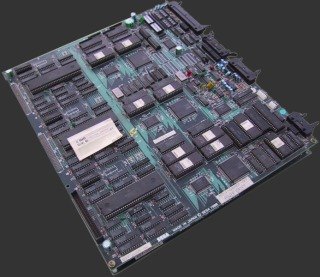
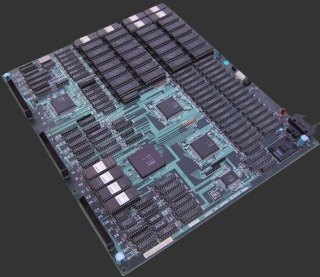
Identification
| Field | Value |
|---|---|
| Manufacturer | Sega (AM2) |
| Year | 1988 |
| Type | high-end super scaler (sprite rotation + zoom) |
| Cabinets | deluxe / motion (hydraulic cockpit) |
Architecture
| Block | Chip | Clock | Role |
|---|---|---|---|
| CPU ×3 | Motorola 68000 | ~12.5 MHz | master + 2 slaves (geometry, objects) |
| Sound CPU | Zilog Z80 | drives the sound | |
| Sound | Yamaha YM2151 (FM) + SegaPCM | FM music + samples | |
| Video | Sega sprite ASIC (rotation + zoom) | large fields of distorted sprites (a 3D feel) |
The triple 68000 and sprite rotation enable effects impossible on the X-Board
(Power Drift: hilly tracks seen "from inside"). Emulated in MAME
(sega/segaybd.cpp).
Protection & de-suicide
Depending on the game, a battery-backed encrypted module (FD1094) may be present → dead battery = suicide. De-suicide = decrypted ROM / re-key. → Sega X / Y-Board (converts) · System 16 FD1094.
EPROM repair: 68000 program in 27C010 (program in 27C010, R360 / G-LOC hardware) → game-by-game EPROM table.
Notable games
Galaxy Force / Galaxy Force II (1988), Power Drift (1988), G-LOC: Air Battle (1990), Rail Chase, Strike Fighter.
Common faults
| Symptom | Likely cause | Lead |
|---|---|---|
| Black screen / stuck boot | FD1094: dead key battery (encrypted games) | De-suicide (decrypted ROM / re-key) |
| Distorted/missing sprites | rotation-zoom ASIC / sprite RAM | Video diagnosis |
| Random freeze | one of the 3× 68000 / shared RAM | Per-CPU diagnosis, RAM test |
| No sound | Z80 / YM2151 / SegaPCM | Sound-stage diagnosis |
| Cabinet motion dead | motion board / actuators | Mechanical diagnosis |
Modernisation & mods
The common ground for every JAMMA board
Video, power, control panel and upscalers depend on the cabinet rather than the board: everything is centralised in Modernising a cabinet. To run the board outside a cabinet (at home, on a display): supergun.
- Anti-suicide 🟠: some games/variants of this platform do suicide (battery-backed key) — see the dedicated section above to find out whether yours is affected. If so, the durable route is de-suiciding → conversions and de-suiciding, not merely replacing the battery → save batteries.
- Storage 🟡: the game lives in EPROM/mask ROM on the board. Changing or restoring a game means reprogramming the EPROMs (and, for a mask ROM, using a pinout adapter) → EPROM method.
- Media preservation: replacing the original storage, multicarts, ODEs and modern options by family → PCB preservation hub.
- Scan rate 📺: ~15.72 kHz / 60.0 Hz — standard resolution, a classic 15 kHz chassis is fine — the most common JAMMA case → tri-sync and upscalers.
(Computed from the MAME sources —
sega/segaybd.cpp— pixel clock ÷ htotal.) - FPGA / emulation: see the Emulation & FPGA section below.
Repair (technician)
- FD1094 (battery module) on some games: flat battery = suicide → replace the battery without cutting the key; otherwise de-suicide — backup batteries.
- Triple 68000 (master + 2 slaves geometry/objects): a freeze = one of the CPUs / its RAM → separate diagnosis.
- Sound: Z80 + YM2151 + SegaPCM — diagnose the sound stage.
- Capacitors: recap PSU + audio filtering. Oxidised EPROM sockets: turned-pin socket.
→ Methods: PCB fault-finding · Recap · EPROM · Traces & vias
Expected clocks — measurement table ✅
Values extracted from the MAME sources for this platform. On a scope or frequency counter, a clock that is missing or off-value points straight at the crystal, the divider or the chip at fault — the fastest starting point on a dead board.
| Component | Expected clock | Role |
|---|---|---|
| YM2151 | 4.026988 MHz | FM (sound) |
| Z80 | 4.026988 MHz | sound CPU (usually) |
How to read this table
Several values for one component = several board variants in this family (or several instances of the chip clocked differently). These frequencies are those of the clock signal at the component's input, not of its original crystal — on many boards the clock is divided down from a single master crystal.
Original manuals for games on this platform ✅
Manufacturer manuals for games running on this board. Beyond the instructions, they very often carry the full DIP settings, the connector pinout, the test procedure, the parts list and the expected voltages.
- Power Drift — original manual (PDF)
→ Full catalogue: service manuals, wiring & game manuals
DIP settings ✅
9 games on this platform, settings extracted from the MAME sources (INPUT_PORTS_START blocks). The Position column gives the switch's physical reference on the board (SW2:!3,!4 = bank SW2, levers 3 and 4) — which is what lets you set it up without the paper manual. Games are sorted by MAME set name.
DIP settings — MAME set gforce2
| Setting | Position | Options (default in bold) |
|---|---|---|
| Demo Sounds | SWB:1 | Off · On |
| Energy Timer | SWB:2,3 | Easy · Normal · Hard · Hardest |
| Shield Strength | SWB:4 | Weak · Strong |
| Difficulty | SWB:5,6 | Easy · Normal · Hard · Hardest |
| Cabinet | SWB:7,8 | Super Deluxe · Deluxe · Upright · City |
DIP settings — MAME set gloc
| Setting | Position | Options (default in bold) |
|---|---|---|
| Difficulty | SWB:1,2 | Easy · Normal · Hard · Hardest |
| Demo Sounds | SWB:3 | Off · On |
| Cabinet | SWB:4,5 | Moving · Cockpit · Upright |
| Allow Continue | SWB:6 | No · Yes |
| Credits | SWB:7,8 | 1 to Start, 1 to Continue · 2 to Start, 1 to Continue · 3 to Start, 2 to Continue · 4 to Start, 3 to Continue |
DIP settings — MAME set glocr360
| Setting | Position | Options (default in bold) |
|---|---|---|
| Game Type | SWB:1,2 | Fighting Only · Fight/Experience · Experience Only |
| Demo Sounds | SWB:3 | Off · On |
| Ever Off | SWB:4 | Off · On |
| Initial Credit | SWB:5,6,7,8 | 1 · 2 · 3 · 4 · 5 · 6 · 8 · 10 · 12 |
| Coin A | SWA:1,2,3,4 | 1C 1C · 1C 2C · 1C 3C · 1C 4C · 1C 5C · 1C 6C · 1C 7C · 1C 8C · Free Play (if Coin B too) or 1/1 |
| Coin B | SWA:5,6,7,8 | 1C 1C · 1C 2C · 1C 3C · 1C 4C · 1C 5C · 1C 6C · 1C 7C · 1C 8C · Free Play (if Coin A too) or 1/1 |
DIP settings — MAME set pdrift
| Setting | Position | Options (default in bold) |
|---|---|---|
| Cabinet | SWB:1,2 | Moving · Upright/Sit Down · Mini Upright |
| Demo Sounds | SWB:3 | Off · On |
| Credits | SWB:4,5 | 1 to Start, 1 to Continue · 2 to Start, 1 to Continue · 2 to Start, 2 to Continue · 3 to Start, 2 to Continue |
| Allow Continue | SWB:6 | No · Yes |
| Difficulty | SWB:7,8 | Easy · Normal · Hard · Hardest |
DIP settings — MAME set pdrifte
| Setting | Position | Options (default in bold) |
|---|---|---|
| Cabinet | SWB:1,2 | Moving · Upright · Mini Upright |
| Demo Sounds | SWB:3 | Off · On |
| Initial Credit | SWB:5 | 1 · 2 |
| Allow Continue | SWB:6 | No · Yes |
| Difficulty | SWB:7,8 | Easy · Normal · Hard · Hardest |
DIP settings — MAME set pdriftj
| Setting | Position | Options (default in bold) |
|---|---|---|
| Cabinet | SWB:1,2 | Moving · Upright/Sit Down · Mini Upright |
| Demo Sounds | SWB:3 | Off · On |
| Initial Credit | SWB:5 | 1 · 2 |
| Allow Continue | SWB:6 | No · Yes |
| Difficulty | SWB:7,8 | Easy · Normal · Hard · Hardest |
DIP settings — MAME set pdriftl
| Setting | Position | Options (default in bold) |
|---|---|---|
| Ground Level Tilts | SWB:5 | No · Yes |
| Difficulty | SWB:6,7,8 | 0 - Easiest · 1 · 2 · 3 · 4 · 5 · 6 · 7 - Hardest |
| Coin A | SWA:1,2,3,4 | 1C 6C · 1C 3C · 1C 2C · 2C 3C · 2C 3C · 4 Coins/5 Credits · 5 Coins/6 Credits · 1C 1C · 4C 3C · 6 Coins/4 Credits … |
| Coin B | SWA:5,6,7,8 | 1C 6C · 1C 3C · 1C 2C · 2C 3C · 2C 3C · 4 Coins/5 Credits · 5 Coins/6 Credits · 1C 1C · 4C 3C · 6 Coins/4 Credits … |
| Cabinet ID | — | 0 · 1 · 2 · 3 · 4 · 5 · 6 · 7 · 8 · 9 … |
| Communication Mode | — | Master/Slave · Stand-Alone |
DIP settings — MAME set rchase
| Setting | Position | Options (default in bold) |
|---|---|---|
| Coin to Credit | SWA:1,2 | 4C 1C · 3C 1C · 2C 1C · 1C 1C |
| Coin #1 multiplier | SWA:3 | x1 · x2 |
| Coin #2 multiplier | SWA:4,5 | x1 · x4 · x5 · x6 |
| Bonus Adder | SWA:6,7,8 | None · 2 gives +1 · 3 gives +1 · 4 gives +1 · 5 gives +1 · 6 gives +1 · 7 gives +1 · Error |
| Credits | SWB:1,2 | 1 to Start, 1 to Continue · 2 to Start, 1 to Continue · 3 to Start, 2 to Continue · 4 to Start, 3 to Continue |
| Coin Chute | SWB:3 | Single · Twin |
| Cabinet | SWB:4 | Moving · Upright |
| Difficulty | SWB:6,7 | Easy · Normal · Hard · Hardest |
| Demo Sounds | SWB:8 | Off · On |
DIP settings — MAME set strkfgtr
| Setting | Position | Options (default in bold) |
|---|---|---|
| Difficulty | SWB:1,2 | Easy · Normal · Hard · Hardest |
| Demo Sounds | SWB:3 | Off · On |
| Allow Continue | SWB:4 | No · Yes |
| Credits | SWB:5,6 | 1 to Start, 1 to Continue · 2 to Start, 1 to Continue · 3 to Start, 2 to Continue · 4 to Start, 3 to Continue |
| Cabinet | SWB:7,8 | Moving · Cockpit · Upright |
Check against your own board
These settings apply to the game and revision described by MAME. One title may have several DIP sets depending on region or revision, and some systems use soft-dips (settings in memory, via the test menu) rather than physical switches. In case of a discrepancy, the board's silkscreen and the test menu are authoritative.
See also: DIP reference · game manuals
Procedure — a dead board, step by step ✅
What this adds
The general method lives in PCB diagnosis. This is its application to this platform: the same order, but with the values actually expected here, so you do not have to go back and forth.
Tools: multimeter, oscilloscope (or frequency counter), current-limited bench supply, desoldering braid. → Tooling
If the board is still in a cabinet
A CRT holds its charge with the machine unplugged. → CRT safety
1. Inspection, power off. Corrosion, cut tracks, oxidised EPROM legs, leaking SMD capacitors, dubious earlier repairs. On this platform the battery is the first suspect: its leakage eats tracks under the holder, and the damage is often hidden by the battery itself. Lift it to look.
2. The connector, before anything else. A large share of "dead boards" are a contact problem, not a fault. Clean the contacts with isopropyl alcohol and reseat — not with an abrasive eraser on a gold edge, which takes the plating off and brings the problem back worse. It costs two minutes and settles the question.
3. Power, measured on the board. Aim for +5.0 V measured as close as possible to where power reaches the board — not at the PSU output: the drop is in the loom, and that is exactly what makes a board boot on the bench and not in the cabinet. Where you probe depends on this board's connector — JAMMA edge, JVS loom or a proprietary harness — plenty of makers kept one long after JAMMA arrived — see Identification above. → Wiring Check −5 V and +12 V too if the sound stage uses them. Suspected short: bring it up current-limited and find the hot spot.
4. /RESET. It must release after power-up. Held low = the CPU never starts. A 1–2 Hz loop is not the reset circuit, it is the watchdog: the CPU is crashing at boot, so look at the bus, not at the reset.
5. Clocks — the values expected on this platform.
- YM2151 → 4.026988 MHz (FM (sound))
- Z80 → 4.026988 MHz (Sound CPU (usually))
6. Bus. Activity on the main CPU's address lines tells you whether it is running or frozen. Frozen with good clocks and good reset → work RAM, bus buffers, ROMs.
7. It boots but the picture or the sound is wrong — that is another job: see Common faults on this page, then signal tracing.
Procedure — replacing the battery without losing the key ✅
Not every board in this family is concerned
Check on this page whether your game is one of the encrypted ones before touching anything. On the others the battery only holds settings, and losing it costs nothing but a re-setup.
The order is the whole procedure
The decryption key of the FD1094 lives in SRAM held up by that battery. Cutting the old cell before the new one is soldered erases it, instantly and for good: the board goes silent and only a de-suicide brings the game back. So the new cell goes in first, in parallel.
- Board powered off, old battery left in place.
- Measure the old cell in circuit and note it (a CR2032 is 3 V nominal). This is what tells you whether you are ahead of the failure or already behind it.
- Solder the new cell in parallel with the old one — piggyback — watching polarity. A reversed cell discharges the old one through itself and erases the key just as surely.
- Re-measure at the holder: the voltage must have come back up. Do not go on before it has.
- Only now, remove the old cell.
- Power up and check the game boots.
Already dead? This procedure will not bring it back — the key is gone. → de-suicide
Emulation & FPGA
- Emulation: MAME (
sega/segaybd.cpp) — FD1094 included. - FPGA / MiSTer: no dedicated core (3× 68000 + sprite rotation) → MAME.
Lineage
After the X-Board, before the polygonal 3D of the Model 1. Same "super scaler" family as the Super Scaler (Hang-On/OutRun).
Photos / assets
(To add: Y-Board, triple 68000, rotation-zoom ASIC.)
Sources & attribution
- MAME —
sega/segaybd.cpp(3× 68000, Z80, YM2151 + SegaPCM, rotation+zoom sprites, FD1094 on some games) — https://github.com/mamedev/mame - Wikipedia — Sega Y Board — CC-BY-SA — https://en.wikipedia.org/wiki/Sega_Y_Board
- Internal page: Sega X / Y-Board (converts)
Image:
-
y-board-dessous.jpg— uploaded by Mikel to Sega Retro (site CC BY 4.0; ⚠️ the file carries no individual licence) — https://segaretro.org/File:YBoard_bottomPCB.jpg -
y-board-dessus.jpg— uploaded by Mikel to Sega Retro (site CC BY 4.0; ⚠️ the file carries no individual licence) — https://segaretro.org/File:YBoard_topPCB.jpg


Review & corrections
How this space is used
Spotted a wrong value, an outdated procedure, a chip reference that does not match your board? Say so here, with what you observed (model, board revision, serial number, measurement). Every report is cross-checked against a source before anything changes — an unverifiable correction is published as “reported by …, not cross-checked” rather than silently applied.
Reading is open to everyone; posting requires signing in with Discord. Reports from the wiki's declared reviewers are handled first; anyone else's are read too, but go through a human before anything is changed.